This article sharesAvada 6.21 Chinese version, has beencracked, comes with language files for the theme and plugins, partially translating the frontend and backend content. The security local scan is safe, but it is still recommended to use cracked themes with caution; purchasing the genuine version is safer if you have the capability.
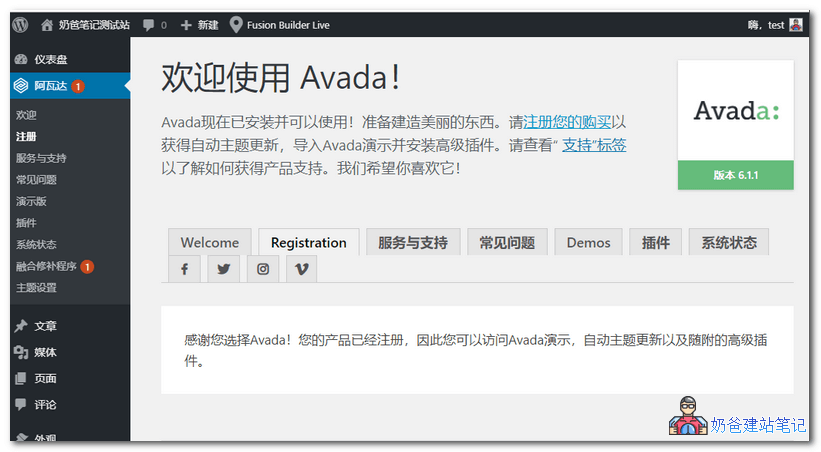 Theme File Description
After downloading, you will have a compressed package; after extraction, the folder inside is as shown in the image below:
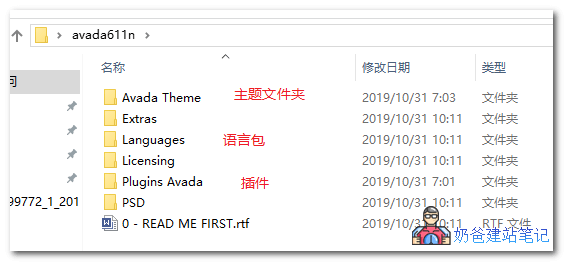
Upload the theme zip file from the Avada Theme folder to the WordPress backend for installation. After activation, you can install plugins and import demo data.
There are many plugins; you can wait until the website is designed to your liking, then deactivate unnecessary plugins to save website resources.
Language file upload path: website root directory /wp-content/languages/ corresponding folder or the corresponding folder under the languages folder in the theme
avada theme tutorial
Previously shared Avada theme installation and usage tutorials, refer to the article below:
How to Build a Website with Avada Theme? WordPress Avada Theme Installation and Usage Tutorial
Avada Theme Download Address
For legitimate website building, it is recommended to purchase genuine themes.
For those who just want to test, please join group 774633089 to download, file path: Group Share > WordPress Themes > ZT05.avada621n.zip
Complete Introduction to Avada Theme
Avada is thebest-selling WordPress theme on the market, with over550,000+beginners, professionals, agencies, businesses, and creatives starting to use itAvadaDesign freely.
Avada is the most feature-rich, intuitive, and easy-to-use multi-purpose WordPress theme on the market (NaibaNote: This is actually not easy for beginners to use). Many other WordPress themes try to create a theme with similar features to compete with Avada. However, they will never match the flexibility Avada WordPress theme provides you. Choosing Avada is not just a mindset; it is a requirement if you plan to surpass competitors when creating a website. The best part is, youdon't need to touchanyline of codeto design anything.
Avada's flexible advanced options network(including theme global options and individual page options) is achieved through Avada 6.0 Live Visual Editor. This makes Avada the ultimate web design tool for your workflow. Knowing that you can design and create unlimited designs and layouts for your projects allows you to work quickly and efficiently.
As a team, we are proud to continue providing an Avada experience that always meets your needs. We do this by offering endless design possibilities, world-class professional support, and regular theme updates with great value. Avada Live is the mostnatural,最intuitive WordPress frontend editing experienceavailable anywhere. Built according to strict WordPress, PHP, and accessibility standards, Avada always stays ahead, allowing you to confidently move your projects forward with a passionate team. Don't just take our word for it; see whyaverage 5-star reviewsexceeding22,000+Over 7 years of experience proves our passion. We are about to build relationships.
Below we highlight some of Avada's features! The list may be long, but that's also the reason to buy Avada and join the most important WordPress theme community!
- Avada has intuitive visual frontend design and editing tools to help you quickly create beautiful websites.
- Clean, modern, multipurpose design that can be modified and used for any website design and layout
- Ranked #1 and continuously growing WordPress theme on the market with over 7 years of sales
- Highly advanced options network for easy customization without modifying code
- Dozens of professionally designed demos that can be quickly imported with a single click
- Over 22,000 ratings with an average of 5 stars
- Always compatible with the latest WordPress version
- Always compatible with the latest versions of third-party integration plugins
- WordPress Multisite (WPMU) tested and approved
- Built-in HTML5 and CSS3
- 100% SEO optimized and perfectly compatible with plugins like Yoast SEO
- Complies with strict WordPress and PHP coding standards
- Performance enhancements for fast, reliable, and high-quality websites
- Cross-browser compatibility: FireFox, Safari, Chrome, IE9, IE10, IE11
- 100% responsive theme with pixel-perfect precision – you can disable responsiveness
- Easy-to-use Fusion Builder visual editor, the best visual page builder on the market
- Full control over site width; content area and sidebar
- Retina ready, ultra-high resolution graphics
- Social icons and theme icons are CSS font icons, no images
- Automatic theme updates directly through the WordPress admin interface
- Auto patcher tool to apply fixes and improvements with a single click, not available in any other theme
- Dual flexible sidebars throughout the theme
- 1-6 column support
- One-page parallax functionality on any page
- CSS3 animations enabled or disabled on desktop/mobile
- Compatible with child themes – your Avada package includes a basic child theme
- Focus on typography, usability, and overall user experience
- jQuery enhancements for modern websites
- JavaScript files are automatically merged and minified for performance
- JS/PHP compiler for CSS, combining all styles into a single generated file for performance
- Includes a fully integrated Font Awesome icon set
- Font Awesome Pro can be enabled for use with Avada
- Avada Classic original design includes 60 layered PSDs
- Compatible with Ubermenu (uber does not support sticky headers)
- Compatible with many popular plugins, such as WPML, Yoast, W3TC, Contact Form 7, JetPack, Gravity Forms, Slider Revolution, Layer Slider, WooCommerce, The Events Calendar, bbPress, BuddyPress, WP Rocket, All in One SEO, NextGen Gallery, UpDraft Plus, to name just a few
Consistently excellent five-star customer support
- We pride ourselves on providing the best after-sales service. We care about your website as much as possible and will help as much as we can
- Feature pack updates – get new features and new developments with every future update
- Technical support from a growing community of over 550,000 customers! In our support center, we answer every ticket as if it were our own, because we care about you and your site
- Customer feedback on new features is always welcome
- After registering your purchase, you can use our premium support ticket system to get professional support
- Includes the most extensive online documentation you can find, constantly updated with new materials
- Multiple HD video tutorials for easy guidance
- Access to our growing, extensive knowledge base
- Growing user base, please read our user reviews
Amazing demo Avada demo
- The best demo importer on the market – industry-leading demo import, extremely easy to use, and the fastest way to build a website. One-click demo import allows you to install a full demo with all content or a partial demo. Want the Creative demo with an e-commerce site but with Modern Shop product demos? Easily done! You can quickly uninstall any imported demo content with just one click.
- Professionally designed demos that you can import with just one click. Industry-leading demo designs created by a team of professional designers.
- More demos are added in each major update based on popular demand
- Each demo is professionally designed to truly represent the exact nature of the industry; cafes, gyms, agencies, travel, photography, etc.
- Beautiful, easy-to-use interface displayed via a welcome screen, allowing you to view each demo, preview the demo, and import with one click.
- WooCommerce store setup and product import, bbPress content import, Events Calendar content import
- Each demo is optimized and carefully combined to be fully complete
Advanced Theme Options Network
Fusion Theme Options control global options and settings across the entire website, while Fusion Page Options control individual pages and posts. Individual page options give you the freedom to change anything on a single page or post, allowing you to override global theme options. The Avada Advanced Options Network provides you with maximum flexibility to design unique designs and styles that stand out from the rest of your website.
- Over 50 main theme and child theme options panels, loaded with powerful customization options
- Extensive options provide incredible customization without modifying code
- Fully dependent options, so you only see the options in use based on configuration
- Entire options network relevance, so you can quickly see global settings versus individual settings
- Incredible search functionality that lets you quickly find any option you need
- Advanced options for enabling or disabling individual features to enhance performance
- Full control over the entire layout; website width, content area, sidebar, etc.
- Options are logically organized according to normal website construction procedures
- Custom repeater fields, allowing unlimited custom fonts and icons
- Custom fonts can be used for any font family submitted throughout the site
- Combination options such as typography give you full control over all settings in one area, saving valuable time
- Easily import and export data for different installations or secure backups
- Native WordPress feel with the same hover effects, styles, and pulling user color profiles
- All running on a custom version of the powerful Redux Framework
Advanced Fusion page/post options
We created page and post options to extend the Avada theme options. This allows overriding global theme options and creating unique, dynamic, content-rich pages, providing you with great flexibility. Any page or post (or multiple pages) can have a different layout and style compared to the rest of the site.
- Multiple option panels with amazing depth of customization options: sliders, pages, posts, headers, footers, sidebars, backgrounds, folders, page title bars
- Assign any slider to any page or post, display sliders above or below the header, use transparent headers per page
- Customize the page title bar for any page or post
- Customize page settings (e.g., padding) for each page or post
- Customize header styles separately for any page or post
- Insert custom images or colors for header sections, main sections, boxing backgrounds per page or post
- Select a custom menu per page or post
- Enable or disable headers, footers, sliders, sidebars, backgrounds, etc., per page or post
- Customize individual sections of the portfolio per page or portfolio post
- Insert custom excerpt length for each portfolio page
- Customize sidebars and sidebar positions for any page or post.
Incredible theme updates, unparalleled
- Due to the current status quo, Avada is not only the number one theme but will continue to be the top theme in the future.
- Avada releases continuous value-added package feature updates based on user-requested features and requirements
- Continuous improvement of the codebase to enhance performance and future maintenance
- Anyone who purchases a license canFreeReceive any updates
Multiple premium slider options
- Includes AmazingRevolution Slider plugin– worth $25
- IncludesAwesome parallax layer slider plugin – Value $22
- Custom Fusion Slider with parallax effect, full-screen option, and self-hosted/YouTube/Vimeo support
- Includes Elastic Slider
- Includes FlexSlider 2 for page and post sliders
- All sliders are touch-swipe compatible and responsive
Intuitive Fusion Builder Live
- Beautiful visual page builder that helps you easily create creative layouts
- The most intuitive page builder on the market, easy to use while delivering incredible results
- User-friendly interface makes page building a breeze
- Drag and drop any of our elements to your heart's content
- Easily create beautiful pages in minutes using shortcodes
- Save custom page layouts for reuse on other pages or for publishing
- Dozens of design elements to quickly build unique pages
- Global options for each shortcode element and individual overrides in Fusion Builder
- Includes element previews for text, images, and more
- Over 60 elements and endless options for easily building creative layouts
- Many shortcodes offer several design options to choose from
- Includes a shortcode generator integrated into Fusion Builder and the default WordPress editor
Fusion Mega Menu
- Beautiful Fusion Mega Menu design, suitable for large, stylish menus and widget-ready out of the box
- Regular menu with 5-level dropdown
- Widget-ready; add maps, images, tables, any available widget!
- Use from 1 to 6 columns
- Set the menu to full width or a specific pixel value
- Control the width of each column for more creative layouts
- Insert background images in the full mega menu or in individual columns
- Insert icons or custom thumbnails next to menu items
- Menu highlight labels can be added to any menu item for enhanced visual cues
WooCommerce compatible with extensive design integration
- Plugin-ready with full design integration
- Intuitive theme options panel, providing industry-leading customization options
- 1-6 column options
- Custom featured product slider to display your products
- Custom featured product carousel to showcase your products
- Full-width or sidebar single product page
- Full-width or sidebar shop page
- Avada Single product gallery or default WooCommerce product gallery
- Single product image hover zoom or disable zoom via Offer Network
- Display products by category, ID, or SKU
- WooCommerce shortcodes compatible with Avada columns
- Continued collaboration with the WooCommerce team to ensure compatibility
Popular plugin design integrations
- WooCommerce withComplete design integrationCompatible
- Events Calendar withComplete design integrationCompatible
- bbPress withComplete design integrationCompatible
- WPML plugin ready
- Compatible with Polylang
- Gravity Forms with complete design integration compatibility
- Contact Form 7 withComplete design integrationCompatible
- Ongoing collaboration with each team to ensure compatibility
Unlimited color and style options
- Extremely detailed theme options that allow you to control the colors of the entire theme
- Shortcode style tab in theme options for easy styling of shortcodes
- Unlimited color options / Skins with backend color picker
- Full color customization – easily change every element, including shortcodes
- One-click selection of light or dark skin
- Choose from 8 predefined color skins, or create your own
- Beautiful color picker with integrated color and opacity sliders to enhance creativity
Advanced Portfolio Layout Options
- 3 layout options to choose from; Grid, Masonry, Classic, Text
- 1-6 Column Classic Layout Options
- 1-6 Column Text Layout Options with Boxed or Unboxed Mode
- Portfolio Masonry Layout with Unique Hover Effects
- Portfolio Grid Layout
- Recent Works Shortcode to Insert Portfolio Posts on Any Page or Post
- Choose Automatic Image Size or Cropped Image Size
- Global Theme Options Settings Along with Individual Page and Post Settings
- Set Up Multiple Portfolio Pages and Assign Custom Categories for Each Page
- Select Custom Layout for Archive/Category Pages
- Choose Specific Categories for Each Portfolio, Fully Customizable
- Set Custom Skills and Tags for Each Portfolio Post
- Easily Order Your Portfolio Items with an Awesome Reordering Plugin
- Awesome Image Flip with Lightbox and Link Icons!
- Full-Width Featured Image or Half-Width Featured Image Single Page
- New Full-Width Single Page Without Details or Sidebar
- Use a 100% Width Page Template on Single Post Pages
- Use Sidebar or Dual Sidebars on Single Post Pages, Also Enable/Disable Project Details and Description
- Choose an Advanced Slider to Display on Your Portfolio Post or Page!
- Easily Use Images, Slides, and Videos!
- Set Custom Featured Image Size for Each Post
- Show or Hide Flip Icons for Each Post
- Change the Opacity and Color of Image Flip
- Automatically Generated Thumbnails
- Easily Specify the Number of Items Per Page
- Automatic Pagination
- Sortable/Filterable Categories
- Enable Comments on Portfolio Posts
- More Features to Build the Perfect Portfolio Website
Advanced Blog Layout Options
- 6 layouts to choose from; Grid, Masonry, Timeline, Large, Large Alternate, Medium, Medium Alternate
- Global Theme Options Settings Along with Individual Page and Post Settings
- Blog Masonry layout features unique hover effects
- All 6 layouts can have a left or right sidebar, or be full-width
- 4 post types (Video, Aside, Audio, Image)
- Set up multiple blog pages and use our blog shortcode to assign custom categories to each page
- Choose an advanced slider to display on your blog page!
- Easily order your blog posts using the awesome Re-Order plugin
- Awesome Image Flip with Lightbox and Link Icons!
- Set Custom Featured Image Size for Each Post
- Show or Hide Flip Icons for Each Post
- Change the Opacity and Color of Image Flip
- Automatically Generated Thumbnails
- Easily Specify the Number of Items Per Page
- Choose between pagination or infinite scroll
- Post sharing box with social icons
- Theme Reviews
- Pages can have a left or right sidebar
- Author Profile Page
- Extensive options for adding or removing metadata, featured images, full content or excerpts, etc.
- More Features to Build the Perfect Portfolio Website
Includes custom page templates and page options
- Easily customize each page via global theme options or by overriding with individual page options
- Use our 4 advanced sliders on each page or per post
- Contact Page Template
- FAQ Page Template
- Default page with left or right sidebar
- 100% width page template for full browser width
- Side Navigation Page Template
- Portfolio 1, 2, 3, 4, 5, 6 columns with automatic or cropped image sizes
- Control column spacing between each column for increased creativity and design flexibility
- Blank Page (perfect for Coming Soon or Maintenance mode)
- Default Page
- Built-in 404 Page
- Advanced Page/Post Options to customize each page/post
Advanced Responsive Image Management
- Custom responsive image settings to automatically create optimal conditions for each image
- Intelligent image size generation, so each layout uses the optimal image size
- Significant performance improvement due to the use of optimal image sizes
Avada supports multilingual/RTL!
- Can be translated, including .po and .mo files
- Translated into over 30 languages
- Built-in RTL support
- WPML plugin integration
- Polyang support
- Each language used by WPML provides you with a complete theme options panel to set options for each language
- Deep integration with Avada and our technical team means you can confidently meet your language needs.
Includes over 30Partially or fullyTranslatedLanguage, here are some examples
- German – Deutsch (de_DE)
- Spanish – Español (es_ES)
- Italian (it_IT)
- Dutch – Nederlands (nl_NL)
- Czech – Čeština (cs_CZ)
- French – Français (fr_FR)
- Polish – Polski (pl_PL)
- Turkish – Türkçe (tr)
- Portuguese (Brazil) – (pt_BR)
- Portuguese (European) – (pt_PT)
- Chinese – Taiwan (zh_TW)
- Russian – Русский (ru_RU)
- Swedish – Svenska (sv_SE)
- Catalan – Català (ca)
- Norwegian – Bokmål (nb_NO)
- And several others are all managed via public repositories on Github!
Advanced Typography Options!
- Use Google Fonts, standard fonts, or upload your custom fonts!
- You can uploadunlimited custom fonts,and use them throughout the website
- All font options are controlled in the Theme Options panel
- Set different font sizes, families, margins, letter spacing, etc. for all fonts, H1-H6 headings, body text, footer, sidebar, etc.
- Set different colors for all fonts, H1-H6 headings, body text, footer, sidebar, etc.
- Also set line-height values for each font type
- Font preview in Theme Options shows all font settings in real-time
Advanced Background Options
- Unlimited backgrounds for boxed and wide-screen modes, per page or globally!
- Use global theme options if you want to use the same image on every page
- Or upload custom background images for each page or post across multiple areas
- Insert backgrounds in the header, footer, main content area, and background
- Options for 100% background image and background repeat
- Full-width sections allow background images to have parallax effects and orientation
- Page title bar background with parallax effect and text fade effect
- Each column (1-6) has a background image option
Wide and boxed layouts
- Full control over site width; content area and sidebar
- Upload custom background images or colors per page or globally (boxed version)
- Upload custom page title bar images or colors per page or globally
- Choose 100% background image or different repeat options
- Choose boxed or wide-screen mode per page or globally
Advanced header options
- Choose from 7 different header layouts, including mobile header layout options
- Header can be positioned at the top, left, or right
- Select what you display in the top-left, top-right, and banner sections
- Top sliding widget bar, insert any widget, 1-6 columns, various theme options
- Includes a sticky header for enhanced usability, can be enabled/disabled via theme options
- Change colors of various elements in the header
- Choose social icons to display in the header with custom or brand colors (boxed or unboxed)
- Full control over social icon size, shape, background fill, etc.
- Change logo position; left, right, center
- Insert custom background image in header or custom colors
- Easily change all margins via theme options
- Support for up to 5-level dropdown menus
- Provide more customization options through theme options and page options
Advanced page title bar
- Enable or disable page title bar globally or per page/post
- Options for setting height, background image, parallax effect, background color, retina image per page or per post, or a global option
- Choose to display a search bar or breadcrumbs on the right side of the page title bar
Advanced footer options
- Insert custom background image behind widgets
- 1-6 columns, insert any widget into each column
- Back to top button, enable/disable in theme options
- Control colors of each footer section
- Various style options for disabling text shadows, social icons, etc.
- Copyright bar, custom text, and enable/disable via theme options
- Choose social icons to display in the footer and custom or brand colors (boxed or unboxed)
- Full control over social icon size, shape, background fill, etc.
- Provide more customization options through theme options and page options
Form plugin options
- Built-in custom styles for the Contact Form 7 plugin
- Advanced Gravity Forms plugin with built-in custom styles
Built-in contact form
- Built-in form with ReCaptcha spam protection
- Google Maps on contact page using the above form
- Custom Google Map styles
- Set custom dimensions for the map
- Use sidebar on your contact page or display it full-width
- Easily select and set options via the theme options panel
Unlimited single or double sidebars
- Create custom sidebars for various sections of the website
- Use single sidebar or double sidebar on any page or post
- Sidebar can be positioned on the left or right
- Use any of our custom or built-in widgets in any sidebar
- Set sidebars globally for each distinct area of the website (e.g., pages, posts, products, events, etc.)
- Set sidebars per page individually or publish via Fusion Page Options
Beautifully designed custom widgets
- Twitter Widget
- Flickr widget
- Facebook widget
- Recent works widget (pulled from portfolio items)
- Contact details widget
- Ad banner widget
- Social links widget
- LayerSlider and Revolution Slider widgets
- Horizontal menu widget
- Basic text widget can use our shortcodes!
Advanced search options
- Display search icon in main menu with pop-up search field
- Choose to search all pages and posts, or only posts
- Dedicated search results page
- Modern expandable search design for Header 6
- Various theme options to customize search results, layout, images, excerpts, etc.
Side navigation pages with parent/child levels
- Select „hover“ or „click“ for side menu items
- Unlimited number of side navigations can be created
- Control side navigation width and other styles
- Can be used with single sidebar and double sidebar