🚀 Is building a website too difficult? Let me guide you step by step—Learn about the 「Naibabiji WordPress Website Building Coaching Service」 →

How to set the number of products displayed on a product page in Astra Theme

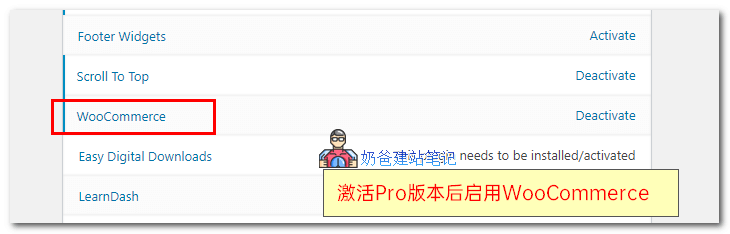
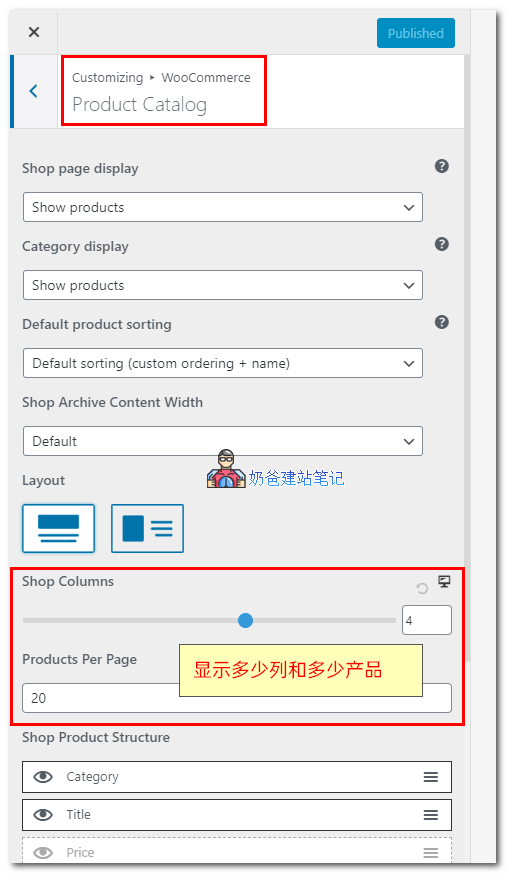
For a shopping website built with Astra, how to set how many products are displayed on the All Products page? The method is as follows: 1. This feature requires Astra Pro. If you haven't purchased the premium version of Astra yet, you canclick here to purchase. 2. After activating Astra Pro, activate WooCommerce in the theme settings. astra pro设置产品数量3. Then return to the website, select Customize, choose WooCommerce, and then select Product Catalog astra pro设置产品数量4. Set the number of columns to display products at Shop Columns, set the number to display at Products Per Page below, and then publish.

🚀 Still feeling confused after reading the tutorial? Let me guide you step-by-step instead.

「Naibabiji WordPress Website Building Coaching」 — From selecting a domain and purchasing hosting to installing themes and publishing posts, I「ll guide you through every step, helping you avoid detours and reach your goals directly.

👉 Learn about Website Building Coaching Service
🔒

Comments are closed

The comment function for this article is closed. If you have any questions, please feel free to contact us through other channels.

×
二维码

Scan to Follow