Home Experience & Tips Sharing Standard Post

Standard Post

How to Set Up Allowlist/Denylist for WPForms Inquiry Form Tutorial

When using a WordPress foreign trade website, we often need to receive customer inquiries, which requires a form plugin. WPForms is an excellent form plugin. To prevent spam comments, most people use Google's CAPTCHA system, but we can actually use WPForms' built-in allowlist/denylist feature to block...

Posted on October 28, 2021 About 1 minute read

When usingWordPress Foreign Trade Website, we often involve the function of receiving customer inquiries, which requires form plugins. WPForms is an excellent form plugin. To prevent malicious comments, most people use Google's captcha system. In fact, we can directly use WPForms' built-in allowlist/denylist feature to block certain fixed comments, which is more efficient.

WPForms Allowlist/Denylist Setup Steps

1. Enter WPForms, find the form item you need to set up allowlist/denylist for, and click on it.
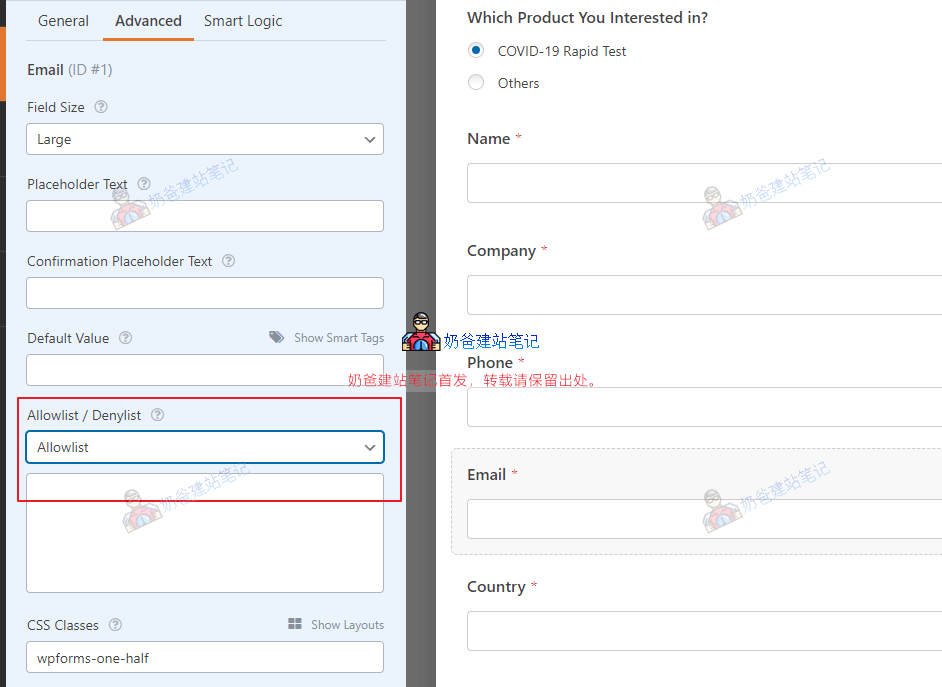
2. In the advanced options, you can see an Allowlist / Denylist, where we can set the allowlist and denylist.

3. We select Denylist, then fill in the email addresses to be blocked in the box below.

4/5 - (3 votes)
Previous How to Change Servers for WordPress? WordPress Migration Tutorial Continue reading content around the same timeline. Next WordPress Configuration Zoho Mail Email Sending Tutorial View the next related tutorial or experience.

AI Website Building Assistant

🤖
Hello! I am the Naibabiji AI Assistant. How can I help you?
Quick Consultation: