
This article explaining what image hosting is was written in 2020. Now in 2026, it seems that the term 'image hosting' is rarely mentioned, mainly because cloud storage and CDN have gained larger market share, and server bandwidth has also increased, making the use cases for image hosting relatively smaller. Therefore, Naiba has updated this article to help novice webmasters understand what image hosting is and whether it is better to choose image hosting, cloud storage, or CDN for building a website.
What is an image host?
FromBaidu Baike's explanation of image hosting:
Image hosting generally refers to servers that store images, which can be domestic or foreign. Foreign image hosting services have slow access speeds due to factors such as spatial distance, affecting image display speed. Domestic ones are also divided into single-line space, multi-line space, and CDN acceleration.
Simply put, an image hosting service is a service provided by others or other companies that supports uploading images and provides image URLs.
You can insert this image URL link into forum posts, Markdown documents, web pages, or chat content, and others can see the image through this address.
In English, image hosting is usually understood as „Image Hosting“ or „Image Hosting Service“.
By 2026, the backend storage location for image hosting services may not necessarily be a single server; it could also be an image hosting service built on object storage, CDN, or regular website storage space.
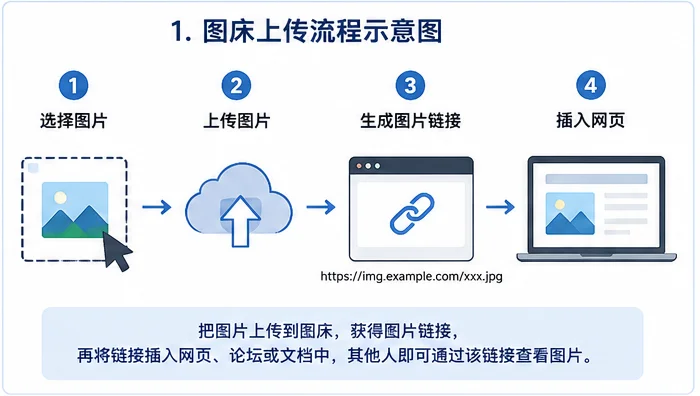
Image hosting can be free or paid, and you can also set up your own image hosting.
Why is an image host needed?
When building a website or browsing the internet, we use image hosting mainly in the following situations:
- Temporarily sharing images to other websites;
- Insufficient server hard drive space;
- Your own server has low bandwidth, resulting in slow image loading;
- You don't want to store images on your own server;
- You don't have a server but want to share images.
Image hosting is a server specifically used to store images, and more often refers to a service that provides external image links. There are free image hosting services and paid ones.
The new generation of netizens may not know that in the era of active forums, many people directly uploaded images to a forum server and used it as image hosting, freeloading on the forum's bandwidth and hard drive. However, this is very risky, and now most forums have shut down.
Temporarily sharing images
For example, when temporarily sharing an image in a forum, group chat, or community, you can choose a free image hosting service. After uploading, copy the link, which is convenient to use.
Images for forums and Markdown documents
For images in forum posts, technical documents, or Markdown files, you can use an image hosting service that allows external links in the corresponding scenario.
However, you need to confirm the service rules in advance to avoid images being deleted or not displayed after a period of time.
Personal test pages
You can also use free image hosting for test websites or temporary pages, but do not upload important images, private images, or original materials that cannot be retrieved later.
Long-term operated websites
For long-term operated blogs, corporate websites, and product display websites, it is more suitable to use website media libraries, object storage, or CDN that you can manage yourself.
Corporate websites and e-commerce websites also need to consider:
- Who controls the image data;
- Can batch download and migrate;
- Has independent backup;
- Can bind your own domain name;
- Can set access permissions and hotlink protection;
- Can quickly recover after service changes.
It is important to note that „being able to generate image links“ does not mean „allowing long-term use as a website image source.“
For example, Imgur still provides image upload and sharing functions, but its official help documentation clearly states that while external image links are allowed in forums, these images cannot be used long-term as blog posts, website elements, avatars, or advertisements.
Therefore, Imgur can serve as an example of an image sharing service, but it is not suitable to recommend as a formal image hosting for WordPress blogs or business websites.
Do I need an image hosting service when building my own website?
Based on Naiba's years of website building experience, it is not recommended tobuilding your own websiterely entirely on image hosting to manage images, at least do not expect to use free image hosting to store website images long-term.
Free is always the most expensive.
When your website has been running for years, and one day the image hosting shuts down or restricts external image links, all images on your site may become inaccessible. Can you accept that loss?
The „not recommended to use image hosting“ here mainly means: do not save the images of your formal website only to a free third-party image hosting that you cannot control, has no reliable backup, and has no migration plan.
If you use an object storage service that you registered and manage yourself, and keep the original images on your computer, NAS, or other space, then although the images are also stored on third-party servers, the risk is much lower than anonymous free image hosting.
The real difference between the two is not whether the images are stored on third-party servers, but:
- Whether the account and storage space are controlled by yourself;
- Whether batch export and migration are possible;
- Whether original images are retained;
- Whether you can bind your own image domain name;
- Whether access permissions and hotlink protection are supported;
- Whether you can quickly switch after service changes.
Therefore, formal websites are not absolutely prohibited from using third-party image storage, but they should not completely hand over images to an uncontrollable free platform.
Without image hosting, what to do if website images load slowly?
Most users who use image hosting are worried that too many images on their website will slow down the network speed. For example, domestic servers usually have limited bandwidth, only 1-5 Mbps. After placing many images on the website, even opening it yourself is very slow. How to solve this without using image hosting?
We can use cloud storage or CDN services, such as the one shared earlier.Upyun CDN Website Acceleration Tutorial。
Object storage and CDN also use the hard disk and bandwidth of third-party servers, but they are usually managed by your own account, and it is more convenient to configure independent domain names, caching rules, hotlink protection, and file migration.
However, it is important to note: using object storage or CDN does not mean that your website server will automatically retain a copy of the original images.
Whether to retain local images depends on the website plugin and synchronization method.
For example:
- If the CDN only caches images from the website server, the origin server usually retains the original files;
- If the plugin deletes local files after uploading images to object storage, the website server may no longer retain the original images;
- Some plugins allow you to keep local files or automatically delete local files after successful upload.
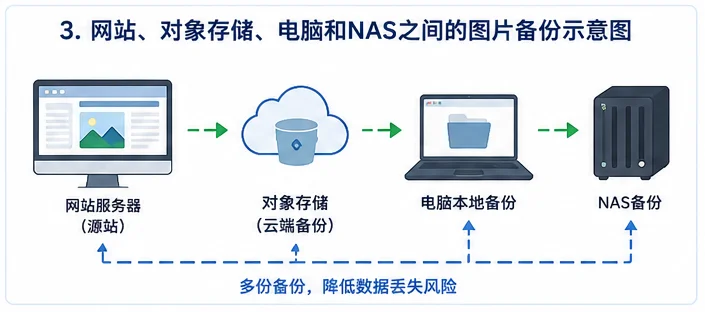
To reduce risk, it is recommended to keep at least one independent backup. Original images can be stored on the website server, computer, NAS, or other backup space.
Even if the object storage account, service provider, or image domain changes in the future, you can re-upload and restore website images.
What are some free image hosting services?
You can find many image hosting websites through search engines. The Luguotu image hosting (https://imgchr.com/) introduced in this article in 2020 is still operating stably. You can consider using it if needed.
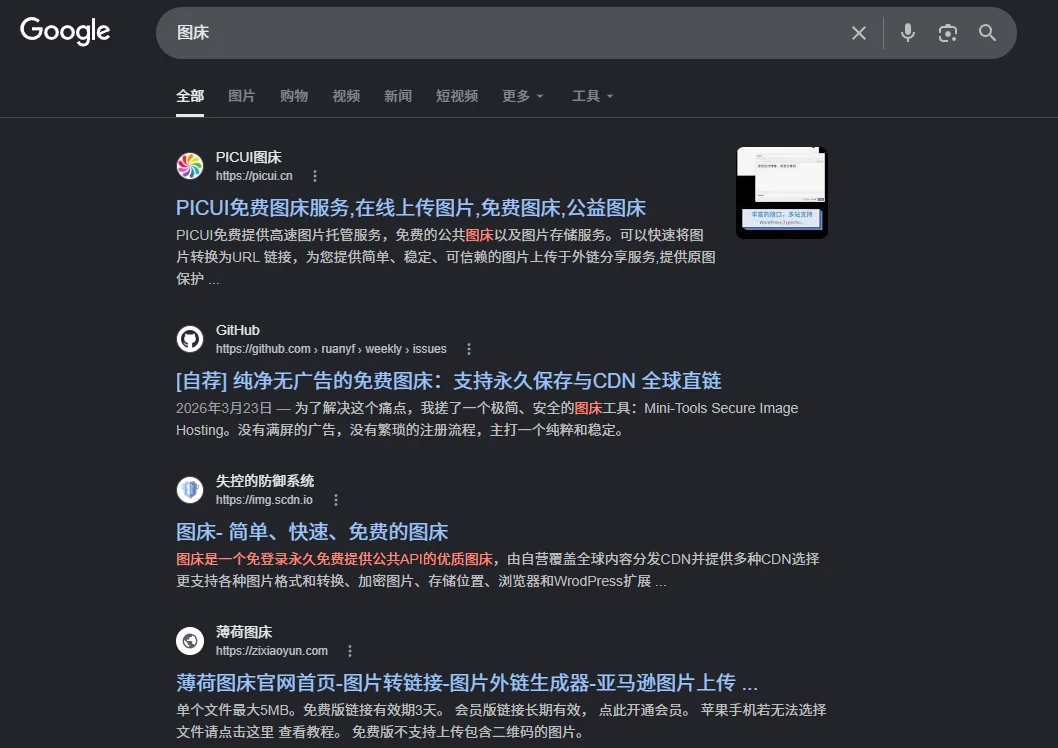
Another free image hosting service previously shared has now changed its business, so using free image hosting still carries risks. When choosing a free image hosting service, besides testing whether uploads work, you should also confirm:
- Whether external image linking is allowed;
- Whether it is allowed for blogs or commercial websites;
- Whether registration is required;
- Whether you can manage and delete your own images;
- Whether batch export is supported;
- Whether images without long-term access may be cleaned up;
- How to restore original images if the service changes.
What you really need to worry about is not whether there is an image hosting service available now, but whether you can quickly restore images on your website when the service becomes unavailable one day.
Free image hosting services still available in 2026
Free image hosting services tend to change quickly.
The services listed below only indicate that official pages or upload entries can still be found at the time of this article's update, and do not guarantee that they will permanently maintain current rules.
Before using, it is recommended to check the service's official website, upload limits, image storage rules, and external linking terms again.
ImgBB
ImgBB provides free image upload and sharing functionality, generating direct image links, BBCode, and HTML thumbnail codes.
As of this article's update, its official upload page shows a 32MB size limit per image. ImgBB also offers an API to upload images via file, image URL, or Base64 data.
ImgBB is suitable for temporary sharing, forum images, or unimportant test images.
If you plan to use it for an official website, you should still check the current terms of service and keep original images locally. Do not treat it as permanent stable website image storage just because direct links are available now.
Imgur
Imgur is not accessible in China. It allows uploading and sharing images and obtaining image links.
However, Imgur is more of an image sharing community than a dedicated object storage service for long-term hosting of assets for ordinary websites.
Imgur's official policy states that it should not be used as a CDN, nor should image external links be used for blog posts, website elements, avatars, advertisements, or other website content.
Therefore, Imgur can be used for image sharing, but it is not recommended as a formal image hosting service for WordPress blogs, corporate websites, or product sites.
imgchr
imgchr is a free image hosting service previously listed in the original article. It is operated by a Chinese team, officially established in 2011, and has been stably operating until 2026. If you really need an image hosting service, you can consider their paid version.
What scenarios are suitable for free image hosting?
Free image hosting is suitable for:
- Temporarily sharing images;
- Posting on forums or communities;
- Temporary illustrations in Markdown;
- Unimportant test content;
- Images that can be re-uploaded at any time.
Free image hosting is not suitable for:
- Core images of corporate websites;
- Product images;
- Long-term accumulated blog post illustrations;
- Original images that cannot be retrieved again;
- Important materials provided by clients;
- Images involving privacy or business secrets.
Even if a free image hosting service works normally now, it cannot be inferred that it will permanently save images, be free forever, or always allow hotlinking.
What are the differences between image hosting, cloud storage, and CDN?
Many beginners are confused about what image hosting is, and what object storage and CDN are.
Object storage and CDN do not necessarily have to be used as image hosting, but mature image hosting services often integrate object storage or CDN. Their differences can be seen in the table below.
| Solution | Main Use | Cost Model | Data Control Capability | Access Speed | Main Risks | Suitable Scenarios |
|---|---|---|---|---|---|---|
| Free Image Hosting | Upload images and get external links | Usually free, may have limitations | Lower | Depends on platform and network route | Service shutdown, image deletion, hotlink restriction | Temporary sharing, forum image posting |
| Website local media library | Images stored directly on the web server | Consumes server disk space and bandwidth | 高 | Depends on server bandwidth | Insufficient bandwidth, excessive disk usage | Small websites, websites with few images |
| Object Storage | Store images and other files separately | Usually billed by storage, requests, and traffic | Relatively high | Can be enhanced with CDN | Permission misconfiguration, traffic costs | Long-term websites, websites with many images |
| CDN | Cache and distribute origin images to nearby locations | Usually billed by traffic or requests | Depends on origin server configuration | Generally good | Cache and origin pull misconfiguration | Existing origin images, need to improve speed |
| Object storage plus CDN | Combined storage and distribution | Billed based on actual usage | Relatively high | Generally good | More complex configuration and cost management | Enterprise websites, content sites, websites with many product images |
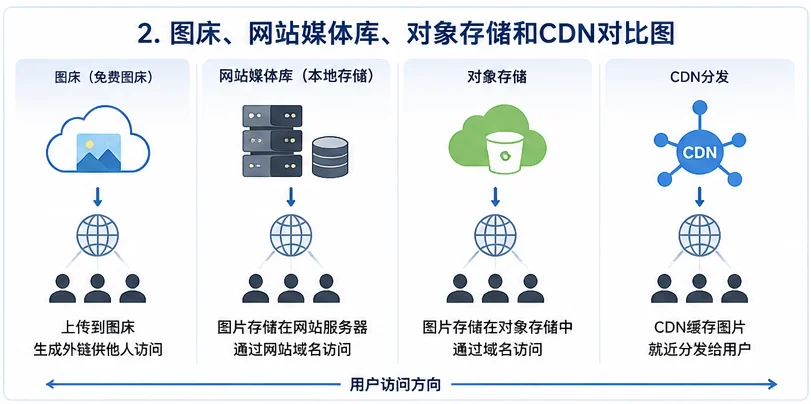
Note that CDN is mainly responsible for caching and distribution, not necessarily for long-term storage of the only copy of original images.
Object storage is mainly responsible for storing files, and cannot replace a complete website backup. Regardless of which solution is chosen, original images and website backups should be kept separately.
Common cloud storage and CDN services
Currently, common object storage or CDN services in China include Upyun, Alibaba Cloud OSS, Tencent Cloud COS, and Qiniu Cloud.
Common object storage and CDN services abroad are provided by the three major cloud vendors: Amazon Web Services (AWS), Microsoft Azure, and Google Cloud. However, most ordinary webmasters are more familiar with Cloudflare, as its free CDN has the largest user base, and Cloudflare R2 costs are relatively low.
Naiba cannot tell you which service is better, as the specific choice should be based on the following factors:
- Where are the website visitors mainly from?
- Where is the website server located?
- Has the website completed ICP filing?
- What is the monthly image traffic?
- Are you already using a particular cloud service?
- Does WordPress have a stable synchronization plugin?
- Is it convenient to bind your own image domain?
- Does it support batch migration and export?
- Is the cost easy to control?
How should you choose when building your own website?
If the website has few images and the server hard drive and bandwidth are sufficient, continue using the WordPress local media library, combined withImage compression, page caching, and CDN, which is usually enough.
If there are many images or the origin server bandwidth is small, consider object storage plus CDN.
If you just need to temporarily share an image, using a free image hosting service is more convenient, and there is no need to configure object storage specifically.
You can simply choose according to the following method:
Temporarily sharing images
Choose a free image hosting service, but do not upload private content or important files.
Personal blog or small website
Prioritize using the WordPress local media library and ensure website backups. If image loading is slow, first compress images, then consider adding CDN.
Content website with many images
Consider object storage plus CDN, but use your own controlled account and domain, and keep independent backups.
Corporate website and product website
Do not store product images, case images, and core page assets only in free image hosting services.
It is recommended to use local storage or self-managed object storage, while keeping original images on your computer, NAS, or other backup space.
Before migrating to object storage, you should also confirm:
- Does WordPress have a stable synchronization plugin?
- Whether local image files are retained;
- Whether image links can be restored after deactivating the plugin;
- Whether you can bind your own image domain;
- Whether files can be exported in batches;
- Whether traffic fees and request fees are controllable;
- Whether hotlink protection is supported;
- Whether upload and delete permissions can be restricted.
Don„t migrate all images of the entire site just because you see “free quota„.
Best Practices for Website Image Management
Regardless of whether you ultimately choose local storage, image hosting, object storage, or CDN, it is recommended to do the following.
Always keep a copy of the original images that you can control
Do not treat files in free image hosting or object storage as the only copy.
Important images should be kept in at least one backup location, such as a computer, NAS, website server, or other backup space.
Use your own image domain name as much as possible
If the object storage or CDN supports binding a custom domain, you can use an image domain like the following:
img.example.com
When switching service providers later, you can reduce the workload of batch modifying image URLs in articles by migrating files and modifying domain resolution.
Compress images before uploading
Image hosting and CDN cannot replace image optimization.
An oversized, uncompressed image, even if placed on a CDN, may affect page loading speed.
Before uploading, adjust the image size according to the actual display size on the page, and consider image formats like WebP when compatibility is suitable.
You can directly use the image compression and WebP conversion service at the following URL.
Online Image to WebP Compression and Watermark Tool – Naiba Web Development
Properly configure hotlink protection
Object storage and CDN usually support hotlink protection, which can prevent other websites from directly referencing your images, reducing traffic abuse.
However, hotlink protection rules should not be set too strict, otherwise it may cause search engine image crawling, RSS readers, social media sharing previews, or normal visitors to be unable to see the images.
Regularly check for broken images
The longer a website operates, the more likely it is to encounter issues such as image hosting failure, domain changes, file deletion, or link format changes.
Regularly check if article images show 404, 403, or other loading errors.
Test on a small scale before migration
When preparing to change image storage services, do not modify the entire site directly.
You can first select a few articles to test:
- Whether images can be uploaded normally;
- Whether thumbnails can be generated normally;
- Can deletion and replacement of images be synchronized?
- Can the website backend still manage media?
- Will images be affected after deactivating the plugin?
- Can image backups be restored normally?
After confirming there are no issues, proceed with the full site migration.
Common Questions About Image Hosting
What to do if images on the image hosting are hotlinked by other websites?
If you are using a self-managed object storage or CDN, you can set up hotlink protection, access rules, signed URLs, or traffic alerts.
When using free image hosting, it is usually difficult to finely control whether other websites reference images, which is one reason why formal websites should not rely on free image hosting.
If the free image hosting suddenly shuts down, how to migrate website images?
If the original images are kept locally, you can batch upload them to a new object storage or website media library, and then update the original image domain via database replacement, migration plugins, or scripts.
If there are no original images, you can only try to retrieve them from the old image hosting, website backups, or other caches, making recovery much more difficult.
Can using image hosting improve website speed?
Possibly, but not necessarily.
Image loading speed depends on the image hosting server location, network lines, CDN nodes, cache settings, image size, and visitor region.
If the free image hosting's network line is unstable, image loading speed may be slower than your own website server.
Is free image hosting suitable for WordPress websites?
Free image hosting can be used for temporary testing or unimportant images, but it is not recommended as the primary media library for long-term WordPress website operations.
Formal websites are more suitable for using local media libraries, self-managed object storage, or origin server images plus CDN.
Are object storage and image hosting the same thing?
Not exactly the same.
Image hosting emphasizes uploading images and generating external links, while object storage is a general file storage service that can store images, videos, archives, documents, and other files.
Object storage usually has more complete permission management, domain binding, API interfaces, file migration, and billing features, and can also be configured as the website's own image hosting.
Does CDN automatically back up website images?
No.
CDN typically only caches and distributes origin server files and cannot replace website backups.
Even if image caches temporarily exist in CDN nodes, they should not be considered as original files that can be restored long-term.
Can product images be placed on free image hosting?
Not recommended.
Product images are important content for business websites. Once lost, deleted, or restricted from external linking, it will directly affect product page display.
Product images are better stored on the website server, object storage, and backup space controlled by the enterprise itself.
Is it necessary to build your own image hosting?
No, it's not necessary. Using object storage plus CDN service is more stable and efficient than building your own image hosting.
Summary
Image hosting is a service used to store images and provide external links to them.
For scenarios like temporarily sharing images, posting on forums, or adding images in Markdown, free image hosting is still convenient. However, if you are running a website for long-term operation, you cannot only consider whether uploading is free.
Using image hosting can reduce the hard disk and bandwidth usage of the website server. Image services with suitable routes and good cache configuration may also improve image loading speed.
But before using it, you must consider the stability of the image hosting, external link rules, account control, data security, and migration capabilities.
Especially for free image hosting, you need to think ahead: if one day the service shuts down, the domain changes, images are deleted, or external links are no longer allowed, can you quickly restore the images in your articles and pages?
For formal websites, Naiba still does not recommend storing all important images only in free image hosting.
A more reliable approach is:
- When there are few images, use the website's local media library and make backups;
- When there are many images or the server bandwidth is low, use self-managed object storage or CDN;
- Regardless of which service you use, keep an independent backup of the original images;
- When you can bind a custom image domain, prioritize using your own domain for easier migration in the future.
Free image hosting is not completely unusable, but it is not suitable as the only image storage solution for a formal website.
Do not believe in „permanent free“ without conditions and duration, and do not entrust important images that cannot be retrieved to a platform you cannot control.