
Home Astra Theme Tutorial Standard Post

Standard Post

How to Set the Number of Products Displayed on the Product Page in Astra Theme

How to set the number of products displayed on the All Products page for a store website built with Astra? Here's how: 1. This feature requires Astra Pro. If you haven't purchased the premium version of Astra yet, click here to buy. 2. After activating Astra Pro, in the theme settings, Activ…

Posted on March 3, 2020 About 1 minute read
Astra主题怎么设置产品页面展示数量

How to set the number of products displayed on the All Products page for a store website built with Astra? Here's how:

1. This feature requires Astra Pro. If you haven't purchased the premium version of Astra yet, you canclick here to purchase it

2. After activating Astra Pro, in the theme settings, Activate WooCommerce.
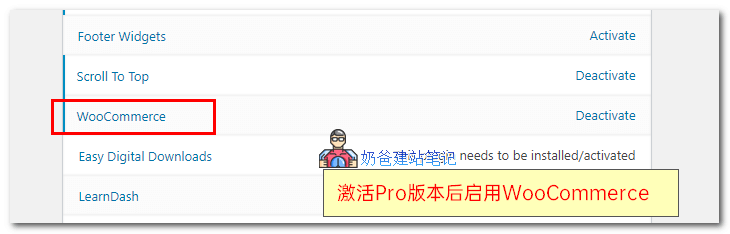
 

astra pro设置产品数量

3. Then go back to the website, select Customize, choose WooCommerce, then select Product Catalog
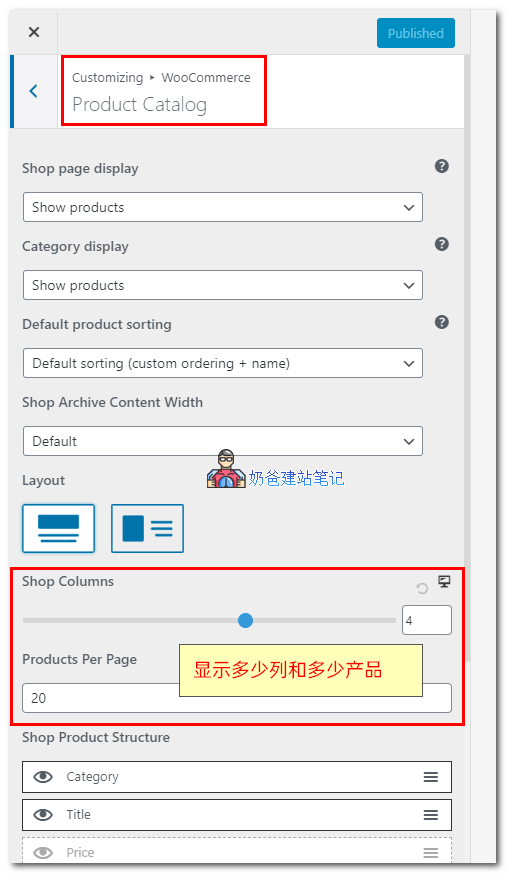
 

astra pro设置产品数量

4. Set the number of columns under Shop Columns, set the number of products per page under Products Per Page, then publish.


1.6/5 - (9 votes)
Previous What Other Open-Source CMS Options Are Available Besides WordPress for Building Your Own Website? Continue reading content around the same timeline. Next Five Recommended WordPress AMP Plugins View the next related tutorial or experience.

AI Website Building Assistant

🤖
Hello! I am the Naibabiji AI Assistant. How can I help you?
Quick Consultation: