
Yesterday, a friend consulted Naiba. He usedWooCommerce Automatic Serial Key Delivery FunctionFailed, the status after payment is pending, requiring the admin to manually click send in the backend for the system to email the serial number to the customer.
Actually, the reason for this problem is simple: WooCommerce's workflow design is that when a user pays, the default status is processing, and it only completes after admin processing (because of shipping, etc.).
But don't worry, Naiba is sharing with everyone heretwo effective methods to achieve automatic order completion.。
Method 1: Using a Plugin
We use the Autocomplete WooCommerce Orders plugin to automatically complete orders.
1. Search for Autocomplete WooCommerce Orders in the backend or download it from the link below and install the plugin.
2. Activate the plugin and go to the WooCommerce settings page.
3. Set and save in the Autocomplete Orders section.
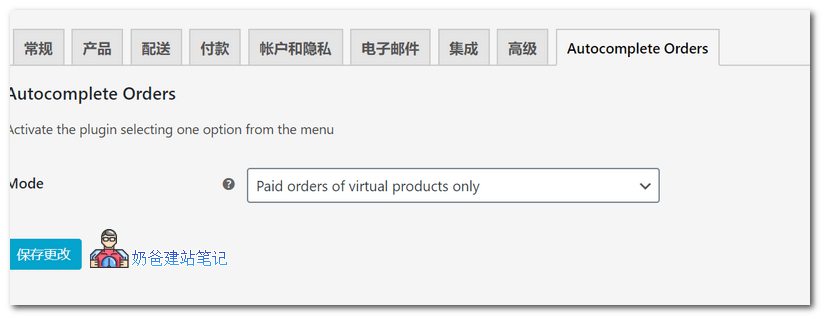
Autocomplete WooCommerce Orders supports separate settings for physical and virtual orders, and is compatible with most payment gateways. You can use it with confidence.
If you are not satisfied with this free plugin, you can also trythe official paid plugin.。
Method Two: Using Code
1. Add the following code to your website's theme functions file. If you don't know how to add it, you can use:Safe Method to Add Code to the functions.php File: Code Snippets
add_action('woocommerce_order_status_changed', 'ts_auto_complete_by_payment_method');

function ts_auto_complete_by_payment_method($order_id)
{

	if ( ! $order_id ) {
	return;
	}

	global $product;
	$order = wc_get_order( $order_id );

	if ($order->data['status'] == 'processing') {
	$payment_method=$order->get_payment_method();
		if ($payment_method!="cod")
		{
			$order->update_status( 'completed' );
		}

	}

}
This code calls thewoocommerce_order_status_changedThis hook determines whether the order is completed. As long as it is not a cash on delivery order, it will be automatically marked as completed upon receipt of payment.
WooCommerce default payment method IDs, you can modify the above code yourself: Direct Bank Transfer (bacs), Check Payment (cheque), Cash on Delivery (cod), and PayPal (paypal)
2. The following code detects whether it is a virtual product, and if so, automatically completes it.
add_action('woocommerce_order_status_changed', 'ts_auto_complete_virtual');

function ts_auto_complete_virtual($order_id)
{

	if ( ! $order_id ) {
		return;
	}

	global $product;
	$order = wc_get_order( $order_id );

	if ($order->data['status'] == 'processing') {

		$virtual_order = null;

		if ( count( $order->get_items() ) > 0 ) {

			foreach( $order->get_items() as $item ) {

				if ( 'line_item' == $item['type'] ) {

					$_product = $order->get_product_from_item( $item );

					if ( ! $_product->is_virtual() ) {
						// once we find one non-virtual product, break out of the loop
						$virtual_order = false;
						break;
					}
					else {
					$virtual_order = true;
					}
				}
			}
		}

		// if all are virtual products, mark as completed
		if ( $virtual_order ) {
		$order->update_status( 'completed' );
		}
	}
}
Alright, the above are the methods shared by Naiba for WooCommerce automatic order completion. Hope it helps you.