Most shared hosting services cannot send emails directly, so we need to rely on SMTP email services. However, Alibaba Cloud (Wanwang) shared hosting cannot use SMTP to send emails directly; the fsockopen function must be enabled first to use the SMTP sending function.
How to Enable the fsockopen Function
If you are using Alibaba Cloud (Wanwang) shared hosting, log in to the shared hosting management interface and follow the steps below to enable it.
- Log in to the Alibaba Cloud (Wanwang) shared hosting management interface;
- In the advanced environment settings, click on PHP.INI settings;
- In the PHP function settings, find the fsockopen setting and select Enable;
- Configure the SMTP sending plugin to implement the email sending function.
How to Configure SMTP to Send Emails
There are many plugins on WordPress that support sending emails via SMTP. Refer to the following article:
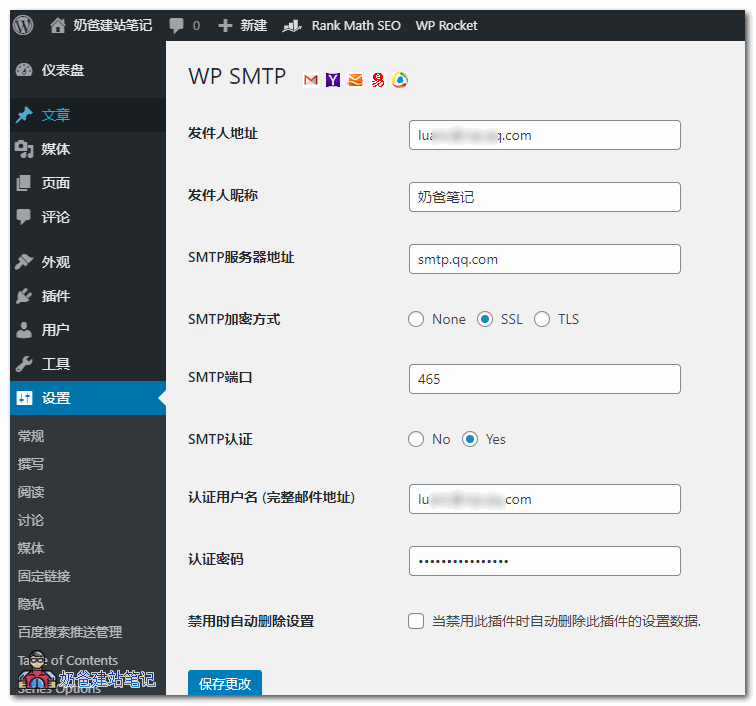
Currently, the plugin used by Naibabiji for sending emails isWP SMTP, and the setup method is as follows:
- Log in to QQ Mail and select Settings;
- Go to the Account interface and find POP3/IMAP/SMTP/Exchange/CardDAV/CalDAV services;
- Enable the SMTP service, then generate an authorization code;
- Copy the authorization code to the WP SMTP plugin interface;
- Refer to the image below for configuration in the WP SMTP plugin interface.
If you are using an overseas server, you may consider using Gmail or the following SMTP service providers with free plans, which can improve email sending speed.