How to Add CSS Code to WordPress?
The method is very simple: directly use the theme'sCustomizefunction or modify the theme'sstylesheetfilestyle.css.
Method 1: Appearance Customizer:
Using the Appearance Customizer allows you to quickly add CSS code to the theme file you are currently using. The method is as follows:
- Log in to the WordPress Admin Dashboard
- Select Appearance, then Customize.
- Insert the CSS code in the „Additional CSS“ section.
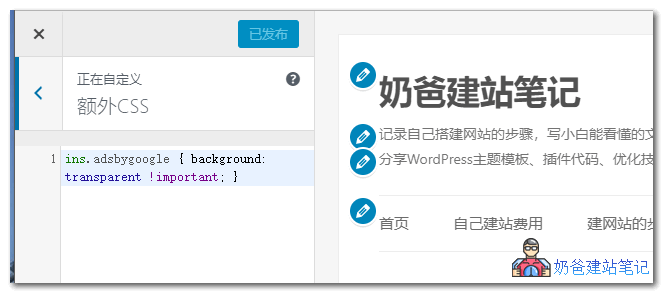
This method is simple and fast, suitable for adding and modifying small amounts of CSS code. For example, the code in the image above iscode to remove the yellow background box from Google ads。
Method 2: Edit the theme stylesheet file style.css
- Log in to the WordPress Admin Dashboard;
- Select Appearance, then Theme Editor. By default, it modifies the stylesheet (style.css)
- Insert the CSS code you need to add into the stylesheet (style.css).
This method is a more commonly used way to modify and add CSS code.
Other Methods:
Other methods to add CSS code include creating a child theme, modifying the child theme's stylesheet file, or using a plugin to add CSS code, but they are not as convenient as Method 1 and Method 2.
So, if you want toadd CSS code to WordPress, just use the methods above.