
When an old version of PHP contains vulnerabilities, or some programs require a new version of PHP, we need to upgrade the PHP version.
This article teaches you how to upgrade the PHP version on your server.
Method for Upgrading PHP with LNMP One-Click Package
If you are usingLNMPone-click package, the method to upgrade the PHP version is as follows:
First, log in to SSH and switch to the lnmp installation package directory.
Run the following upgrade command
./upgrade.sh php
Go to http://www.php.net/downloads.php to get the version number, enter the version number, e.g., 7.3.11, press Enter, and press Enter again to confirm to start the upgrade. As shown in the figure below.
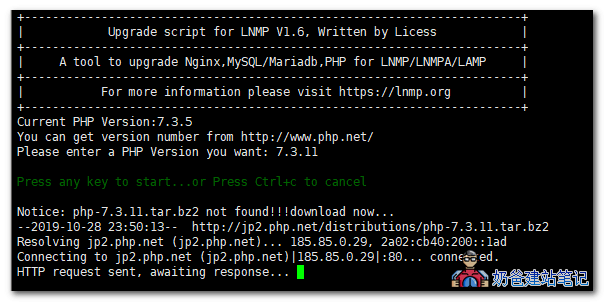 During the upgrade, the website will be temporarily inaccessible. It will be available again after the upgrade is complete.
If you have previously installed PHP-related components, you need to reinstall them.
After upgrading PHP, phpMyAdmin may become unusable. You need to upgrade phpMyAdmin to a version compatible with the PHP and MySQL versions.
To restore the original PHP, rename the directory under /usr/local/ with the oldphp log to php, and copy the file /usr/local/oldphp_date/init.d.php-fpm.bak.date to /etc/init.d/ and rename it to php-fpm to restore.
Method for Upgrading PHP Version with Baota Panel
There are two methods to upgrade the PHP version in Baota Panel.
Method 1: Directly install the new PHP version from the Baota App Store, then go to the website settings and switch the PHP version used by the website to the new one.
Method 2: First delete the old PHP version, then install the new PHP version from the App Store.