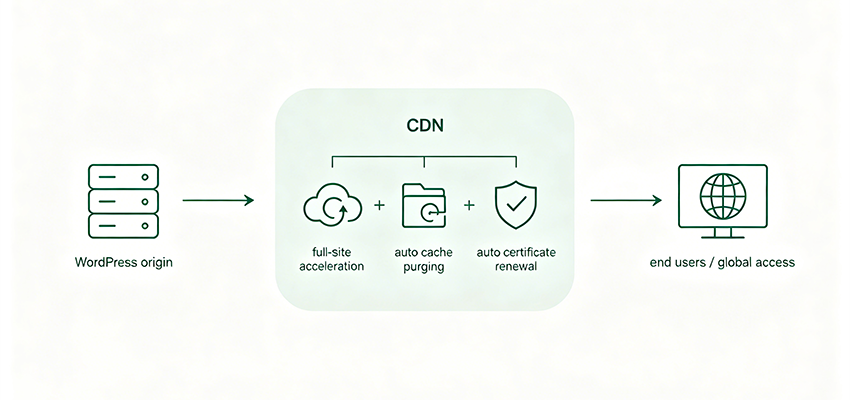
Naiba has previously written many articles about WordPress website acceleration, such asWordPress Website Access to Alibaba Cloud ESA Complete Tutorial, and also introduced CDN solutions like Upyun. Today, a client asked Naiba for website hosting. Their Alibaba Cloud CDN certificate had expired, so I took this opportunity to write this Alibaba Cloud CDN tutorial, and also use the automatic cache clearing and SSL certificate synchronization features to make it truly „set and forget.“
This tutorial is suitable for beginners or those new to CDN. Naiba will start from adding a domain name, and explain step by step the cache rules, SSL certificate configuration, origin settings, and the very practical automation plugin WP Panel. Before starting, remember to register forAlibaba Cloud CDNservice (requires real-name authentication).
Step 1: Add a Domain Name in Alibaba Cloud CDN
Enter the Alibaba Cloud CDN console, click „Domain Management“ → „Add Domain Name.“ Here you need to fill in your WordPress primary domain (e.g.,www.naibabiji.com), then select the acceleration region. If you mainly target domestic users, select „Mainland China“; if you have overseas users, select „Global.“
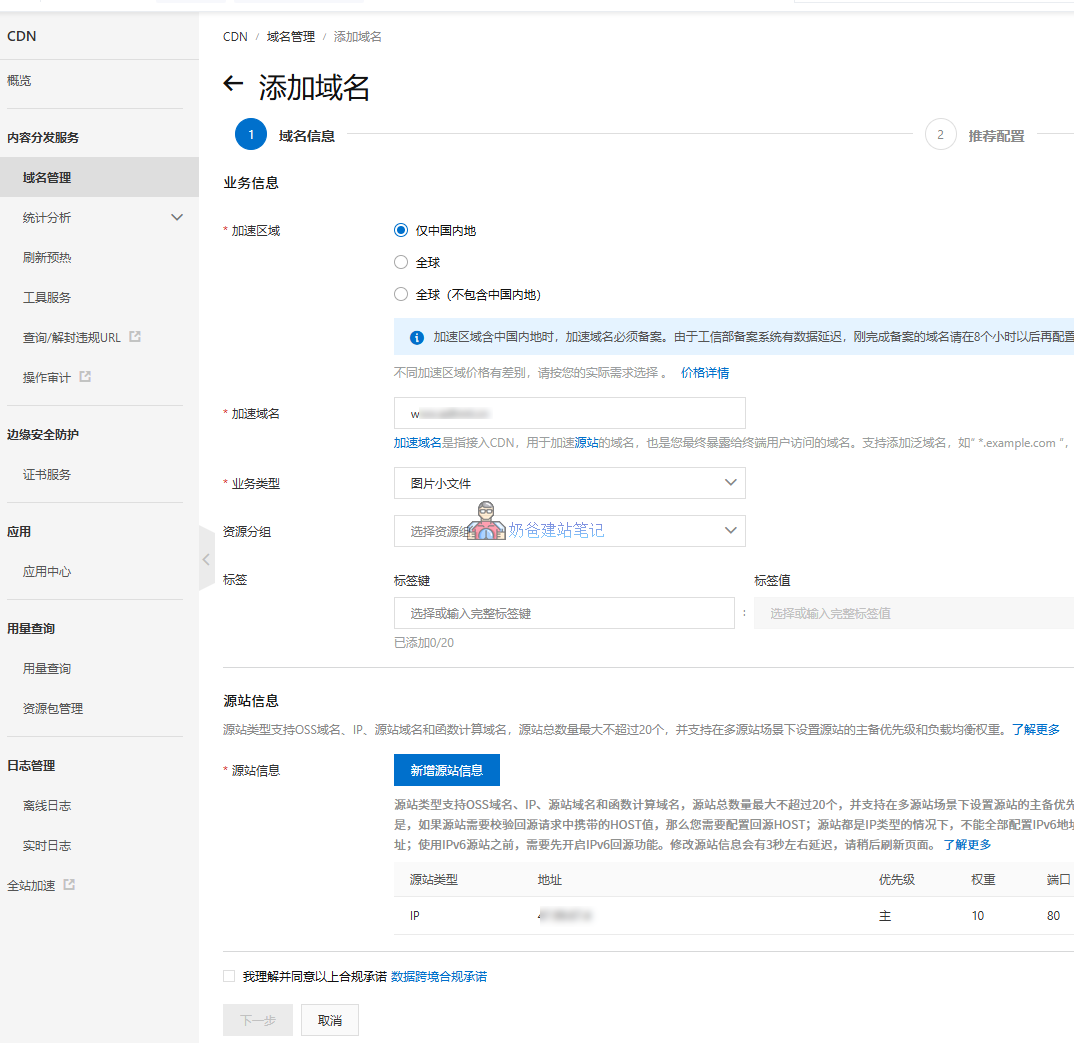
Select „Small files of images“ as the business type, because WordPress mainly accelerates static resources like CSS, JS, and images. Next, you will enter the configuration state. Leave it for now, and we will set it up step by step later.
Step 2: Set Cache Expiration Rules
The core function of CDN is caching. If no rules are set, CDN nodes may not cache or cache for too long, affecting website updates. You can refer to the screenshot for configuration rules (the site demonstrated by Naiba is a corporate website with low content update frequency and no interactive features, so the rules are set relatively simply).
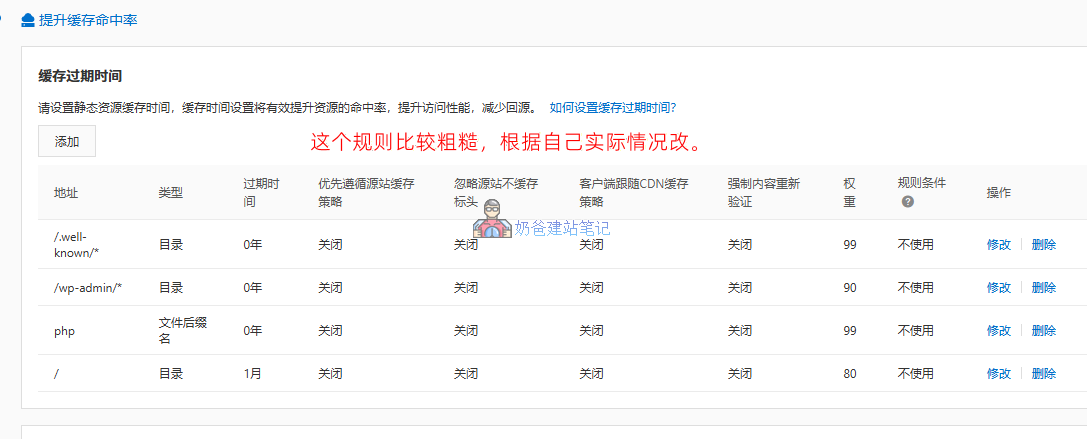
Note that Alibaba Cloud CDN cache rule weight 99 is the highest priority rule. To ensure you can apply for an SSL certificate smoothly, remember to create a 0-second cache rule with priority 99 for the /.well-known/* directory.
After configuring the cache rules, follow the next steps to complete the process. You will be asked to modify the domain resolution record, i.e., add a CNAME record. It is very simple. If you have any questions, you can contact AI customer service or human customer service.
At the same time, if you have bound both the www and non-www domains, the other domain also needs to be added following the same process.
Step 3: Configure SSL Certificate (HTTPS)
To enable HTTPS, you need to configure SSL certificates for both the origin server and the CDN. The certificate management entry for Alibaba Cloud CDN is in „Digital Certificate Management Service". You can purchase a paid certificate or apply for a personal test certificate (free, valid for 30 days, requires manual renewal before expiration).
Naiba himself usesWP Panel, so he downloads the certificate automatically generated by the panel from the WP Panel backend and uploads it to the Alibaba Cloud certificate management interface. This avoids manual application and the hassle of updating each time. If you also use WP Panel, the steps are:
- Find the SSL certificate download page in the WP Panel and download the certificate file.
- Go to the Alibaba Cloud certificate console, click „Upload Certificate“, and paste the contents of these two files.
- Return to the CDN domain configuration, select „Enable HTTPS“, and bind the uploaded certificate to this domain.
Note:The free certificate expires in 30 days. Be sure to update the certificate before expiration! If you find manual operation troublesome, you can refer to the last chapter of this article, „Automatically Sync SSL Certificates“. The WP Panel plugin can help you automatically sync the certificate to Alibaba Cloud CDN after updating it in the panel.
Step 4: Configure Origin Settings (Important!)
CDN needs to know where to pull original resources, which is called „origin pull“. You need to configure it in two places:
4.1 Basic Origin Information
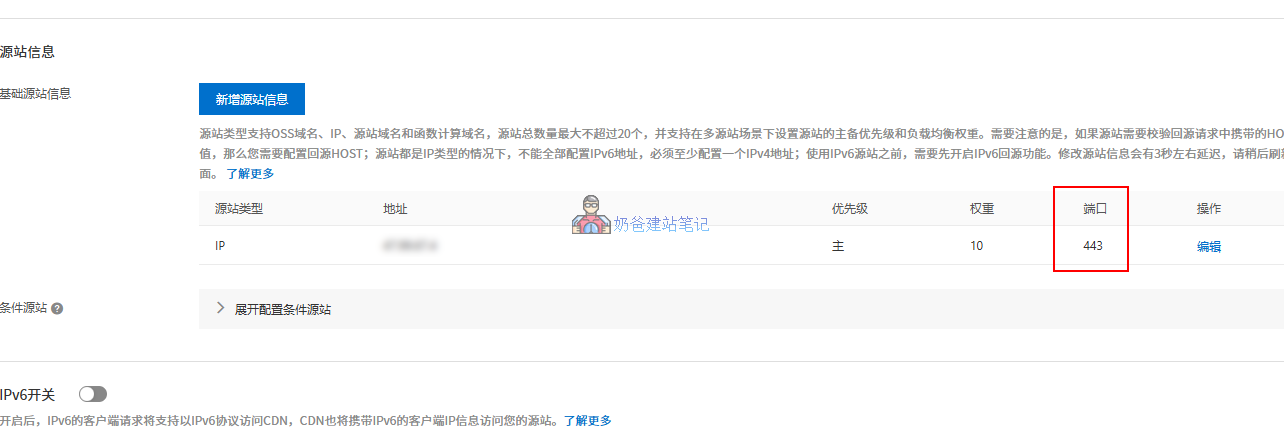
In the basic information of the CDN domain, find „Origin Server Information“ and fill in your server IP or domain name. If your site uses HTTPS,the port must be set to 443, otherwise the origin pull will fail. Fill in your server IP for the origin domain.
4.2 Origin Configuration (Origin Protocol + SNI)
Go to the „Origin Pull Configuration“ page and set „Origin Pull Protocol“ to „HTTPS“ (or „Follow“). If the origin server uses HTTPS, you must enable „Origin SNI“ and fill in your primary domain name (e.g.,naibabiji.com). This step is easily overlooked, but without it, your website will keep redirecting and fail to load.
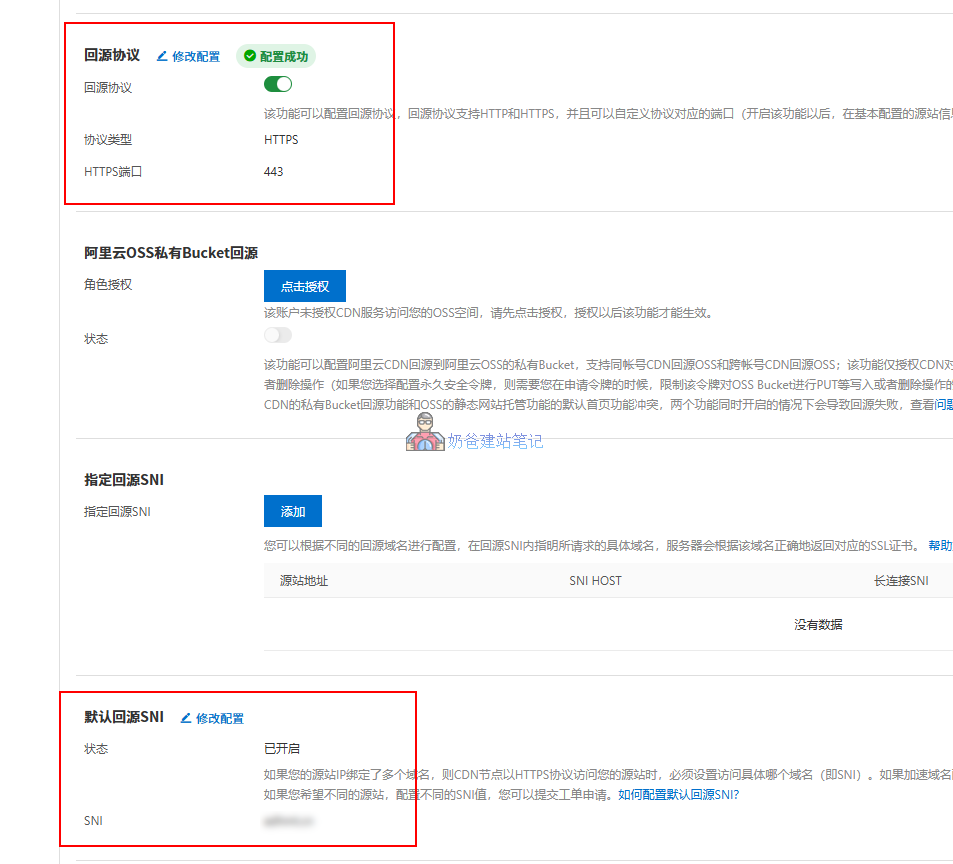
After configuration, wait a moment for the settings to take effect, then open your website to check if it is accessible normally. You can see traces of Alibaba Cloud CDN in the request headers.
x-cache: HIT TCP_MEM_HIT dirn:-2:-2Step 5: Automatic Cache Clearing & SSL Certificate Synchronization (Naiba Recommended Plugin)
Manually refreshing the CDN cache and renewing certificates is too troublesome, especially having to clear the cache in the backend every time you publish an article. It's a real waste of time. Here, Naiba recommends aWordPress Alibaba Cloud CDN plugin developed by WP Panel (the certificate sync feature only supports websites using WP Panel).
Plugin features include:
- Auto-clear cache: When publishing or updating an article, automatically call the Alibaba Cloud CDN API to clear the cache of related pages and resources.
- Manually Clear Cache: In the WordPress admin panel, one-click refresh the cache for the entire site or a specified URL.
- Auto Sync SSL Certificate: 30 days before the certificate expires, periodically scan the certificate status of the WP Panel. When the panel updates the certificate, the plugin automatically syncs it to the Alibaba Cloud CDN backend, achieving fully automatic updates. You no longer need to worry about the 30-day expiration.
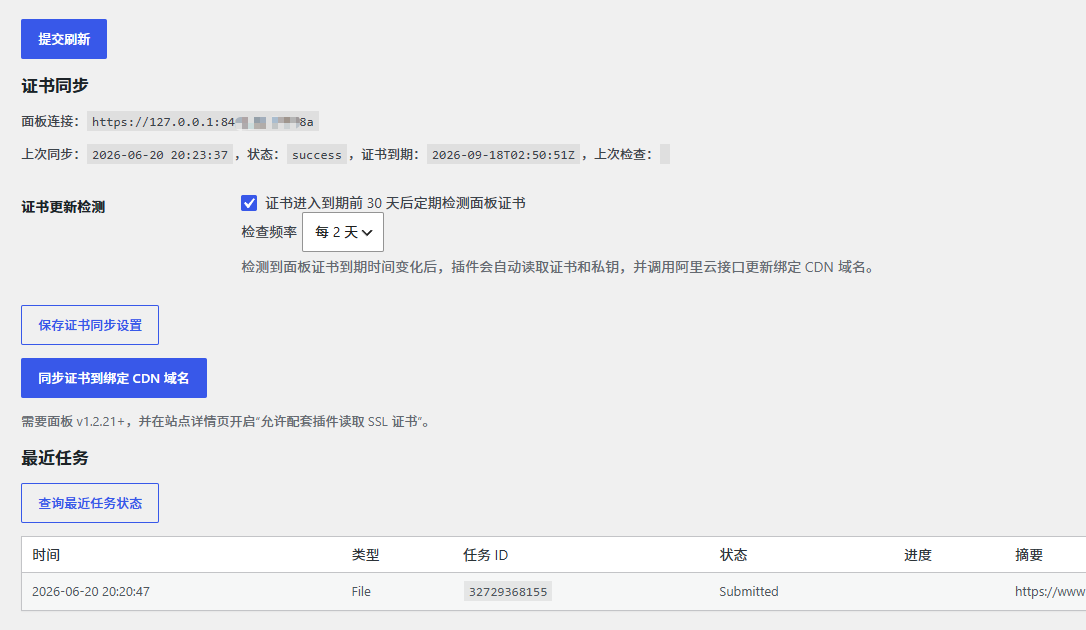
The installation and configuration of the plugin are very simple. Contact Naiba to get the plugin package (stability observation, not yet open for download), upload it to WordPress and activate it. Then, in the Alibaba Cloud RAM Access Control, generate a sub-account AccessKey (only grant CDN and certificate management permissions) and fill it into the plugin configuration page. After that, you no longer need to manually clear the cache or renew certificates in the Alibaba Cloud backend, making it very suitable for beginners and lazy people.
Frequently Asked Questions (FAQ)
Q1: Website cannot be opened after configuring Alibaba Cloud CDNWhat to do?
Usually, the origin server SSL is not configured properly or the CDN SSL is not configured properly. Check whether the IP/domain name filled in the origin server information is correct, and whether the port is 443. Also, the origin SNI must be filled with your primary domain name. If it still doesn't work, the simplest way is to contact Alibaba Cloud customer service.
Q2: How to set the cache time appropriately?
Static resources (images, CSS, JS) can be set to 30 days or longer; PHP files are recommended to be set to 0. For more detailed configuration, refer tothe rules in the ESA configuration tutorial。
Q3: The free certificate is about to expire. Can it be automatically renewed?
If you use the WP Panel plugin and associate it with the panel's auto-renewal feature, the plugin will automatically obtain the new certificate from the panel and sync it to Alibaba Cloud before expiration, achieving full automation. If you use Alibaba Cloud's free certificate, automatic renewal is currently not supported; you need to manually reapply and upload it.
Summary and Interaction
Alibaba Cloud CDN combined with WordPress can indeed improve the access speed for domestic visitors, but there are many configuration steps. Naiba's tutorial tries to write down the precautions for each step, especially the two areas prone to pitfalls: origin server settings and SSL certificate synchronization.
If you haven't purchased Alibaba Cloud CDN service yet, Naiba recommends you directly purchase ESA, which has simpler configuration and supports automatic certificate renewal.
If you find this tutorial useful, don't forget to give Naiba a like and bookmark it for future reference~