
Home Experience & Tips Sharing Standard Post

Standard Post

Linode OS Reinstallation Tutorial

If the VPS server purchased on Linode has issues and we need to reinstall the system, we can follow the steps below. On your server details page, click the three dots in the upper right corner, then click Rebuild. Then, in the interface that appears, reselect the system, fill in the server label information, and at the bottom there is a Confirm confirmation. According to the given...

Updated on March 26, 2024 About 1 minute read
Linode重装系统教程

If there is a problem with the VPS server purchased on Linode and we need to reinstall the OS, we can follow the steps below.
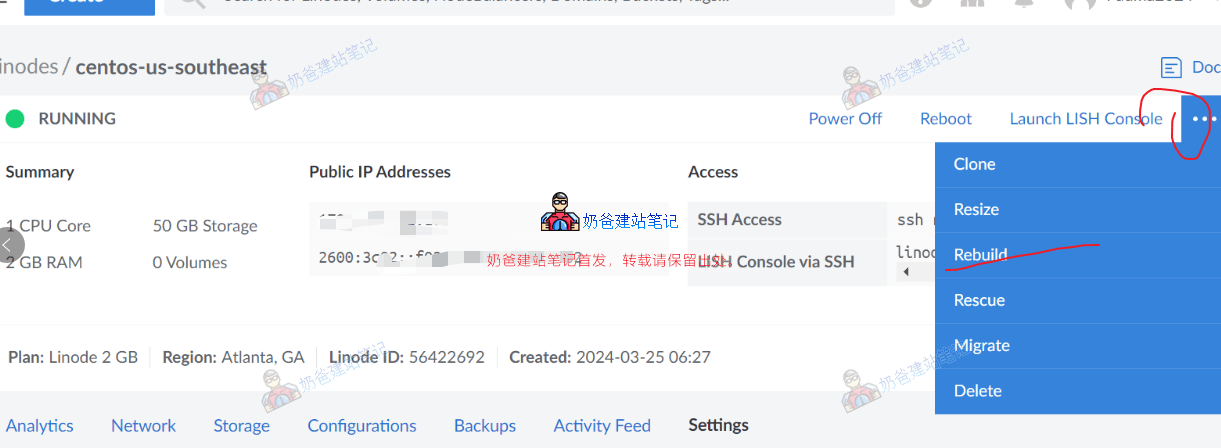
Image 7

On your server details page, click the three dots in the upper right corner, then click Rebuild.

In the interface that appears, reselect the OS, fill in the server label information. At the very bottom, there is a Confirm confirmation prompt.
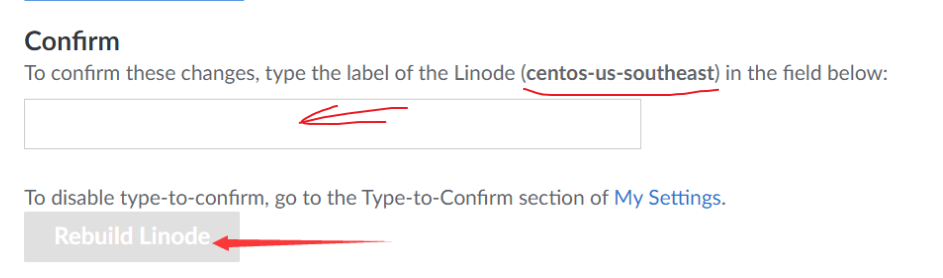
Image 8

Enter the text as prompted into the text box, then you can click the Rebuild Linode button to reinstall the OS.

Wait for the system to indicate the reinstallation is complete, then you can use an SSH tool to connect to the VPS for subsequent operations.

2.4/5 - (5 votes)
Previous WordPress Set Up Website Cookie Notice to Comply with GDPR Region's Consent Mode V2 Policy Continue reading content around the same timeline. Next NameSilo Domain Renewal Tutorial: Latest 2026 Steps + Discount Strategy View the next related tutorial or experience.

AI Website Building Assistant

🤖
Hello! I am the Naibabiji AI Assistant. How can I help you?
Quick Consultation: