Home Experience & Tips Sharing Standard Post

Standard Post

Elementor Error: „Uncaught SyntaxError: Identifier “a’ has already been declared (at instant-page.min.js„

Today, while building a website for a client, I updated Elementor and then encountered an error when editing pages with Elementor. The error was something like: Uncaught SyntaxError: Identifier 'a' has already been declared (...

Published on August 29, 2022 About 1 minute read

Today, while building a website for a client, I updated Elementor and then encountered an error when editing pages with Elementor. The error was: Uncaught SyntaxError: Identifier ‚a‘ has already been declared (at instant-page.min.js?ver=3.7.3:formatted:1:1)

Some pages could not be edited with Elementor normally and returned a 500 error.

I tried rolling back to older versions of Elementor and Elementor Pro, but the problem persisted.

After some research, I found that the new version enabled a Page Transitions feature by default. Go to Elementor settings, under Experiments, disable Page Transitions, and it works fine.
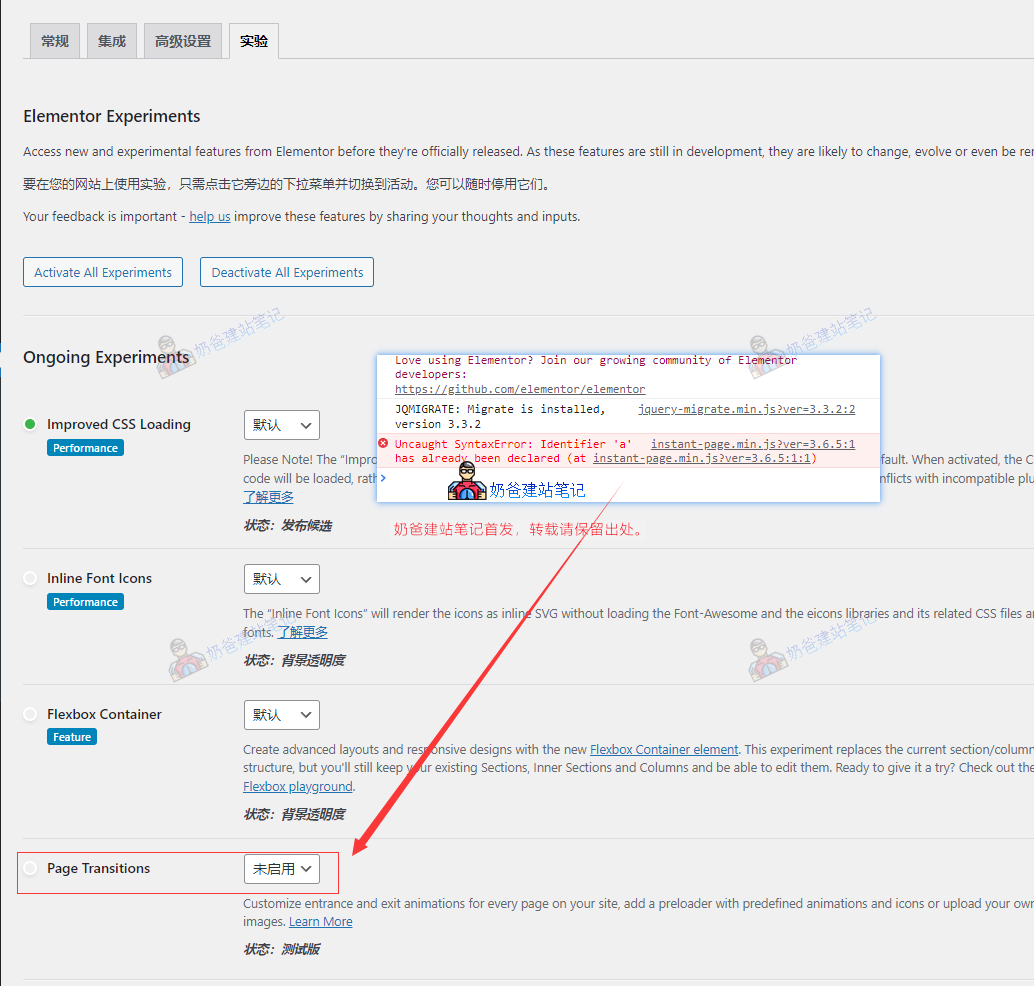
关闭Page Transitions

5/5 - (1 vote)
Previous Industrial Construction Industry WordPress Theme Batiment Installation and Simple Usage Tutorial Continue reading content around the same timeline. Next Plugin-Free Export WooCommerce Orders Tutorial View the next related tutorial or experience.

AI Website Building Assistant

🤖
Hello! I am the Naibabiji AI Assistant. How can I help you?
Quick Consultation: