
After building an e-commerce website with WooCommerce, we may encounter situations where some customers place impulsive or incorrect orders and need to request cancellation. By default, there is no cancellation button, so they can only contact customer service to apply for order cancellation. We can install a WC Cancel Order plugin to enable users to automatically cancel orders on the frontend.
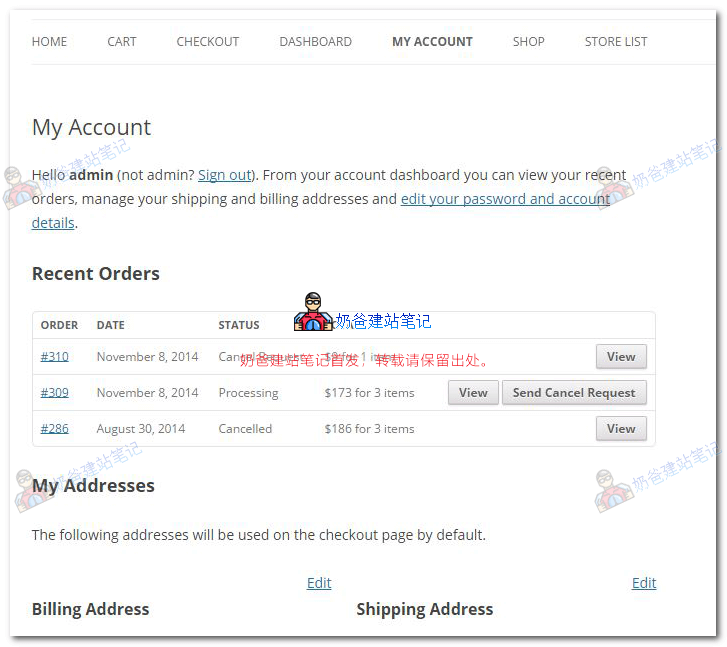
Plugin Features:
- Adds a cancel order request button on the My Account page.
- Customers can send order cancellation requests to the store manager or administrator.
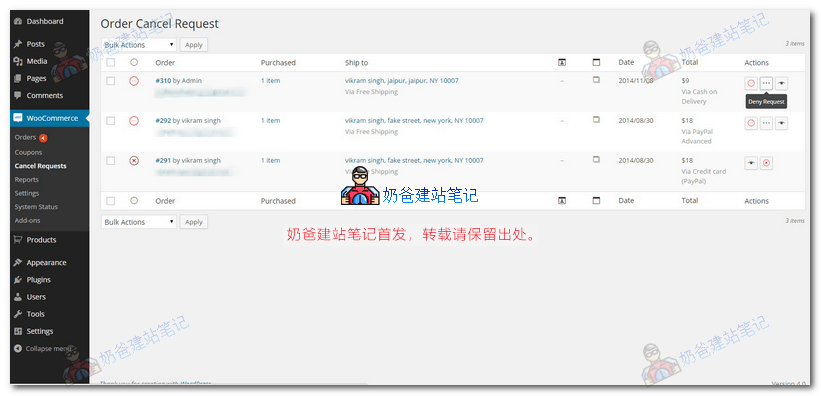
- The store manager or administrator can approve or reject the order cancellation request.
- Automatically restores product stock/inventory after accepting the cancellation request.
Usage Method:
1. Search for WC Cancel Order in the WordPress Admin Dashboard plugins or click the button below to download and install the plugin.
2. Activate the plugin, and you will see order cancellation related information in the backend menu.
3. Users can click the cancel button in the frontend user center.