After setting the homepage, visit the website Frontend, and you will see the webpage has changed to the content of the page you set. This is part of the WordPress basic tutorial. If you still have questions, you can join the Naibabiji discussion group. QQ group: 774633089How to set a self-edited page as the homepage in WordPress
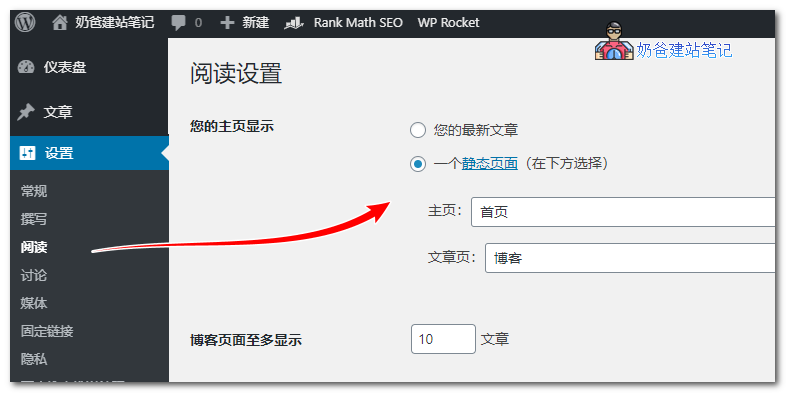
Nowadays, more and more people are using various builder Plugins to design their website homepage content themselves, but one question is: how can you set a self-designed page as the homepage? Actually, it's very simple; just select the page you created as the homepage in the settings.The specific method to set the homepage in WordPress is as follows:1. Enter the WordPress Admin Dashboard, click on Settings; 2. Select Reading, then choose the homepage you created yourself, and save.
After setting the homepage, visit the website Frontend, and you will see the webpage has changed to the content of the page you set. This is part of the WordPress basic tutorial. If you still have questions, you can join the Naibabiji discussion group. QQ group: 774633089
After setting the homepage, visit the website Frontend, and you will see the webpage has changed to the content of the page you set. This is part of the WordPress basic tutorial. If you still have questions, you can join the Naibabiji discussion group. QQ group: 774633089🚀 Still feeling confused after reading the tutorial? Let me guide you step-by-step instead.
「Naibabiji WordPress Website Building Coaching」 — From selecting a domain and purchasing hosting to installing themes and publishing posts, I「ll guide you through every step, helping you avoid detours and reach your goals directly.
👉 Learn about Website Building Coaching Service
Comments are closed
The comment function for this article is closed. If you have any questions, please feel free to contact us through other channels.