
Individual webmasters are often the most frugal, disliking the poor performance of shared hosting while finding VPS prices too high. Fortunately, Naiba fromRaksmartsecured a first-month $1.99 test slot from the official, with specs of 2 CPU cores, 4GB RAM, and 50GB HDD. Friends interested in building websites on a VPS can grab one to personally experience the differences between VPS and shared hosting, and how much performance varies.
Why test this VPS?
Because it's cheap. $1.99First month promotional price(Update: The merchant says renewal is at the same price) This is a temporary discount specially applied by the merchant for Naiba, and may be removed in a few days. However, you can directly purchase the $3.99/month plan at that time (same configuration as the $1.99 plan).
Many beginners worry that cheap goods are not good, and indeed you get what you pay for. A more expensive VPS definitely has better performance, but if you are still in the website building stage or planning to rely on SEO for traffic, using a cheap VPS to get the site running initially and then upgrading to a better VPS when traffic grows is perfectly fine. A 2C4G VPS is more than enough for a personal blog or a small business showcase site.
About Raksmart
Raksmart is an established overseas hosting provider, mainly offering US VPS, dedicated servers, etc., supporting Alipay and WeChat Pay. They provide a Chinese control panel and Chinese customer service, so beginners can communicate in Chinese when encountering issues, which is much friendlier than providers with only English support. If you haven't used a VPS before, starting with Raksmart has almost no learning curve (Note that all unmanaged VPS providers do not handle after-sales issues beyond hardware.).
Performance Test
Performance benchmarks: CPU, memory, disk, network
Naiba directly SSH'd into this 2C4G VPS and ran a full test using the fusion monster script. Let's look at the data:
Full test script results
---------------------------------VPS融合怪测试----------------------------------
版本:v0.1.146
测评频道: https://t.me/+UHVoo2U4VyA5NTQ1
Go项目地址:https://github.com/oneclickvirt/ecs
Shell项目地址:https://github.com/spiritLHLS/ecs
----------------------------------系统基础信息----------------------------------
 CPU 型号            : Intel Core Processor (Broadwell, IBRS) @ 2199.996 MHz
 CPU 数量            : 2 Virtual CPU(s)
 CPU 缓存            : L1: 128 KB / L2: 8 MB / L3: 16 MB
 GPU 型号            : GD 5446
 AES-NI              : ✔️ Enabled
 VM-x/AMD-V/Hyper-V  : ✔️ Enabled
 内存                : 372.62 MB / 3.82 GB
 气球驱动            : ✔️ Enabled
 内核页合并          : ❌ Undetected
 虚拟内存 Swap       : [ no swap partition or swap file detected ]
 硬盘空间            : 1.94 GB / 49.44 GB [3.9%] /dev/vda2 - /
 启动盘路径          : /dev/vda2
 系统                : debian 12.11 [x86_64]
 内核                : 6.1.0-35-amd64
 系统在线时间        : 0 days, 00 hours, 49 minutes
 时区                : US/Eastern (EDT, -0400)
 负载                : 0.13 / 0.04 / 0.01
 虚拟化架构          : KVM
 NAT类型             : Port Restricted Cone
 TCP加速方式         : cubic
 IPV4 ASN            : AS54600 PEG TECH INC
 IPV4 Location       : San Jose / California / United States
----------------------------CPU测试-通过sysbench测试----------------------------
1 线程测试(单核)得分: 654.79
2 线程测试(多核)得分: 1269.24
----------------------------内存测试-通过stream测试-----------------------------
Function    Best Rate MB/s  Avg time     Min time     Max time
Copy:           11156.7     0.014846     0.014341     0.015508
Scale:           6539.7     0.025619     0.024466     0.026676
Add:             7099.1     0.035143     0.033807     0.037788
Triad:           7059.6     0.035370     0.033996     0.037217
------------------------------硬盘测试-通过fio测试------------------------------
测试路径         块大小       读测试(IOPS)            写测试(IOPS)            总和(IOPS)
/root             4k        20.57 MB/s(5143)        20.59 MB/s(5147)        41.16 MB/s(10.3k)
/root             64k       213.67 MB/s(3338)       214.80 MB/s(3356)       428.47 MB/s(6694)
/root             512k      210.93 MB/s(411)        222.14 MB/s(433)        433.07 MB/s(844)
/root             1m        211.66 MB/s(206)        225.75 MB/s(220)        437.41 MB/s(426)
----------------------------------就近节点测速----------------------------------
位置            上传速度        下载速度        延迟            丢包率
Speedtest.net   4512.09 Mbps    4874.11 Mbps    938.028µs       0.00% (Sent: 402/Dup: 0/Max: 401)
其他Guangzhou    22.28 Mbps      N/A             174.03 ms       N/A
其他Chengdu      14.73 Mbps      N/A             179.73 ms       N/A
日本东京        33.77 Mbps      123.12 Mbps     104.351262ms    N/A
联通上海5G      29.83 Mbps      232.39 Mbps     176.936108ms    N/A
电信Shanghai     24.68 Mbps      4.99 Mbps       191.81 ms       N/A
移动Nanjing      23.38 Mbps      97.40 Mbps      198.24 ms       N/A
--------------------------------------------------------------------------------
花费          : 5 分 52 秒
时间          : Thu Jul 16 05:30:27 EDT 2026
--------------------------------------------------------------------------------
CPU & Memory
- CPU model: Intel Broadwell, 2 cores, ~2.2GHz
- AES-NI & VM-x both enabled, beneficial for virtualization performance
- Memory: ~3.8GB usable (system uses a few hundred MB), more than enough for WordPress
- CPU performance: Single-core 654, multi-core 1269 (sysbench) — perfectly fine for running PHP+MySQL
Disk I/O
HDD read/write speed around 200MB/s (large block), random read/write performance is also decent. Although not as good as NVMe SSD, it's sufficient for ordinary websites (hundreds to thousands of visits per day). If traffic grows later, you can upgrade to an SSD plan for an additional fee.
Network Speed
The data center is in the US West (San Jose). Latency from domestic China Telecom, Unicom, and Mobile is about 170-200ms, with very low packet loss. Upload speed to domestic nodes is about 20-30Mbps, download speed about 100-230Mbps. However, if you plan to build a website targeting domestic users, Naiba still does not recommend it. Accessing foreign servers from China is much slower than domestic servers. For foreign trade websites, it is perfectly fine.
Installation Environment: WP Panel + WordPress
This VPS comes with Debian 12 by default, but the WP Panel that Naiba wants to use requires Debian 13. Actually, it's very simple. Refer tothis tutorialReinstall the system.
A reminder here: RAKsmart's default SSH port is not 22. You need to check the SSH port on the server details page to connect.
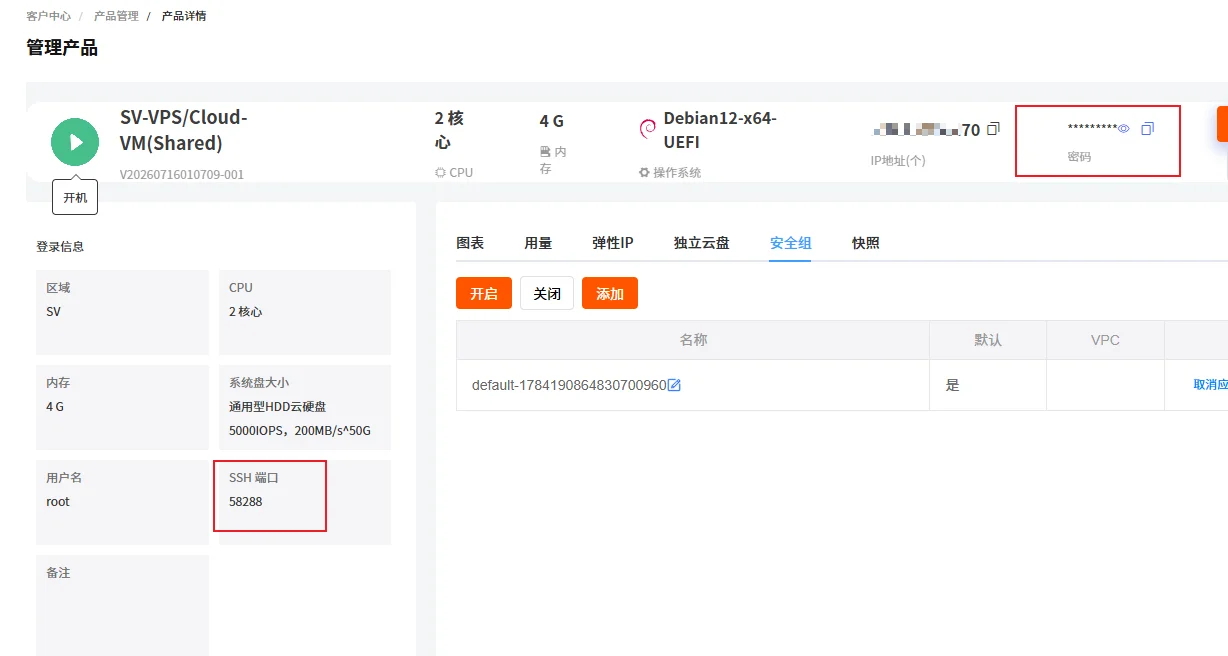
After reinstalling the system, the default SSH port changes back to 22. So you don't need to modify the SSH port again when reconnecting.
The installation method for WP Panel is also very simple. After reinstalling the system and connecting via SSH, just copy and paste the command below and press Enter.
apt-get update && apt-get install -y wget ca-certificates && wget -qO- https://raw.githubusercontent.com/naibabiji/wp-panel/main/install.sh | bashOpen Security Group
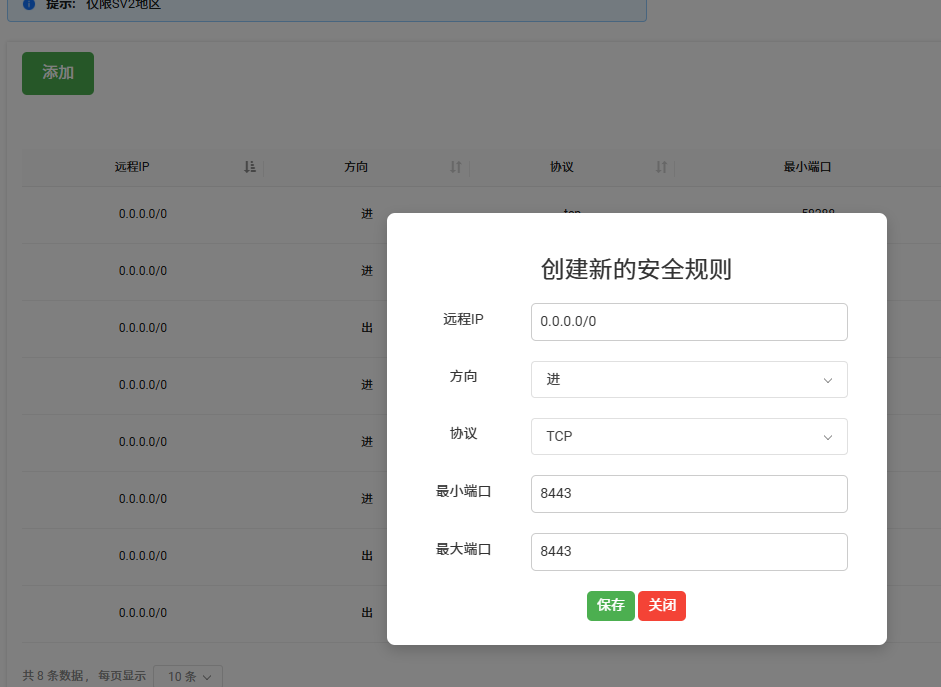
RAKsmart servers support security group configuration, which saves more resources than the firewall on our VPS. So if you don't manually open the ports, WP Panel and the website won't be accessible.
Specific operation: Server Details Panel → Security Group → Manage → Add → Add the following 3 rules
- Remote IP 0.0.0.0/0 Direction In Protocol TCP Min Port 8443 Max Port 8443
- Remote IP 0.0.0.0/0 Direction In Protocol TCP Min Port 80 Max Port 80
- Remote IP 0.0.0.0/0 Direction In Protocol TCP Min Port 443 Max Port 443
Can it really build a website? Conclusion is here
Yes, it can.The 2C4G configuration runs WordPress without any issues. Daily visits, article publishing, and plugin installation are all smooth. If you just need a personal blog, corporate showcase site, or small information site, this VPS is fully capable.
Below is the test site built by Naiba (it won't be accessible if the VPS is deleted)

But a few reminders:
- HDD read/write is slower than SSD. It is recommended to enable NGINX cache in the WP Panel backend.
- The US line has high latency, so it is not recommended for websites targeting domestic users in China.
- The $1.99 price is the first-month promotional price. If the configuration is sufficient, buying the $3.99 one from the activity link gives the same configuration, and renewal is at the same price.
Naiba personally thinks that for beginners learning to build a website, trying out the $1.99 plan is very cost-effective. Even if you don't renew later, using it for a month to get familiar with the environment is worth it. If you are already using this VPS, feel free to share your website building experience in the comments!
Frequently Asked Questions (FAQ)
Q1: Is $1.99 monthly or yearly?
A: Monthly. The first month is $1.99, and subsequent renewals require repurchasing the $3.99/month configuration. Renewal is at the same price, no contract.
Q2: What if I don't know how to install the environment?
A: Follow Naiba's tutorial. First, usexShell to connect via SSH, and thenReinstall the system,Install WP Panel, it's not difficult to follow.