Cloudflare is a free CDN service provider used by manyForeign Trade Website Buildingusers are using the free CDN service provider. Today, Naiba found a line loading /cdn-cgi/scripts/5c5d***28/Cloudflare-static/email-decode.min.js in the source code while optimizing a client's website. After searching, it was found that this is code referenced by Cloudflare's email address obfuscation technology (displaying obfuscated email addresses on your website to prevent bots and spammers from obtaining them, while for human visitors, the address is not visibly changed).
As a foreign trade website, this feature is actually quite useless. Whether you obfuscate it on your site or not, the email will still be leaked. It's better to delete this email-decode.min.js file to reduce one page request.
Method to Disable email-decode.min.js
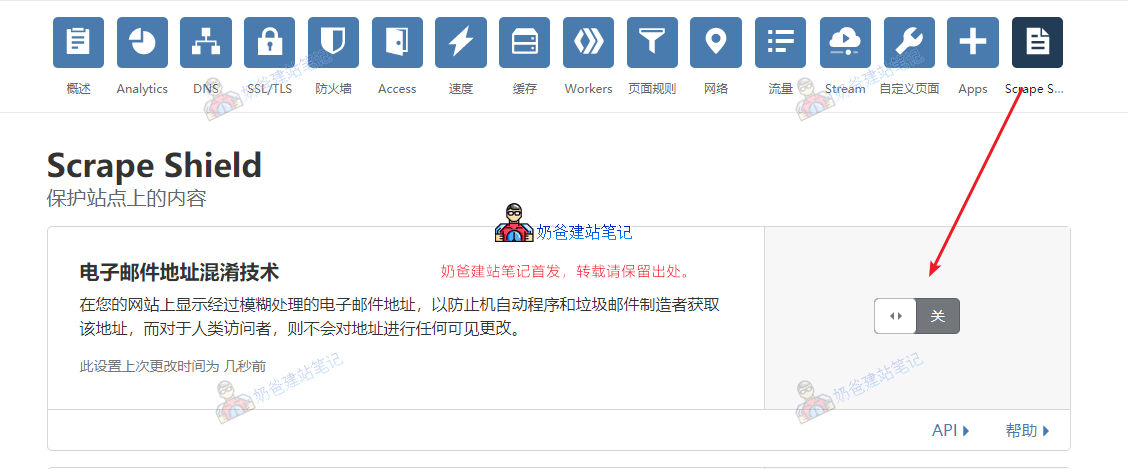
To prevent your website from loading email-decode.min.js, the method is very simple. Just go to the Cloudflare Admin Dashboard, find Scrape Shield, and then turn off the Email Address Obfuscation switch.