
Alibaba Cloud OSS cloud storage service helps individual and enterprise users save resources. Compared to using your own server for storage, it offers higher stability, faster speed, greater efficiency, and lower cost, making it very suitable for websites that need to provide large numbers of files for download or display.
In addition to normal cloud storage usage, we can also use OSS to back up websites or temporarily forward resources. Today, Naiba used this service while moving a client's server, and I'll take the opportunity to record how to use the ossutil tool to upload files to OSS, and then how to download files from OSS on the new server.
Use Case:
- Server A, configuration: 1 core, 1GB RAM, 5Mbps bandwidth
- Server B, configuration: 2 cores, 8GB RAM, 6Mbps bandwidth
- The compressed website data on Server A is 4GB in size, with a maximum download speed of 600KB/s. Moving data from A to B would be very slow.
Therefore, Naiba used OSS as an intermediate network drive for temporary data storage. (A and B are not in the same region, or perhaps firewall rules were not opened, and the client did not provide the Alibaba Cloud admin account, so internal network transfer was not possible.)
Solution:
Purchase anAlibaba Cloud OSS service(discount package: 6 RMB for 6 months), then use the ossutil tool on both servers A and B to upload and download the website backup data.
ossutil Tutorial
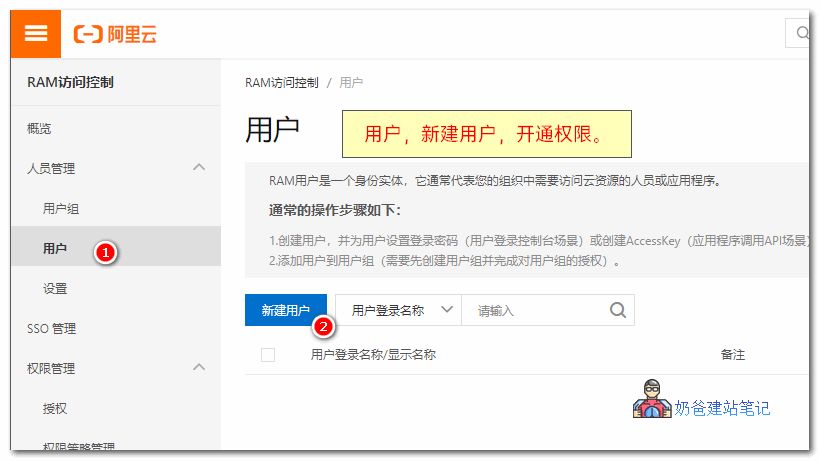
Create a RAM Account
Open theRAM Access Controlpage, User, Create User, then assign permissions to the account, obtain theaccessKeyID和accessKeySecret。
Save the obtained accessKeyID and accessKeySecret values securely.
Install and Configure ossutil
1. Download ossutil on the server
wget http://gosspublic.alicdn.com/ossutil/1.6.10/ossutil64
2. Modify file permissions
chmod 755 ossutil64
3. Configure ossutil
./ossutil64 config
请输入配置文件名,文件名可以带路径(默认为:/home/user/.ossutilconfig,回车将使用默认路径。如果用户设置为其它路径,在使用命令时需要将--config-file选项设置为该路径):
未输入配置文件路径,将使用默认配置文件:/home/user/.ossutilconfig。
对于下述配置,回车将跳过相关配置项的设置,配置项的具体含义,请使用"help config"命令查看。
请输入endpoint:
请输入accessKeyID:yourAccessKeyID
请输入accessKeySecret:yourAccessKeySecret
请输入stsToken:
4. Copy the OSS endpoint address
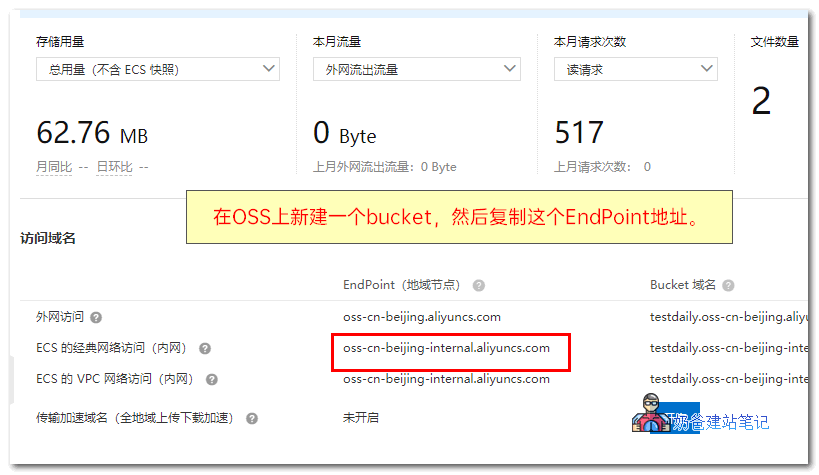
5. Fill in the endpoint, accessKeyID, and accessKeySecret into the configuration information respectively.
Using ossutil to Upload and Download Files
The command to upload a single file is as follows:
./ossutil64 cp 要上传的文件名 oss://路径
The command to download a single file is as follows:
./ossutil64 cp oss://路径/文件名 /服务器路径
That's it. You can quickly transfer large files between two hosts via OSS.
Official documentation: https://help.aliyun.com/document_detail/50452.html?spm=a2c4g.11174283.6.1275.24747da2SQFT45