You will find that as the webpage window changes, the site's layout also adjusts accordingly, and images automatically shrink based on the browser window. So, you don't need to worry about image size issues for PC and mobile; it's all automatic. Additionally, WordPress version 5.3 supports automatically generating responsive image sizes for different devices, but this feature isn't always ideal in certain situations. Naibabiji hasdisabledit. Disabling it does not affect how images are displayed when the website is accessed via mobile or computer.How to distinguish image dimensions for PC and mobile versions of a foreign trade SOHO self-built website
After building their own website, foreign trade SOHO individuals often have a question: users will access images on their website from computers and mobile devices like phones. So, when publishing articles, how should I choose the image size? Which size is for computers, and which is for phones? Actually,There is absolutely no need to worry about this issue. If you are using WordPress to build your website and the Theme is from recent years, then it likely employs a responsive layout design.What is a responsive layout design?It means the webpage automatically adjusts its display according to the visitor's browser size. Friends who don't understand can now move your mouse and resize the browser window of the webpage you are currently viewing, and you will see the changes. Then, look at the changes in the image below.
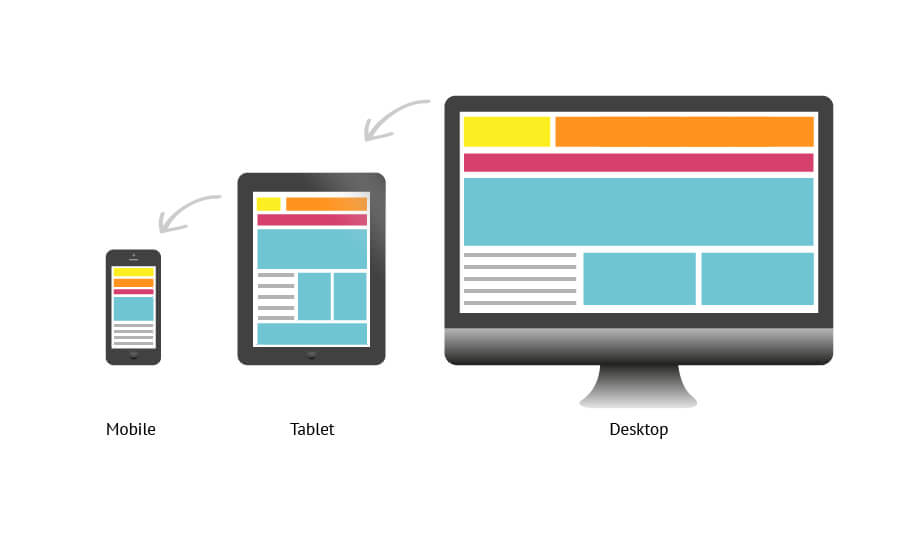
You will find that as the webpage window changes, the site's layout also adjusts accordingly, and images automatically shrink based on the browser window. So, you don't need to worry about image size issues for PC and mobile; it's all automatic. Additionally, WordPress version 5.3 supports automatically generating responsive image sizes for different devices, but this feature isn't always ideal in certain situations. Naibabiji hasdisabledit. Disabling it does not affect how images are displayed when the website is accessed via mobile or computer.
You will find that as the webpage window changes, the site's layout also adjusts accordingly, and images automatically shrink based on the browser window. So, you don't need to worry about image size issues for PC and mobile; it's all automatic. Additionally, WordPress version 5.3 supports automatically generating responsive image sizes for different devices, but this feature isn't always ideal in certain situations. Naibabiji hasdisabledit. Disabling it does not affect how images are displayed when the website is accessed via mobile or computer.🚀 Still feeling confused after reading the tutorial? Let me guide you step-by-step instead.
「Naibabiji WordPress Website Building Coaching」 — From selecting a domain and purchasing hosting to installing themes and publishing posts, I「ll guide you through every step, helping you avoid detours and reach your goals directly.
👉 Learn about Website Building Coaching Service
Comments are closed
The comment function for this article is closed. If you have any questions, please feel free to contact us through other channels.