Because WPforms' visual operation is very simple, many foreign trade websites use WPforms to create inquiry forms. However, as long as a website can submit comments, it is very susceptible to spam comment harassment. In this article, Naiba will introduce two methods to block WPforms form spam comments: through an online spam verification system, such as Google reCAPTCHA; or using a blacklist to prohibit submissions with specific content.
Blocking via reCAPTCHA or hCaptcha
Although WPforms comes with an 'Enable anti-spam protection' feature by default, its blocking effect is not ideal. We can integrate reCAPTCHA or hCaptcha to achieve cloud-based blocking of bot submissions.
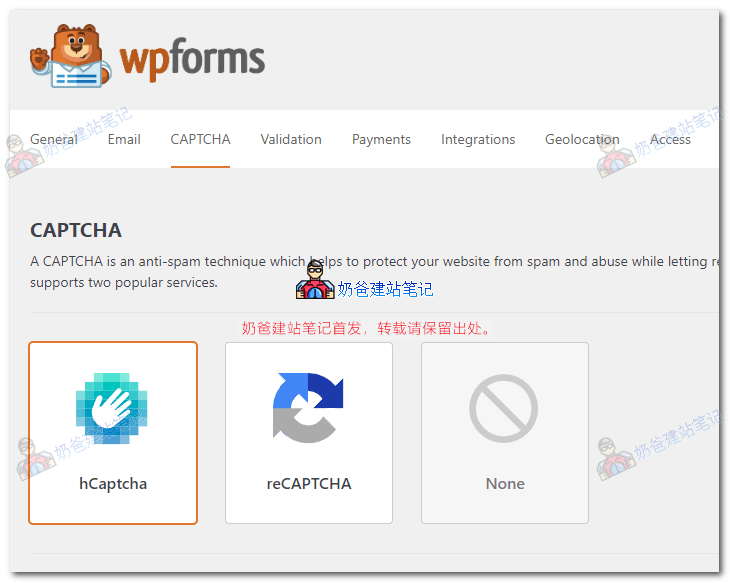
To integrate CAPTCHA, simply go to WPforms settings, find CAPTCHA, and configure the corresponding parameters.
According to Naiba's actual testing, hCaptcha verification may not work properly under some themes. It is recommended to use reCAPTCHA for verification first.
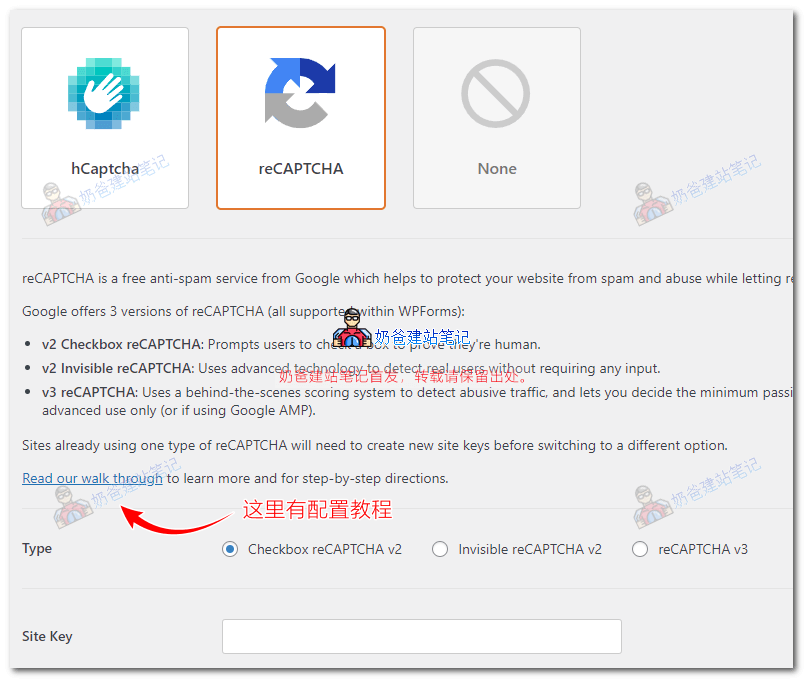
After clicking to the reCAPTCHA settings page, you can click "read our walk through" to get configuration tutorials. The overall configuration is relatively simple.
After configuration, go to the form you created, drag the verification component onto the form, and enable it.
Using a Blacklist to Prohibit Submission of Certain Words
Compared to using cloud verification, when spam comments are not particularly numerous, Naiba prefers to use a blacklist method to block spam content.
Here we need to manually install a plugin called „I don’t like Spam!".
Plugin installation method:
- Search for "I don’t like Spam!" directly in the WordPress backend and install it;
- Click this link to downloadthe installation package, then upload and install it from the Plugins section in the WP Admin Dashboard.
This plugin supports blacklist content settings for Ninja Forms, Caldera Forms, and WPForms.
After installing the plugin, go to WordPress backend settings, under Discussion, find Disallowed Comment Keys, fill in the blacklist words extracted from the spam comments on your site, save, and then content containing the blacklist words cannot be submitted.
For example, block usernames like Henryuphot, Henryinfem, or the URLs they leave.