When building a website using a domestic server in China, website filing is required. After filing is completed, it is also necessary to display the filing number at the bottom of the website and link it to the filing website to be compliant. So, webmasters who have completed filing should quickly check if their website footer has the filing number information.
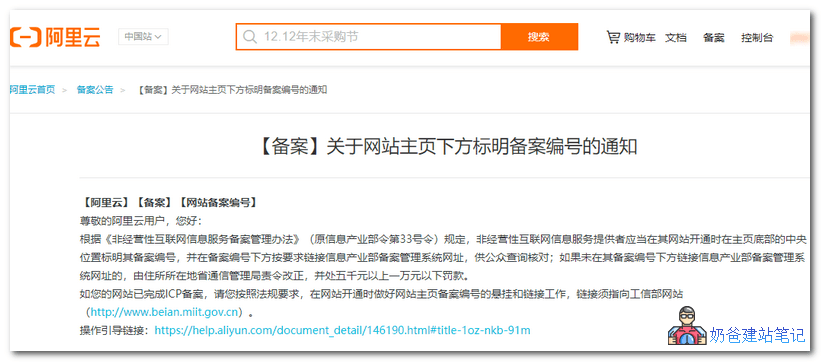
[Filing] Notice Regarding Displaying the Filing Number at the Bottom of the Website Homepage
[Alibaba Cloud] [Filing] [Website Filing Number]
Dear Alibaba Cloud User, Hello:
According to the "Measures for the Administration of Non-commercial Internet Information Service Filing" (formerly the Ministry of Information Industry Order No. 33), non-commercial internet information service providers should prominently display their filing number in the central position at the bottom of their website's homepage when the website is launched, and link the website of the Ministry of Information Industry's filing management system below the filing number as required for public verification; if the link to the Ministry of Information Industry's filing management system website is not provided below the filing number, the provincial communications administration of the domicile shall order corrections and impose a fine of not less than 5,000 yuan but not more than 10,000 yuan.
If your website has completed ICP filing, please follow the regulatory requirements and properly display and link the website homepage filing number when the website is launched. The link must point to the Ministry of Industry and Information Technology website (http://www.beian.miit.gov.cn).
Operation guide link:https://help.aliyun.com/document_detail/146190.html#title-1oz-nkb-91m
Original notification:https://help.aliyun.com/noticelist/articleid/1060207196.html?spm=5176.13279267.floorOne.d1060207196.235c378eAAdTD1&aly_as=h5fCNbNF
Method to add the ICP filing number to a website:
Websites in China require ICP filing, and after completing the filing, the filing information needs to be added to the website footer. Similarly, if your theme has a field for entering the website ICP filing number, simply add it there.
<a href="http://www.beian.miit.gov.cn">你的备案号</a>
If your website theme does not support directly filling in filing information, you can only manually edit the theme footer (footer.php) file to make changes.
- Website backend, Appearance, Edit Theme
- Find the theme footer (footer.php) file (you can also download and modify it using FTP software)
- Insert code at an appropriate position (position requires experience to judge)
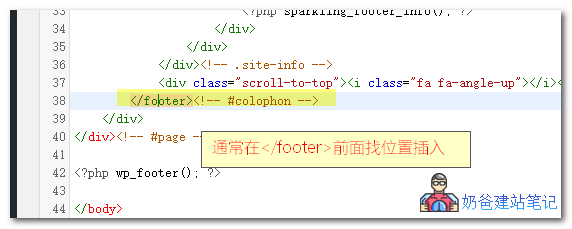 Different themes have different code. If your theme includes footer code, generally insert the code at an appropriate position before <\/footer>.
Method to add ICP filing number in Relativity theme
A webmaster is using the free WP theme Relativity and doesn't know how to add the ICP filing code. Here, it serves as a case study to teach everyone how to add the ICP filing code.
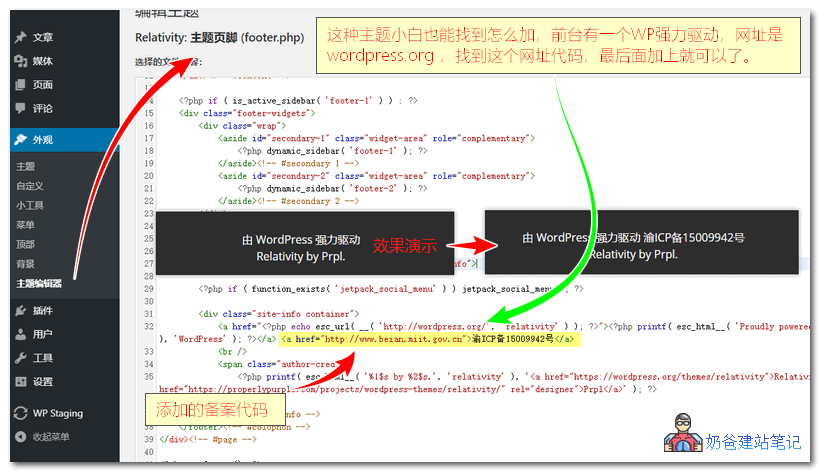
This type of theme is very easy to modify. Just edit the theme's footer.php file, then search for wordpress.org
Just add the ICP filing code at the end of that line, as shown in the image above. The ICP filing code is as follows:
<a href="http://www.beian.miit.gov.cn">你的备案号</a>