
Some time ago, Naiba switched a VPS environment from LNMP to Baota Panel, but frequentlyMySQL databaseinexplicablyautomatically stopped. Checking the logs didn't reveal the issue, so the simplest solution was todatabase process daemon.
Method to add a MySQL process daemon script in Baota Panel
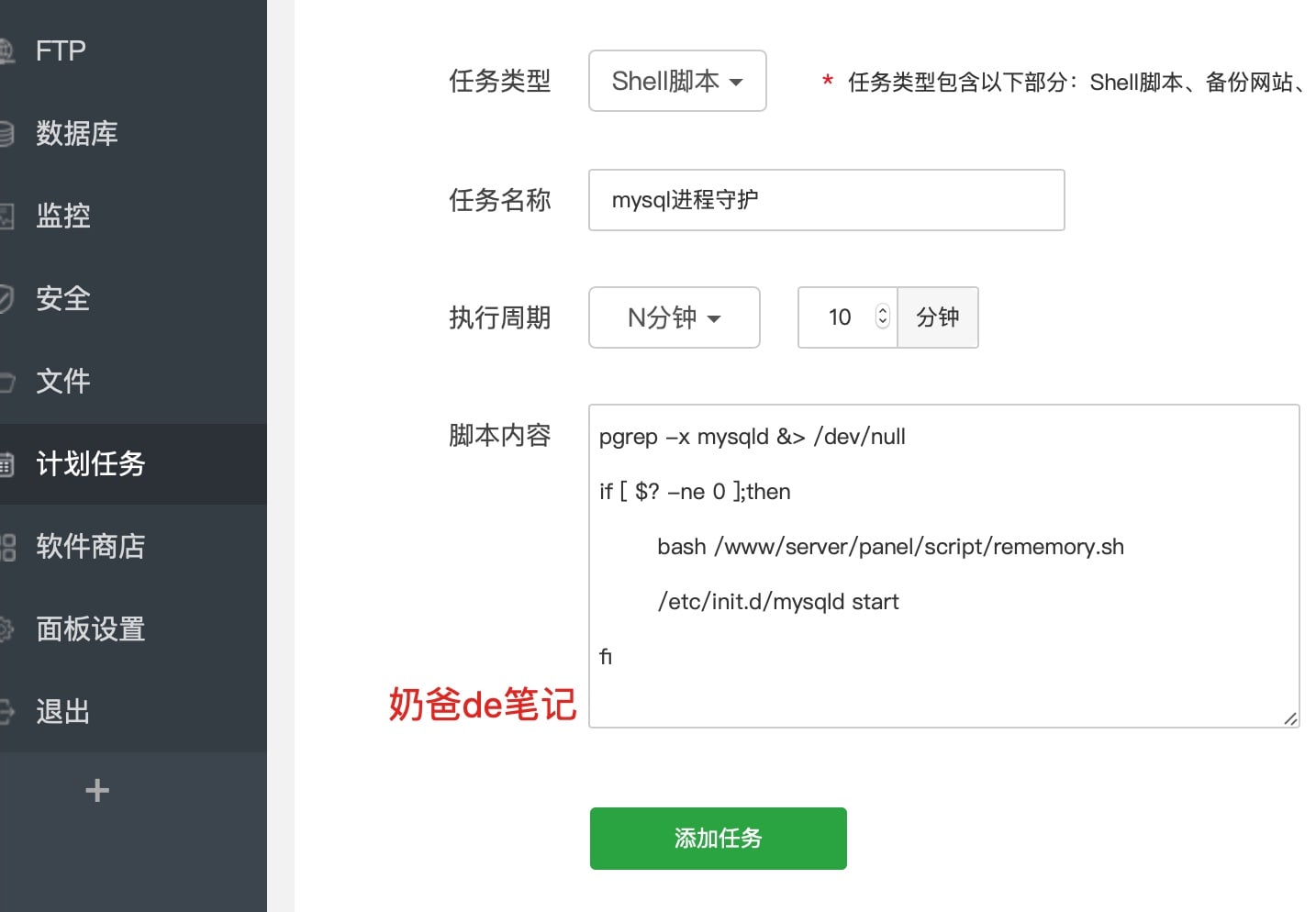
在Baota PanelIn the backend, click on Scheduled Tasks, then add a Shell script. Choose a name, set the execution cycle to run by the minute. Naiba set it to ten minutes here. The script content is as follows:
pgrep -x mysqld &> /dev/null
if [ $? -ne 0 ];then
bash /www/server/panel/script/rememory.sh
/etc/init.d/mysqld start
fi
Additionally, in MySQL's performance optimization settings, some adjustments were made and saved, but they proved useless. MySQL still stopped running. The code is as follows; I'll investigate the specific issue when I have time.
190513 14:39:11 [Note] /www/server/mysql/bin/mysqld: Normal shutdown

190513 14:39:11 [Note] Event Scheduler: Purging the queue. 0 events
190513 14:39:11  InnoDB: Starting shutdown...
190513 14:39:12  InnoDB: Shutdown completed; log sequence number 618693401
190513 14:39:12 [Note] /www/server/mysql/bin/mysqld: Shutdown complete

190513 14:39:13 [Note] Plugin 'FEDERATED' is disabled.
190513 14:39:13 InnoDB: The InnoDB memory heap is disabled
190513 14:39:13 InnoDB: Mutexes and rw_locks use GCC atomic builtins
190513 14:39:13 InnoDB: Compressed tables use zlib 1.2.7
190513 14:39:13 InnoDB: Using Linux native AIO
190513 14:39:13 InnoDB: Initializing buffer pool, size = 256.0M
190513 14:39:13 InnoDB: Completed initialization of buffer pool
190513 14:39:13 InnoDB: highest supported file format is Barracuda.
190513 14:39:14  InnoDB: Waiting for the background threads to start
190513 14:39:15 InnoDB: 5.5.57 started; log sequence number 618693401
190513 14:39:15 [Note] Server hostname (bind-address): '0.0.0.0'; port: 3306
190513 14:39:15 [Note]   - '0.0.0.0' resolves to '0.0.0.0';
190513 14:39:15 [Note] Server socket created on IP: '0.0.0.0'.
190513 14:39:15 [Warning] 'user' entry 'x@%' has both a password and an authentication plugin specified. The password will be ignored.
190513 14:39:15 [Note] Event Scheduler: Loaded 0 events
190513 14:39:15 [Note] /www/server/mysql/bin/mysqld: ready for connections.
Version: '5.5.57-log'  socket: '/tmp/mysql.sock'  port: 3306  Source distribution
190513 14:39:21 [Warning] IP address '2' has been resolved to the host name '2.vultr.com', which resembles IPv4-address itself.
190513 14:39:43 [Warning] IP address '9' has been resolved to the host name '9.vultr.com', which resembles IPv4-address itself.
190513 14:39:48 [Warning] IP address '8' has been resolved to the host name '8.vultr.com', which resembles IPv4-address itself.
190513 14:40:12 [Warning] IP address '9' has been resolved to the host name '9.vultr.com', which resembles IPv4-address itself.
Updated May 14th: Still dead. Adjusted the swap size and will observe further. Also restarted the server once. After booting, memory usage was 600+ MB, with 200+ MB free.