
When building your own website and doing Google SEO, how can you make your website rank a bit higher than your competitors? Besides creating good content, we can also use AMP to accelerate mobile pages. In this article, Naiba will use practical examples to introduce how to get better rankings than competitors with the AMP plugin.
What is AMP?
Accelerated Mobile Pages (AMP) is an open-source project led by Google aimed at improving website access speed on mobile devices.
Your landing page loading speed determines whether you gain or lose customers. Most mobile website visitors will leave if a page takes more than 3 seconds to load. The average page load time for most mobile websites is 19 seconds (source), far exceeding the 3-second threshold. To stand out in such fierce competition, use AMP to optimize your landing page experience.
What are the advantages of AMP?
Improving the loading speed of landing pages often leads to more conversions, and AMP allows you to create web pages that load quickly. AMP landing pages load faster and more smoothly, thus often meaning a better landing page experience. Landing page experience is one of the important factors in quality score and ad ranking.
The impact of AMP on webpage ranking
Google has publicly stated that page loading speed affects website rankings. Naiba's website happens to have an example to share:
Searching for SiteGround SSL tutorial on Google,Desktop results are as follows:
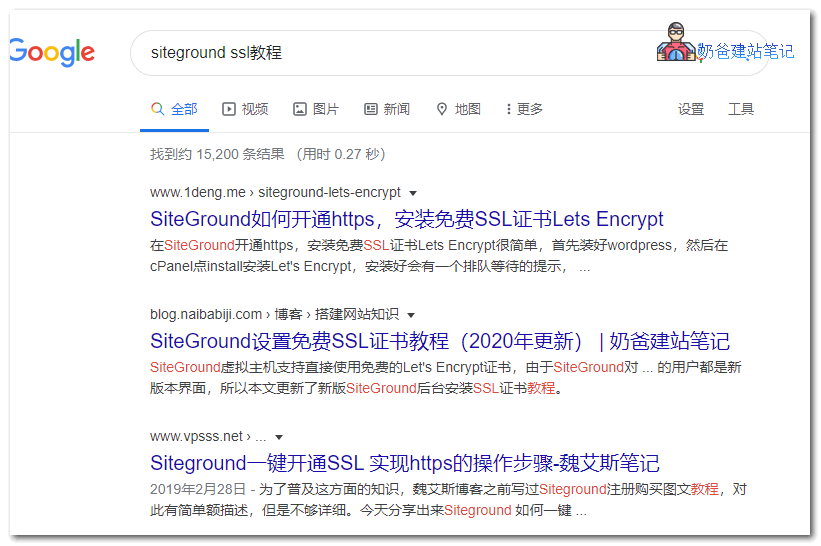
You can see that when this article was published on February 27, 1 Lamp's article ranked first, while Naibabiji Website Building Notes' article ranked second.
Next, weTry the ranking effect on mobile:
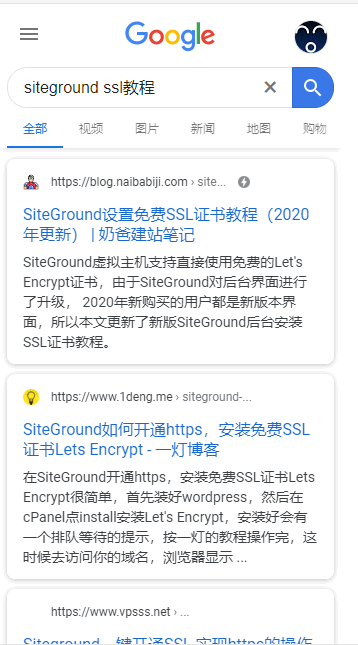
You can see that Naibabiji Website Building Notes' article ranked first, while 1 Lamp's ranked second.
Looking closely at the URL, you'll notice that Naibabiji Website Building Notes' URL has a lightning icon, which indicates it is an AMP page.
So you see, this is the impact of AMP pages on Google SEO rankings.
How to add AMP support to WordPress
The method is very simple. Just install an AMP plugin directly in WordPress. The steps are as follows:
- Enter the WordPress Admin Dashboard
- In the Plugins interface, select Add New
- In the top right search box, search for AMP
- Install and activate the plugin (Naiba uses the first one)
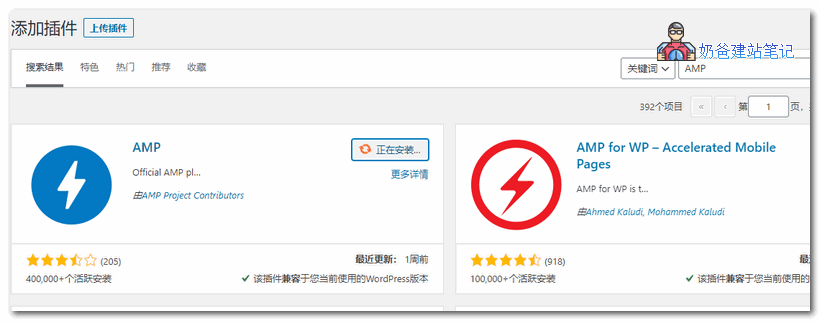
That's it, simply adding AMP support to your WordPress website. Once Google crawls your AMP pages, users searching on mobile will see the AMP pages prioritized.
Moreover, Naiba believes that if mobile traffic is high, it will indirectly affect the ranking of PC pages. Whether this is correct can be tested later with Naiba's article.SiteGround SSL TutorialGoogle ranking information of the article.
References:
- https://zh.wikipedia.org/wiki/Accelerated_Mobile_Pages
- https://support.google.com/google-ads/answer/7496737
- https://search.google.com/structured-data/testing-tool