
Naiba believes that WordPress comment email notification is a very useful feature that can increase interaction with your readers.
Imagine if you ask me in this article: „I followed your tutorial, but why are there still no email notifications for comments?“ Would you prefer to refresh the article several times a day to see if I replied, or would you prefer that when I comment, an email is sent to notify you, saying, Hey, someone replied to your comment.
Code Implementation Method
There are two methods to implement the function of sending emails to commenters after WordPress blog comments: one is by adding code, and the other is by using a plugin.
If using code, basically the following code or a slightly modified version is used
/* comment_mail_notify v1.0 by willin kan. (All replies send email) */
Log in to the blog backend, click the „Appearance“ tab, then the „Editor“ option to enter the theme editing interface. Add the following function in the functions.php file between:
1. Send emails to everyone
/* comment_mail_notify v1.0 by willin kan. (所有回复都发邮件) */
function comment_mail_notify($comment_id) {
  $comment = get_comment($comment_id);
  $parent_id = $comment->comment_parent ? $comment->comment_parent : '';
  $spam_confirmed = $comment->comment_approved;
  if (($parent_id != '') && ($spam_confirmed != 'spam')) {
    $wp_email = 'no-reply@' . preg_replace('#^www\.#', '', strtolower($_SERVER['SERVER_NAME'])); //e-mail 发出点, no-reply 可改为可用的 e-mail.
    $to = trim(get_comment($parent_id)->comment_author_email);
    $subject = '您在 [' . get_option("blogname") . '] 的留言有了回复';
    $message = '
    <div style=" border:1px solid #d8e3e8; color:#111; padding:0 15px; -moz-border-radius:5px; -webkit-border-radius:5px; -khtml-border-radius:5px;">
      <p>' . trim(get_comment($parent_id)->comment_author) . ', 您好!</p>
      <p>您曾在《' . get_the_title($comment->comment_post_ID) . '》的留言:<br />'
       . trim(get_comment($parent_id)->comment_content) . '</p>
      <p>' . trim($comment->comment_author) . ' 给您的回复:<br />'
       . trim($comment->comment_content) . '<br /></p>
      <p>您可以点击 查看回复完整內容</p>
      <p>欢迎再度光临 ' . get_option('blogname') . '</p>
      <p>(此邮件由系统自动发送,请勿回复.)</p>
    </div>';
    $from = "From: \"" . get_option('blogname') . "\" <$wp_email>";
    $headers = "$from\nContent-Type: text/html; charset=" . get_option('blog_charset') . "\n";
    wp_mail( $to, $subject, $message, $headers );
    //echo 'mail to ', $to, '<br/> ' , $subject, $message; // for testing
  }
}
add_action('comment_post', 'comment_mail_notify');
// -- END ----------------------------------------
2. Let visitors choose whether to receive email notifications
Add the following function between the tags in the functions.php file. This function will generate an option at the bottom of the comment box for whether to receive reply notifications.
/* 开始*/
function comment_mail_notify($comment_id) {
  $admin_notify = '1'; // admin 要不要收回复通知 ( '1'=要 ; '0'=不要 )
  $admin_email = get_bloginfo ('admin_email'); // $admin_email 可改为你指定的 e-mail.
  $comment = get_comment($comment_id);
  $comment_author_email = trim($comment->comment_author_email);
  $parent_id = $comment->comment_parent ? $comment->comment_parent : '';
  global $wpdb;
  if ($wpdb->query("Describe {$wpdb->comments} comment_mail_notify") == '')
    $wpdb->query("ALTER TABLE {$wpdb->comments} ADD COLUMN comment_mail_notify TINYINT NOT NULL DEFAULT 0;");
  if (($comment_author_email != $admin_email && isset($_POST['comment_mail_notify'])) || ($comment_author_email == $admin_email && $admin_notify == '1'))
    $wpdb->query("UPDATE {$wpdb->comments} SET comment_mail_notify='1' WHERE comment_ID='$comment_id'");
  $notify = $parent_id ? get_comment($parent_id)->comment_mail_notify : '0';
  $spam_confirmed = $comment->comment_approved;
  if ($parent_id != '' && $spam_confirmed != 'spam' && $notify == '1') {
    $wp_email = 'no-reply@' . preg_replace('#^www\.#', '', strtolower($_SERVER['SERVER_NAME'])); // e-mail 发出点, no-reply 可改为可用的 e-mail.
    $to = trim(get_comment($parent_id)->comment_author_email);
    $subject = '您在 [' . get_option("blogname") . '] 的留言有了回复';
    $message = '
    <div style=" border:1px solid #d8e3e8; color:#111; padding:0 15px; -moz-border-radius:5px; -webkit-border-radius:5px; -khtml-border-radius:5px;">
      <p>' . trim(get_comment($parent_id)->comment_author) . ', 您好!</p>
      <p>您曾在《' . get_the_title($comment->comment_post_ID) . '》的留言:<br />'
       . trim(get_comment($parent_id)->comment_content) . '</p>
      <p>' . trim($comment->comment_author) . ' 给您的回复:<br />'
       . trim($comment->comment_content) . '<br /></p>
      <p>您可以点击查看回复的完整內容</p>
      <p>还要再度光临 ' . get_option('blogname') . '</p>
      <p>(此邮件由系统自动发送,请勿回复.)</p>
    </div>';
    $from = "From: \"" . get_option('blogname') . "\" <$wp_email>";
    $headers = "$from\nContent-Type: text/html; charset=" . get_option('blog_charset') . "\n";
    wp_mail( $to, $subject, $message, $headers );
    //echo 'mail to ', $to, '<br/> ' , $subject, $message; // for testing
  }
}
add_action('comment_post', 'comment_mail_notify');

/* 自动加勾选栏 */
function add_checkbox() {
  echo '<input type="checkbox" name="comment_mail_notify" id="comment_mail_notify" value="comment_mail_notify" checked="checked" style="margin-left:20px;" /><span for="comment_mail_notify">有人回复时邮件通知我</span>';
}
add_action('comment_form', 'add_checkbox');
3. Let the blog administrator decide under what circumstances to send emails
Add the following function between the tags in the functions.php file:
/* comment_mail_notify v1.0 by willin kan. (无勾选栏) */
function comment_mail_notify($comment_id) {
  $admin_email = get_bloginfo ('admin_email'); // $admin_email 可改为你指定的 e-mail.
  $comment = get_comment($comment_id);
  $comment_author_email = trim($comment->comment_author_email);
  $parent_id = $comment->comment_parent ? $comment->comment_parent : '';
  $to = $parent_id ? trim(get_comment($parent_id)->comment_author_email) : '';
  $spam_confirmed = $comment->comment_approved;
  if (($parent_id != '') && ($spam_confirmed != 'spam') && ($to != $admin_email) && ($comment_author_email == $admin_email)) {
    /* 上面的判断式,决定发出邮件的必要条件:
    ($parent_id != '') && ($spam_confirmed != 'spam'): 回复的, 而且不是 spam 才可发, 必需!!
    ($to != $admin_email) : 不发给 admin.
    ($comment_author_email == $admin_email) : 只有 admin 的回复才可发.
    可视个人需修改上面的条件.
    */
    $wp_email = 'no-reply@' . preg_replace('#^www\.#', '', strtolower($_SERVER['SERVER_NAME'])); // e-mail 发出点, no-reply 可改为可用的 e-mail.
    $subject = '您在 [' . get_option("blogname") . '] 的留言有了回复';
    $message = '
    <div style=" border:1px solid #d8e3e8; color:#111; padding:0 15px; -moz-border-radius:5px; -webkit-border-radius:5px; -khtml-border-radius:5px;">
      <p>' . trim(get_comment($parent_id)->comment_author) . ', 您好!</p>
      <p>您曾在《' . get_the_title($comment->comment_post_ID) . '》的留言:<br />'
       . trim(get_comment($parent_id)->comment_content) . '</p>
      <p>' . trim($comment->comment_author) . ' 给您的回复:<br />'
       . trim($comment->comment_content) . '<br /></p>
      <p>您可以点击 查看回复的完整內容</p>
      <p>还要再度光临 ' . get_option('blogname') . '</p>
      <p>(此邮件由系统自动发送,请勿回复.)</p>
    </div>';
    $from = "From: \"" . get_option('blogname') . "\" <$wp_email>";
    $headers = "$from\nContent-Type: text/html; charset=" . get_option('blog_charset') . "\n";
    wp_mail( $to, $subject, $message, $headers );
    //echo 'mail to ', $to, '<br/> ' , $subject, $message; // for testing
  }
}
add_action('comment_post', 'comment_mail_notify');
// -- END ----------------------------------------
Those interested in the code canClick here to visit Shenjie's blog, which is quite detailed.
However, this code may not work in some themes, so Naiba recommends using the Wenprise Better Emails plugin, a WordPress comment email notification plugin, to solve this.
Plugin method (recommended)
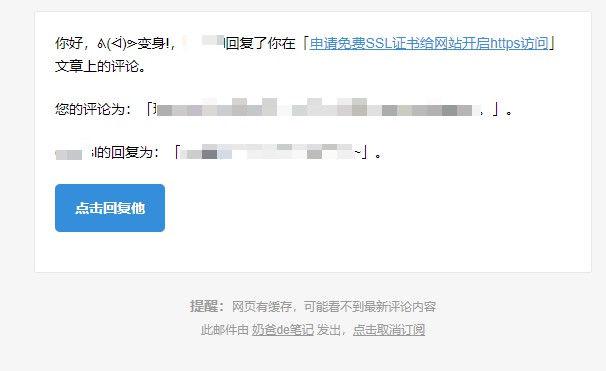
Wenprise Better Emails can beautify WordPress comment moderation notification emails, notification emails to article authors, and add the function to send email notifications to comment authors when replying to comments.
Naiba recommends this Wenprise Better Emails plugin for the following reasons:
- Can implement email reply notifications for comments, ready to use upon installation, suitable for beginners;
- A plugin made by Chinese developers, conforms to usage habits, and has a beautiful interface;
- Includes an unsubscribe function, which can reduce the likelihood of emails being marked as spam.
Plugin installation address:https://wordpress.org/plugins/wenprise-better-emails/
Neither code nor plugin works?
There is a prerequisite for using comment email notification: your server must be able to send emails.
In fact, most hosts do not support direct email sending, so we need to use a third-party plugin to enable the host to send emails, that is, using SMTP to send emails. You can refer to the following article.
WordPress Email Plugins I Have Used and Recommend
Additionally,Comment ApprovedNaiba has also used this plugin. It sends an email to the commenter after the comment is approved, informing them that the comment has been approved.