
Using domestic hostingBuild a Websitewill encounterwebsite filingthis issue, (further reading:Website Building Q&A: Do I Need to File for Recordal When Building a Website Myself?) Recently, Alibaba Cloud and Tencent Cloud have been strictly checking website filing information.
Mainly checking whether the website name and content match the filing information. If it is found that the website name you filed is Naibabiji Notes, but the actual website is a tutorial on building websites, then you may be required to change the website name to Naibabiji Notes.
Moreover, if your website supports comments, personal websites may be required to disable the comment function. If your website also has a login function, you will also be required to disable login.
Below, Naibabiji will explain how to disable website comments and login functionality.
Method to disable website comments
Here, we take a website built with WordPress as an example. If you are using other website building programs, you can contact Naiba via the QR code at the end of the article for support.
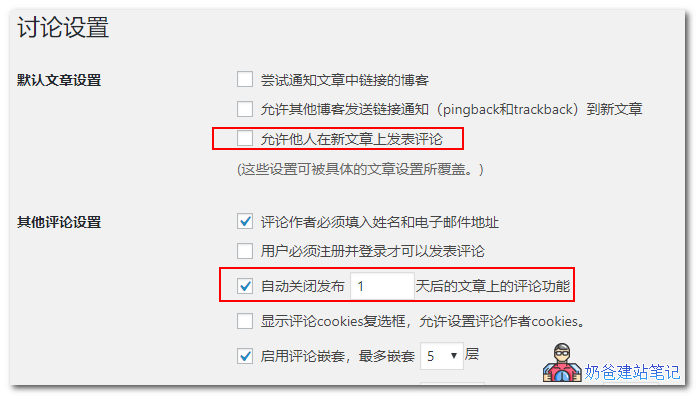
In the WordPress settings interface, under Discussion settings, uncheck "Allow people to post comments on new articles" and check "Automatically close comments on articles older than X days".
This solves the issue of disabling comments.
Method to clear comment content
The above method only disables the comment function, but what about comments that have already been posted? We can use a plugin to bulk delete all comments.
There are many plugins for deleting comments on WordPress websites, such as the following: Delete All Comments of WordPress.
Delete All Comments of WordPress
Description
The „Delete All Comments of WordPress“ plugin is designed to delete all comments (approved, pending) from the WordPress database with just one click, and it can be easily changed.
Use this plugin under admin:
Tools > Delete Comments
Further Reading:WordPress Plugin Installation Tutorial
Disable website login functionality
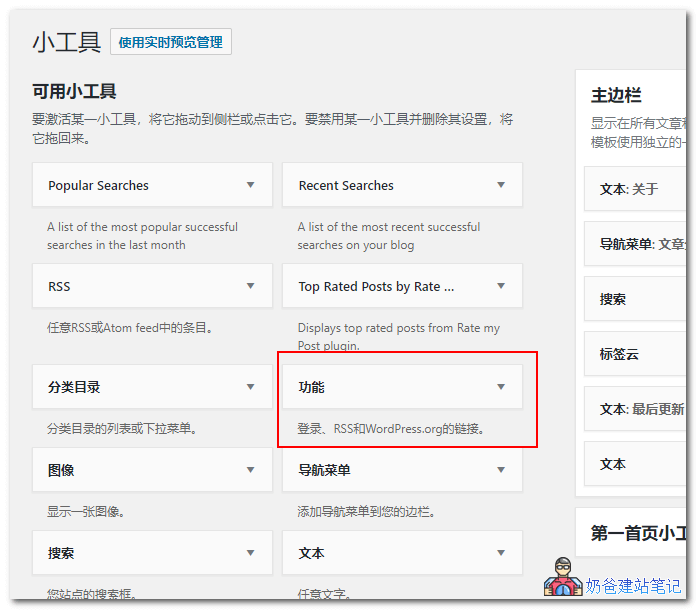
The login functionality of a WordPress website is usually provided by the „Meta“ widget in the widgets area. Simply remove the Meta widget from the widget area to remove the login link.
If you need to log in yourself, use "URL/wp-admin/" to log in.