
Website owners who frequently visit blogs must have encountered situations where some websites' comment boxes do not save personal information, such asNaibabijisuch as this.
So every time before commenting, you have to manually enter or select historical information from autofill data. Although you don't need to use the keyboard, it's still troublesome.
Naiba previously used the browser's autofill feature, but it wasn't very convenient. Now I'm sharing a very convenient method to automatically fill in personal information in the comment form.
One-Click Fill Code
javascript: void
function() {
    var lauthor = ["#author", "input[name='comname']", "#inpName", "input[name='author']", "#ds-dialog-name"],
    lmail = ["#mail", "#email", "input[name='commail']", "#inpEmail", "input[name='email']", "#ds-dialog-email"],
    lurl = ["#url", "input[name='comurl']", "#inpHomePage", "#ds-dialog-url", "input[name='url']"];
    for (i = 0; i < lauthor.length; i++) {
        var author = document.querySelector(lauthor[i]);
        if (author != null) {
            author.value = '你的名字';
            break
        }
    }
    for (j = 0; j < lmail.length; j++) {
        var mail = document.querySelector(lmail[j]);
        if (mail != null) {
            mail.value = '你的邮箱';
            break
        }
    }
    for (k = 0; k < lurl.length; k++) {
        var url = document.querySelector(lurl[k]);
        if (url != null) {
            url.value = '你的网址';
            break
        }
    }
    return ! 1
} ()
After modifying the above content with your own information, copy it to the clipboard.
Add the Code as a Bookmark
Find any bookmark, or simply press CTRL + D to add this article as a bookmark, then right-click on the bookmark and select 'Edit.' If you don't understand, refer to the animated demonstration below.
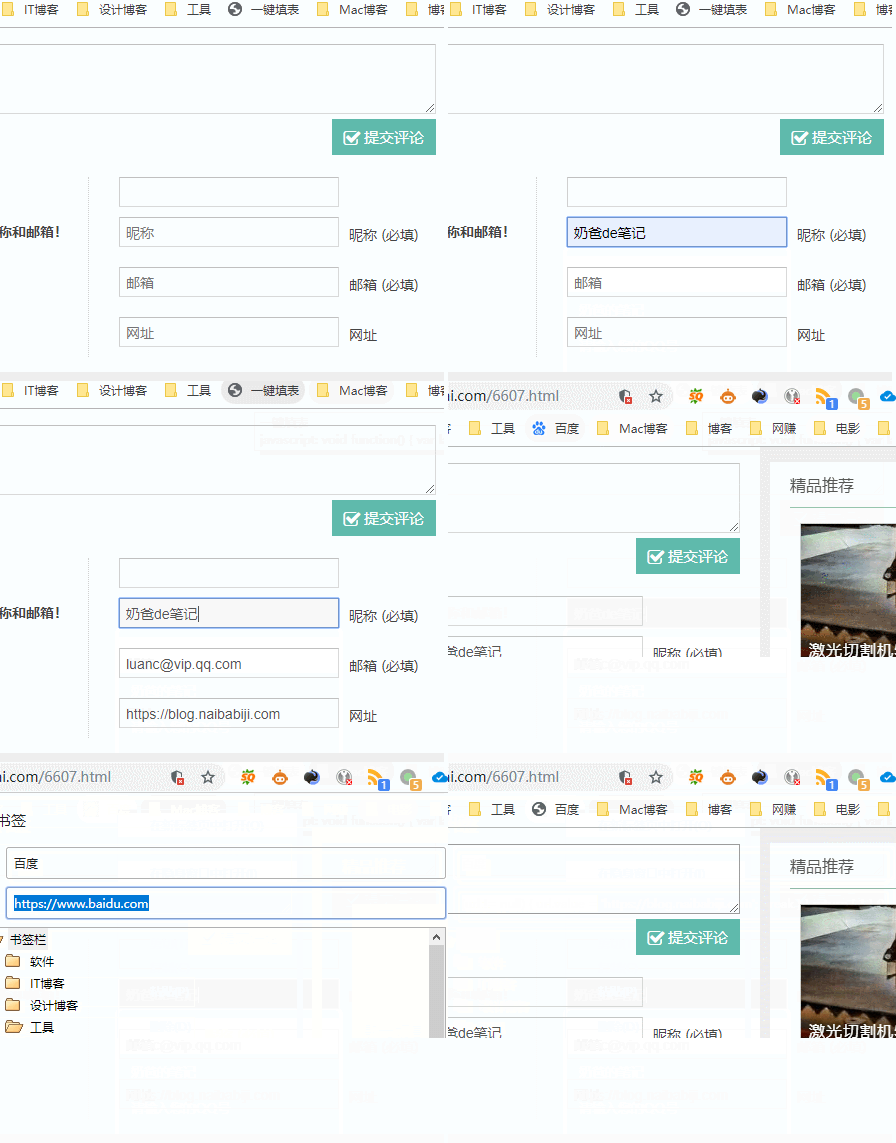
The first part of the animation above shows the effect, and the latter part shows how to modify the bookmark content.
The content inside the quotes „“ in lauthor, lmail, and lurl is the corresponding id, class, or tag of the input element in the comment form that needs to be filled. If you encounter a blog that cannot be automatically filled, you can right-click „Inspect Element“ and modify the relevant parts in the above code according to the changes in the comment form input elements of each blog.
Add, delete, or modify the relevant parts in the above code!
This method comes from:xcnte