Today Naiba encountered another website case that was hacked due to the „WP File Manager“ plugin and is sharing it with everyone.
WP File Manager is a popular file management plugin on WordPress. A long time ago, Naiba's own website was also hacked once because of this plugin, so since then he rarely installs or uses this plugin. Even when needed, it is alsoinstalled temporarily and deleted after use, and it is recommended that everyone do the same.
Infection scenario
This time, I was helping a user troubleshoot a website migration bug on a WP Panel panel. After the troubleshooting was completed, the user sent me a text message from Tencent Cloud, saying that malicious files were detected on the server.
从The website looks normal from the frontend, but after actually checking the server information, it was found that there were simultaneously4 sets of webshells (web backdoors) on the server. The earliest one had been alive for four and a half months, and during that time the attacker had also addedan administrator account for themselves. At the same time, they also addeda plugin named „Protect Uploads“。
in the plugin directory. Antivirus process
First, connect to the server and download the malicious file mentioned in the message to your local machine to inspect its code, then delete it directly from the server.
Next, go to the user list in the backend and you will see an unfamiliar administrator account; delete it directly.
Go to the plugin list and you will find malicious plugins that you did not upload yourself; delete them directly: kzbasvw, anirfsp, ztbzpym, ZEDNAAX
Then, delete all plugins that are deactivated but not in use directly.
Finally, overwrite the WordPress core files as well as all plugins and themes with the official latest installation packages, and change the server and website administrator account passwords.
Summary
Because of its powerful ecosystem, WordPress has many corresponding plugin and theme resources. AI is now quite powerful, making it even easier to find their vulnerabilities. Combined with the PHP vulnerabilities exposed recently, to prevent our websites from being compromised, we need to implement the following protections:
- Delete plugins you do not use directly; do not keep them on the server;
- Regularly check for server updates and updates to programs such as PHP, and upgrade to new versions;
- Regularly check website administrator accounts and use secure passwords;
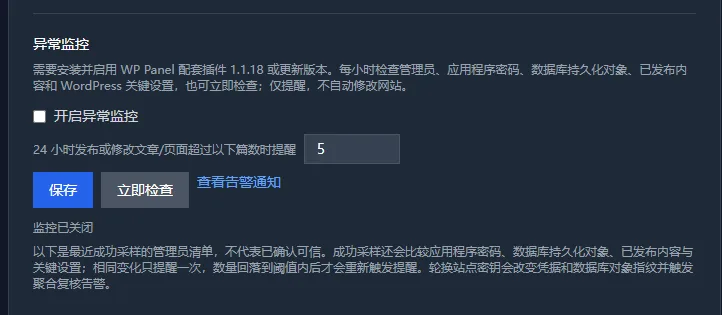
If your server usesWP Panel, then you can enable website anomaly monitoring in the website details, which can help you discover content anomalies earlier.