
Home Experience & Tips Sharing Standard Post

Standard Post

Baota Panel Management Commands Solution for Forgetting Baota Panel Password

Previously, we shared what to do if you forget the Baota Panel backend login URL. What if you also forget the Baota password? Method to retrieve the default Baota Panel account and password: Directly SSH into the VPS, then enter bt default. To modify the Baota password and username, directly enter bt and then select the required number and press Enter.

Updated on December 7, 2019 About 1 minute read
宝塔管理命令 忘记宝塔面板密码的解决方法

Previously, we sharedWhat to do if you forget the Baota Panel backend login URLWhat if you also forget the Baota password?

Method to retrieve the default Baota Panel username and password

Directly SSH into the VPS, then enter

bt default

If you want to change the Baota password and username, directly enter

bt

Then select the required number and press Enter.
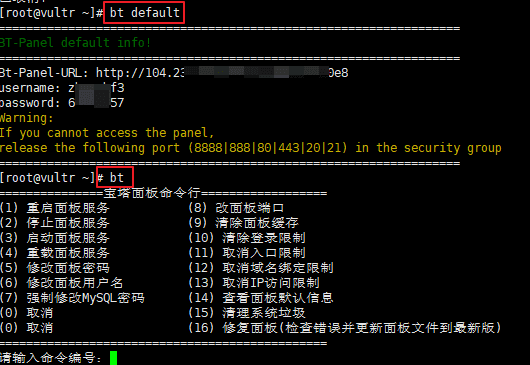
宝塔管理命令

Rate this article post
Previous Share a Case of a Foreign Trade WordPress Website Being Hacked with Malicious Redirects Continue reading content around the same timeline. Next 4 Malware Scanning Plugins Recommended by WordPress View the next related tutorial or experience.

AI Website Building Assistant

🤖
Hello! I am the Naibabiji AI Assistant. How can I help you?
Quick Consultation: