🚀 Is building a website too difficult? Let me guide you step by step—Learn about the 「Naibabiji WordPress Website Building Coaching Service」 →

WooCommerce Store Announcement Setup Tutorial

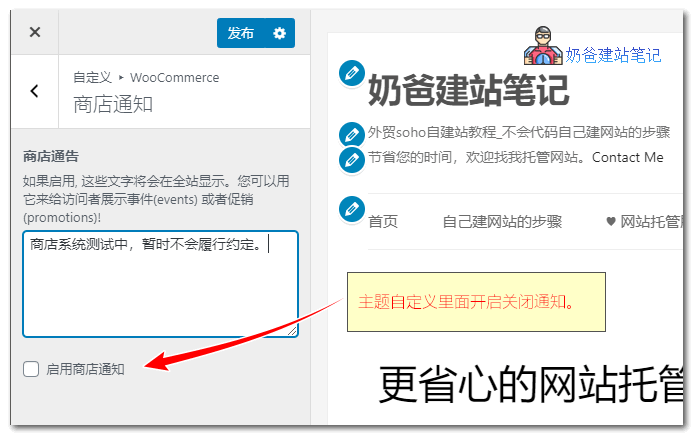
After installing the WooCommerce e-commerce Plugin on WordPress, if you want to set up an announcement for your online store, such as publishing promotional offers, you can do so in the Theme Customizer.woocommerce公告Specific Steps: 1. In the WordPress Admin Dashboard, select Theme Customizer; 2. Switch to the WooCommerce section and select Store Notices; 3. After filling in the notice, check the 'Enable Store Notice' option.

🚀 Still feeling confused after reading the tutorial? Let me guide you step-by-step instead.

「Naibabiji WordPress Website Building Coaching」 — From selecting a domain and purchasing hosting to installing themes and publishing posts, I「ll guide you through every step, helping you avoid detours and reach your goals directly.

👉 Learn about Website Building Coaching Service
🔒

Comments are closed

The comment function for this article is closed. If you have any questions, please feel free to contact us through other channels.

×
二维码

Scan to Follow