WooCommerce is the plugin chosen by most e-commerce websites built with WordPress. As the first major version, WooCommerce 4.0 is about to be released. Let's take a look at the new features worth paying attention to.
WooCommerce Admin Interface
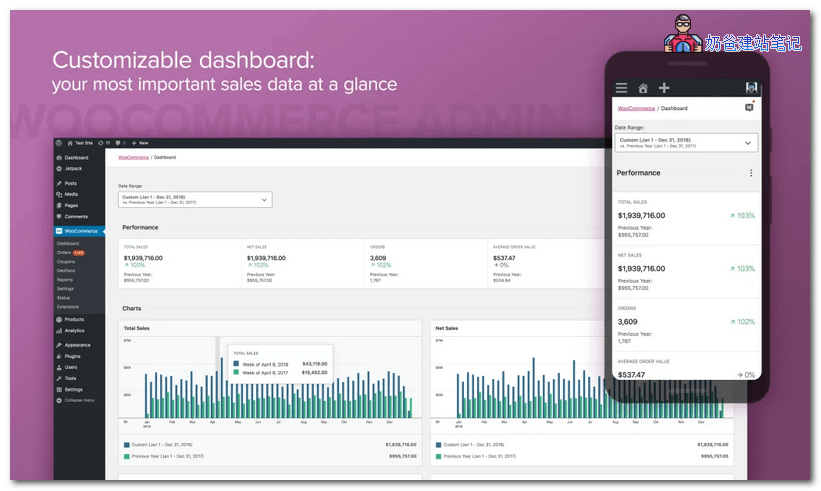 WooCommerce 4.0 comes with a new WooCommerce Admin interface. Users will experience a new dashboard, new and improved reports, and an enhanced notification experience. Additionally, users can now access new store management tools, which will bring significant meaning to the entire WooCommerce experience.
WooCommerce 4.0 Configuration Requirements Adjustment
WooCommerce 4.0 has made some modifications to the minimum hardware configuration. The latest requirements are as follows:
- The minimum version of WordPress is 5.3; versions below 5.3 cannot be installed.
- WooCommerce version 3.6.0 or higher is required to install the new WooCommerce Admin.
- PHP version must be at least 5.6.20; the recommended version is PHP 7.2 or higher.
- MySQL version must be at least 5.0; the recommended version is MySQL 5.6 or higher.
Action Scheduler 3.0
Action Scheduler version 3.0Uses new tables to handle tasks, which greatly helps stores with a large number of orders and billing queries in the database.
Other Updates
The new WooCommerce version includes other updates, such as:
- Improved order editing screen
- WooCommerce blocking package fixes
- Email processing improvements
- Optimized Cash on Delivery system
- Several new hooks and fixes
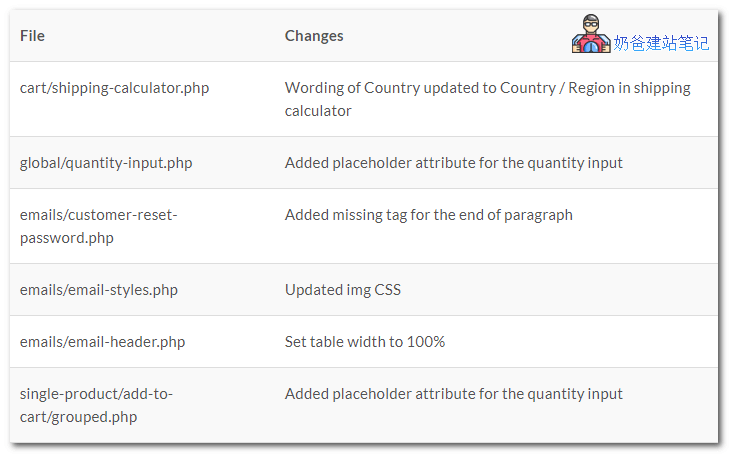
Template File Changes
WooCommerce 4.0 Release Date
WooCommerce 4.0 beta was released on February 10th, with the RC planned for February 25th. If everything goes as planned, the official release of WooCommerce 4.0 is scheduled for March 10th.
To test WooCommerce 4.0 beta, you can use theWooCommerce Beta Tester plugin, ordownload it directly from WordPress.org。