🚀 Is building a website too difficult? Let me guide you step by step—Learn about the 「Naibabiji WordPress Website Building Coaching Service」 →

The reason why you need to access your self-built website via domain name plus /wordpress

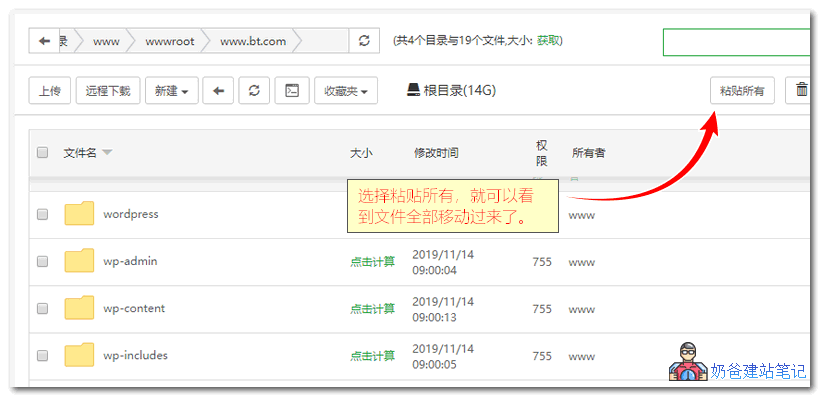
Today, a WeChat friend asked Naiba why, after installing WordPress himself, he couldn't access it directly via the domain name and needed to use the URL domain name/wordpress. The reason for this issue is simple: you installed WordPress in the wordpress folder, not in the website's root directory.宝塔面板Taking Baota Panel as an example, you missed the step of moving the files and folders from the wordpress folder to the website's root directory. Therefore, you need to add wordpress after the URL to access it. This method is also known as installing the website in a subdirectory. So,Simply move all the website files to the website's root directory, then go to the system Admin Dashboard and set the URL to one without the wordpress path, save it, and you're done.

🚀 Still feeling confused after reading the tutorial? Let me guide you step-by-step instead.

「Naibabiji WordPress Website Building Coaching」 — From selecting a domain and purchasing hosting to installing themes and publishing posts, I「ll guide you through every step, helping you avoid detours and reach your goals directly.

👉 Learn about Website Building Coaching Service
🔒

Comments are closed

The comment function for this article is closed. If you have any questions, please feel free to contact us through other channels.

×
二维码

Scan to Follow