
After building a website using Z-Blog,how do you set up the server'spseudo-static rules? Actually, the official Zblog provides pseudo-static rules for common web environments like Apache + .htaccess, IIS 7 and above + URL Rewrite Module, IIS 6 + ISAPI Rewrite 2.X, Nginx, and Lighttpd on the pseudo-static settings page. If you still don't know how, just read this article.
Zblog pseudo-static rule acquisition
1. After logging into the ZBLOG backend, click on Plugin Management and find the Static Management Center.
If you don't have a Static Management Center, go to the App Center to install one.
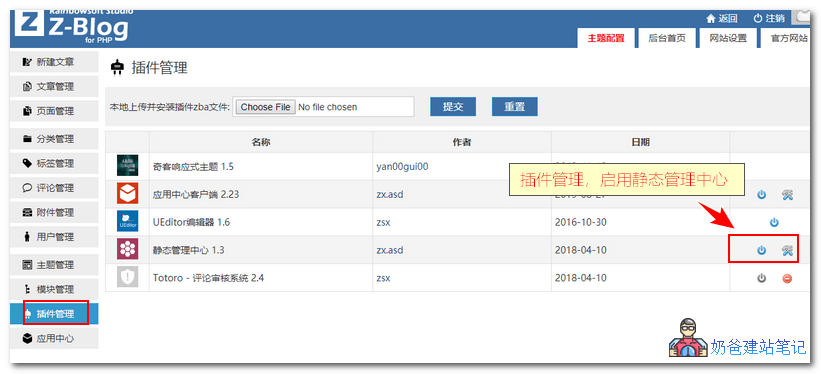
2. In the settings interface, select Pseudo-Static, then you can modify the rules below or keep the defaults.
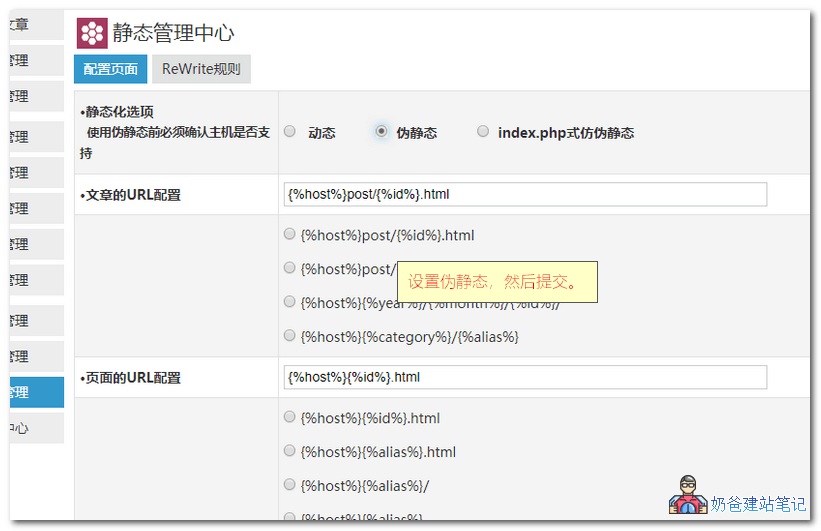
3. After clicking OK, you will be redirected to the ReWrite Rules interface.
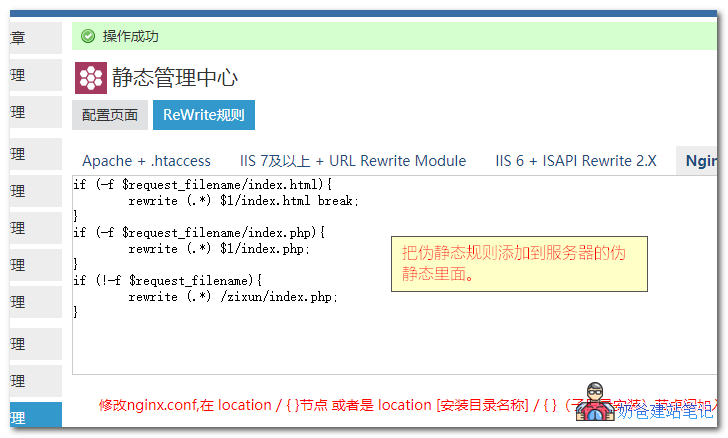
4. Add the generated pseudo-static rules to your website's pseudo-static configuration.
Zblog Pseudo-Static Rules for Different Programs
Apache Zblog Pseudo-Static Rules
<IfModule mod_rewrite.c>
RewriteEngine On
RewriteBase /zixun/
RewriteCond %{REQUEST_FILENAME} !-f
RewriteCond %{REQUEST_FILENAME} !-d
RewriteRule . /zixun/index.php [L]
</IfModule>
Save the above content as a.htaccessfile, then upload it to the website root directory. The same applies to subdirectory rules.
IIS7 Zblog Pseudo-Static Rules
<?xml version="1.0" encoding="UTF-8"?>
<configuration>
 <system.webServer>
  <rewrite>
   <rules>
	<rule name="/zixun/ Z-BlogPHP Imported Rule" stopProcessing="true">
	 <match url="^.*?" ignoreCase="false" />
	  <conditions logicalGrouping="MatchAll">
	   <add input="{REQUEST_FILENAME}" matchType="IsFile" negate="true" />
	   <add input="{REQUEST_FILENAME}" matchType="IsDirectory" negate="true" />
	  </conditions>
	 <action type="Rewrite" url="index.php/{R:0}" />
	</rule>
	<rule name="/zixun/ Z-BlogPHP Imported Rule index.php" stopProcessing="true">
	 <match url="^index.php/.*?" ignoreCase="false" />
	  <conditions logicalGrouping="MatchAll">
	   <add input="{REQUEST_FILENAME}" matchType="IsFile" />
	  </conditions>
	 <action type="Rewrite" url="index.php/{R:0}" />
	</rule>
   </rules>
  </rewrite>
 </system.webServer>
</configuration>
Create a web.config file in the website„s “current directory„ and copy the relevant content into it. The same applies to subdirectories.
IIS6 Zblog Pseudo-Static Rules
[ISAPI_Rewrite]

RewriteRule /zixun/page_([0-9]*)\.html /zixun/index\.php\?page=$1&rewrite=1&full_uri=$0 [I,L]
RewriteRule /zixun/date-([0-9\-]+)(?:_)?([0-9]*)\.html /zixun/index\.php\?date=$1&page=$2&rewrite=1&full_uri=$0 [I,L]
RewriteRule /zixun/author-([0-9]+)(?:_)?([0-9]*)\.html /zixun/index\.php\?auth=$1&page=$2&rewrite=1&full_uri=$0 [I,L]
RewriteRule /zixun/tags-([0-9]+)(?:_)?([0-9]*)\.html /zixun/index\.php\?tags=$1&page=$2&rewrite=1&full_uri=$0 [I,L]
RewriteRule /zixun/category-([0-9]+)(?:_)?([0-9]*)\.html /zixun/index\.php\?cate=$1&page=$2&rewrite=1&full_uri=$0 [I,L]
RewriteRule /zixun/post-([0-9]+)\.html(\?.*)? /zixun/index\.php\?id=$1&rewrite=1&full_uri=$0 [I,L]
RewriteRule /zixun/([0-9]+)\.html(\?.*)? /zixun/index\.php\?id=$1&rewrite=1&full_uri=$0 [I,L]
Create an httpd.ini file in the website root directory and copy the relevant content into it. The httpd.ini file must be in ANSI encoding. You can also click the button to generate it.
Tip: Users can add custom rules to this rule set to exclude their directories or files from overly broad rewrites.
Tip: ISAPI Rewrite 3 should be generated according to Apache rules.
Nginx Zblog Pseudo-Static Rules
if (-f $request_filename/index.html){
	rewrite (.*) $1/index.html break;
}
if (-f $request_filename/index.php){
	rewrite (.*) $1/index.php;
}
if (!-f $request_filename){
	rewrite (.*) /zixun/index.php;
}
Modify nginx.conf, add the above rules within the location / { } node or location [installation directory name] / { } (subdirectory installation) node.
To explain, if youinstall Zblog in a subdirectory, then the correspondingpseudo-static ruleslooks like this:
location /zblog/ {
	if (-f $request_filename/index.html){
	rewrite (.*) $1/index.html break;
}
if (-f $request_filename/index.php){
	rewrite (.*) $1/index.php;
}
if (!-f $request_filename){
	rewrite (.*) /zixun/index.php;
}

}
If you are using the LNMP one-click package, you can save the above subdirectory pseudo-static rules as a separate conf file. For example, zblog2.conf, and then include it in the virtual host configuration file.
include rewrite/zblog2.conf;
For Baota Panel, add the subdirectory rules after the current pseudo-static rules.
Z-Blog Pseudo-Static Style Customization
If you are not satisfied with the default Z-blog pseudo-static link effect, you can DIY it yourself. The corresponding parameters are as follows:
1. Article URL Configuration
Configurable parameters:
- {%host%}: Website address, required
- {%id%}: Article ID, either Article ID or Article Alias must be selected
- {%alias%}: Article Alias, either Article ID or Article Alias must be selected
- {%year%}: Article year, optional
- {%month%}: Article month, optional
- {%category%}: Article category slug, optional
2. Page URL configuration
Configurable parameters:
- {%host%}: Website address, required
- {%id%}: Page ID, must choose either Page ID or Page slug
- {%alias%}: Page slug, must choose either Page ID or Page slug
3. Homepage URL configuration
Configurable parameters:
- {%host%}: Website address, required
- {%page%}: Pagination number, required
4. Category page URL configuration
Configurable parameters:
- {%host%}: Website address, required
- {%id%}: Category ID, use at least one of Category ID or Category slug
- {%alias%}: Category slug, use at least one of Category ID or Category slug
- {%page%}: Pagination number, required
5. Tag page URL configuration
Configurable parameters:
- {%host%}: Website address, required
- {%id%}: Tag ID, choose at least one of Tag ID or Tag slug
- {%alias%}: Tag slug, choose at least one of Tag ID or Tag slug
- {%page%}: Pagination number, required
6. Date archive page URL configuration
Configurable parameters:
- {%host%}: Website address, required
- {%date%}: Date, required
- {%page%}: Pagination number, required
7. Author page URL configuration
Configurable parameters:
- {%host%}: Website address, required
- {%id%}: Author ID, required
- {%page%}: Pagination number, required