
How to set WordPress post links to open in a new window? This article introducestwo very simple methods to achieve opening links in a new window。
Method 1: Check 'Open in new window' when adding a link
The specific method is as follows: when inserting a hyperlink in a post, select the link settings or link options, then check 'Open in new window'.
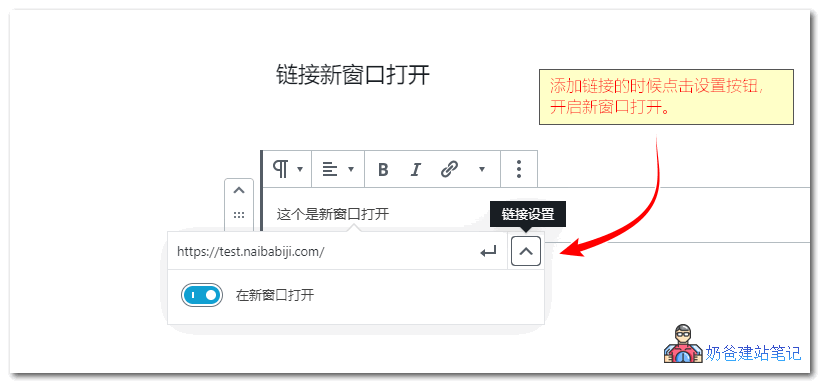
The Gutenberg editor link new window opening setting effect is as shown above.
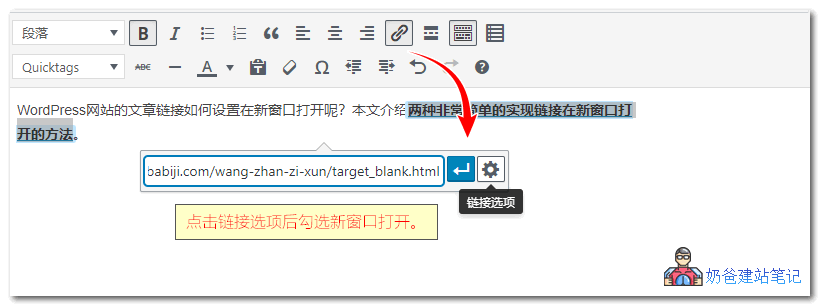
The classic editor link new window opening setting effect is as shown above.
Method 2: Insert a base tag to make all site links open in a new window
<base> is an HTML language tag. Through its attribute values, you can set the default opening method for links on a website. The URL opening attributes in tags including <a>, <img>, <link>, and <form> will be affected by the base value.
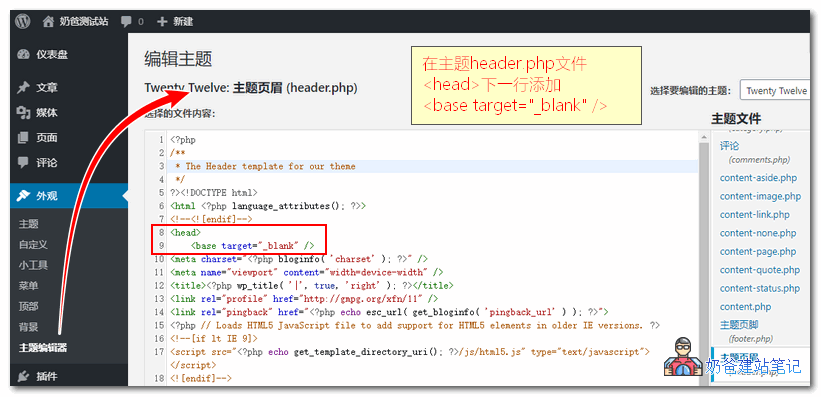
Specific implementation method:
- WP Admin > Appearance > Theme Editor > header.php
- Insert code on the next line after <head>
<base target="_blank" />
base tag attribute value
| 值 | Description |
|---|---|
| _blank | Opens the linked document in a new window. |
| _self | Default. Opens the linked document in the same frame. |
| _parent | Open the linked document in the parent frameset. |
| _top | Open the linked document in the entire window. |
| framename | Open the linked document in the specified frame. |
The above two methods can easily achieve opening links in a new window. If you don't want the entire site to open in a new window, but the link is not within an article, you can directly edit the link tag attributes of the corresponding position on the webpage template and add target="_blank".