
Home Experience & Tips Sharing Standard Post

Standard Post

How to modify the slideshow poster image for a website built with the Enfold theme yourself

Enfold is a responsive WordPress multi-purpose theme that can create various enterprise website interfaces. After building your own enterprise website, if you want to modify the slideshow images and links, how do you change the poster images of the slideshow using Enfold? The method to modify the slideshow images after building your own website with the Enfold theme is as follows: 1...

Posted on December 27, 2019 About 1 minute read
自己用Enfold主题搭建的网站怎么修改幻灯片海报图片

Enfold is a responsive WordPress multipurpose theme that can create various website interface effects desired by businesses. After building a corporate website yourself, if you want to modify the slideshow images and links, thenHow to modify the slideshow poster image using Enfold?

The method to modify slider images after building a website yourself using the Enfold theme is as follows:

1. In the WordPress admin dashboard, switch to Pages, then click the Edit button for the homepage; alternatively, you can directly click the Edit Page button at the top of the website homepage to enter.
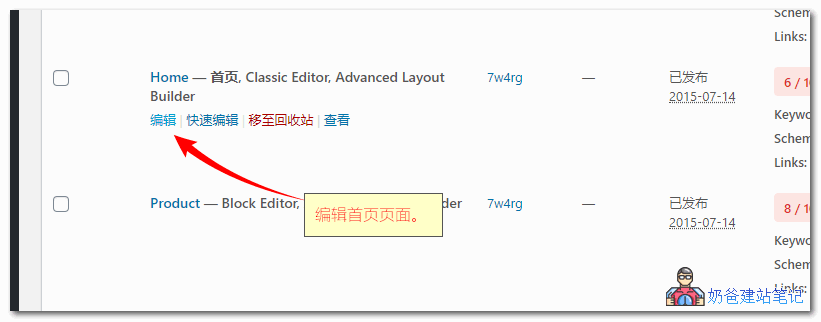
enfold幻灯片滑块修改

2. Move the mouse to the edit button of the Fullwidth Easy Slider.
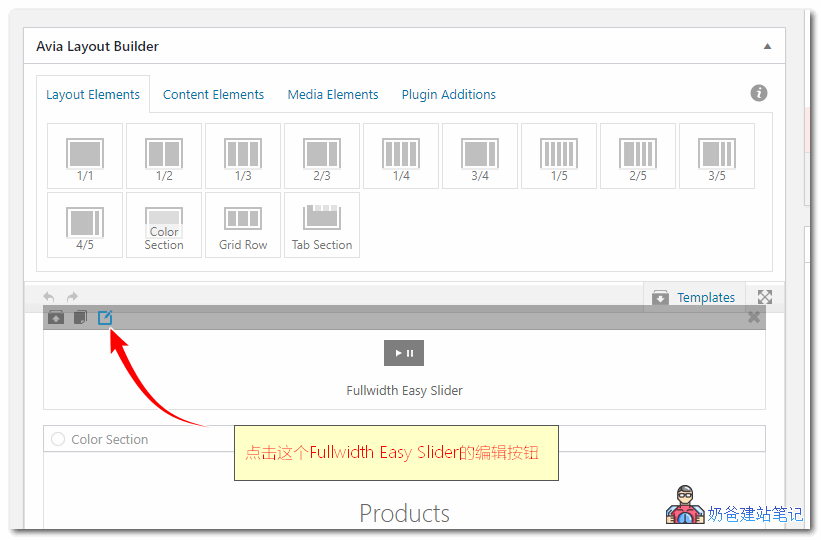
enfold幻灯片滑块修改

3. On the pop-up page, you can see your current poster images; click on any one to edit the image.
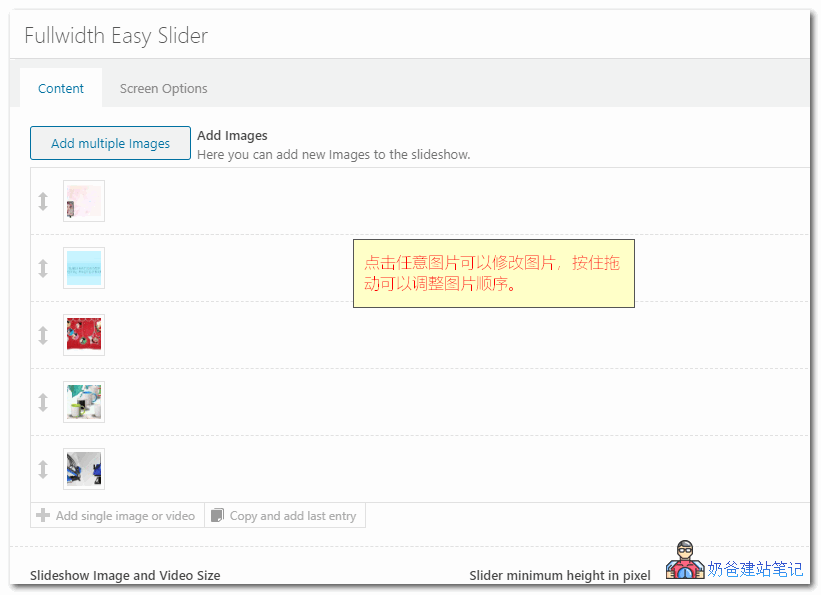
enfold幻灯片滑块修改

4. Hold the arrow in front of the image to adjust the order; if you want to delete an image, simply click the × button behind the image to delete it.

Rate this article post
Previous How to Build a Novel Website Yourself Without Coding Continue reading content around the same timeline. Next How to set up the sitemap.xml file after building a website with the Astra theme yourself View the next related tutorial or experience.

AI Website Building Assistant

🤖
Hello! I am the Naibabiji AI Assistant. How can I help you?
Quick Consultation: