Home Website News Articles Standard Post

Standard Post

How to Comment on WordPress Without Filling in Email

After enabling comments on your website, users are required to fill in a username and email address by default to comment. So how can you allow comments without requiring an email address? It's very simple: just turn off the requirement for username and email in the settings. However, enabling the comment system may attract a lot of spam comments. You can install a comment verification plugin, such as the one below: 11 Good...
Published on December 20, 2019 About 1 minute read

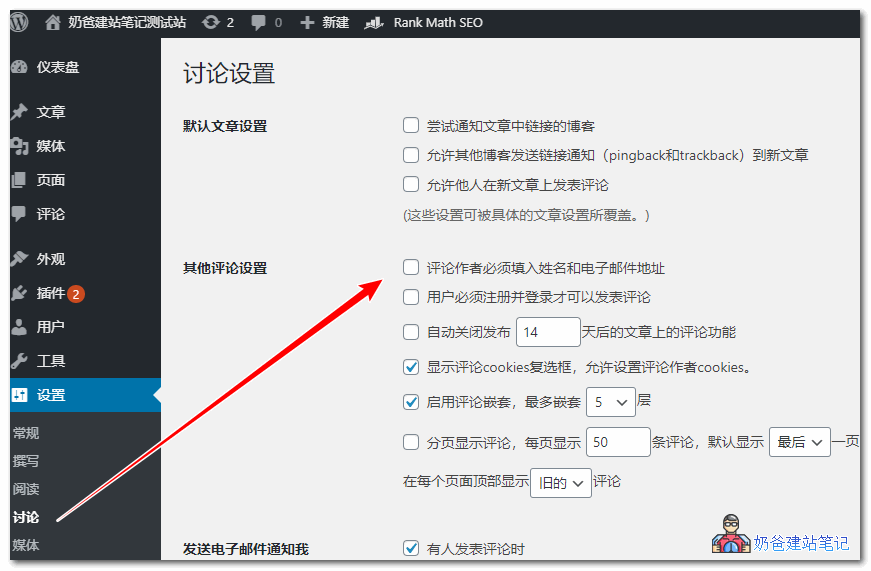
After enabling comments on your website, users are required to fill in a username and email address by default to comment.

So how can you allow comments without requiring an email address?

It's very simple: just turn off the requirement for username and email in the settings.

wordpress评论不填邮箱

However, enabling the website comment system may encounter a lot of spam comments. You can install a comment verification plugin, such as the one below:

2/5 - (5 votes)
Previous Does Building a Website Cost Money? How Much Does It Cost to Build Your Own Website Continue reading content around the same timeline. Next WP Hide & Security Enhancer – Make People Unaware Your Site is Built with WordPress View the next related tutorial or experience.

AI Website Building Assistant

🤖
Hello! I am the Naibabiji AI Assistant. How can I help you?
Quick Consultation: