
If you pay attention to the Naibabiji website, you can see a mischievous emoji on the right side, just like the one in the image below.
 Clicking it will pop up a dialog box for online chat with customer service.
thisonline customer servicefeature is implemented through Baidu Shangqiao. Previously, Naiba also tried manyWordPress online customer service plugins, as well as open-source and freeonline customer service programs, none were very satisfactory.
Finally, I found that Baidu also has a free online customer service system. It was really a case of searching high and low.
Introduction to Baidu Shangqiao
Baidu Bridge is an online customer service platform launched by Baidu that understands marketing. It offers multi-channel consultation, intelligent customer service reception, real-time visitor monitoring, and full-chain data analysis, ensuring you never miss a business opportunity!
Simply put, Baidu Bridge can add an online customer service function to your website. When customer service is offline, visitors can choose to leave a message or activate an intelligent robot.
It supports visitor statistics analysis and real-time monitoring of visitor click trajectories on the website.
The key point is,Baidu Shangqiao is free, which you might not have expected.
Adding Online Customer Service to Your Website via Baidu Shangqiao
Below, Naibabiji teaches you how to add an online customer service dialog box to your website.
1. Register a Baidu promotion account.
2. Download the Baidu Shangqiao client.
PC Client Android Client IOS Client
3. Open the Baidu Bridge PC client.
Log in to your Baidu promotion account. On the first login, there will be a guide to add a website. Just add your website.
4. After adding the website, copy the code provided to your website's theme code.
If youare using a WordPress-installed website, you can add the code to the footer file. If you don't know how to add it, use the following plugin:
5. Set the display style and other items you need to configure. After 10 minutes, you will see the online customer service button on your website.
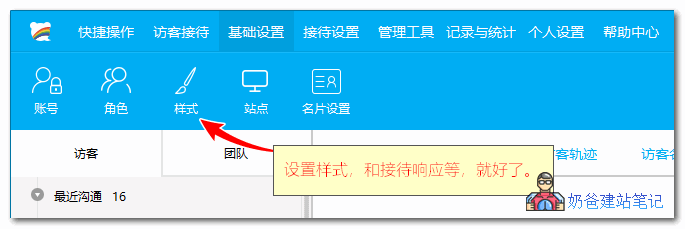
Explore other settings on your own to see how they work.
Additionally, if you use Baidu Bridge, the default code also includes a website statistics function. If you don't need it, you can turn it off, or you can delete the website's statistics code and use Baidu Bridge's statistics instead.
For foreign trade websites, do not use Baidu Bridge to add online customer service. There are two reasons:
- International users may experience lag when accessing Baidu Shangqiao's code;
- There may be time zone differences between you and international users, making an online customer service button ineffective.
If you want to add anonline customer service chatoption to your foreign trade website, simply go to the WP backend plugin section and search for 'Live chat'. Many plugins will appear—just pick a popular one and install it.