Home Website News Articles Standard Post

Standard Post

How to Set Image Link to Media File When Publishing a Post in WordPress 5.3

After upgrading to WordPress 5.3, you may not know how to link images to media files when publishing articles in the Gutenberg editor. Naiba will teach you how to link images to media files. After uploading an image, click on the image, then select the link icon that appears, and then choose Media File. How to add images to articles? If you are using the built-in...

Updated on November 27, 2019 About 1 minute read

After upgrading to WordPress 5.3, you might not know how to link images to media files when publishing posts in the Gutenberg editor. Naiba here teaches you how tolink images to media files.

图像连接到媒体文件After uploading an image, click on the image, then select the link icon that appears, and choose Media File.
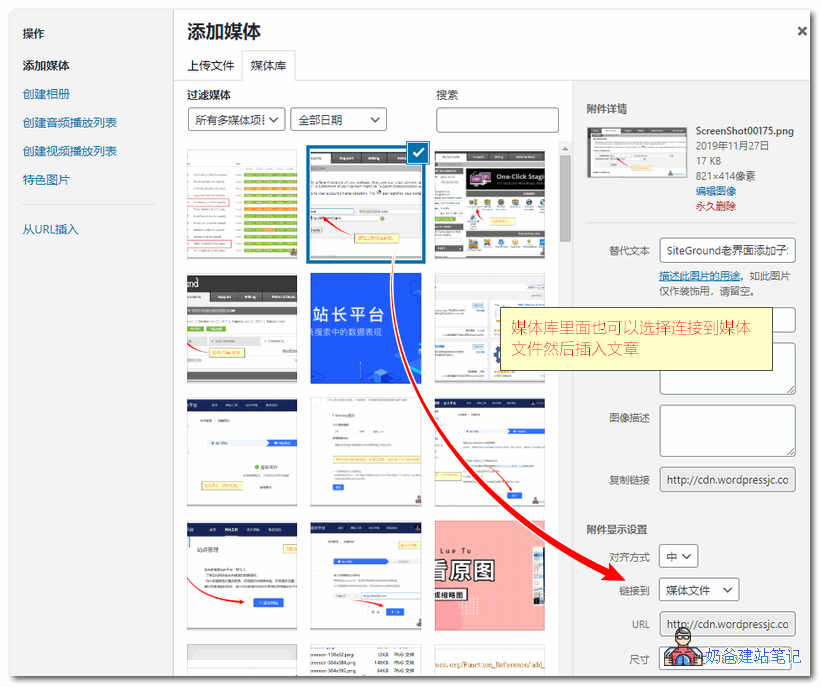
连接到媒体文件

How to add images to a post?

wordpress上传图片位置

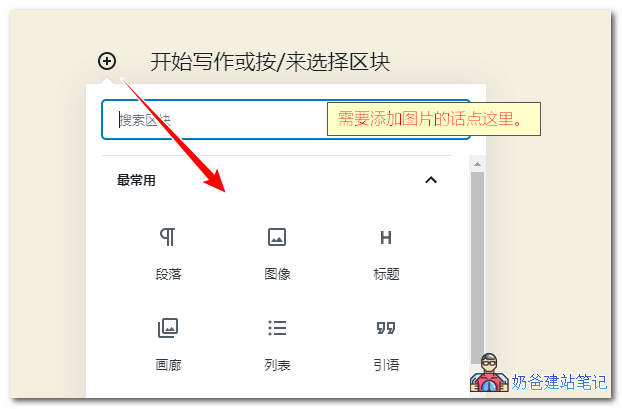
If you are using the built-in Gutenberg editor, the location to upload images is to click the plus sign in the upper left corner, then select Image, and you can upload and insert images.

Note: Some hosts may fail to publish images when publishing with WP 5.3, promptingError message: This response is not a valid JSON response.

4/5 - (4 votes)
Previous Top 20 Foreign Trade Cross-border E-commerce Independent Websites Ranking_Major Seller Platform Continue reading content around the same timeline. Next How to Disable the Password Reset Function in WordPress View the next related tutorial or experience.

AI Website Building Assistant

🤖
Hello! I am the Naibabiji AI Assistant. How can I help you?
Quick Consultation: