
After registering a domain name, it can only function properly and open the corresponding website by correctly adding resolution rules. This article explains how to add resolution rules for a domain name registered with Alibaba Cloud.
Alibaba Cloud Domain Registration Tutorial
1. Click the link below to enter the Alibaba Cloud domain registration interface.
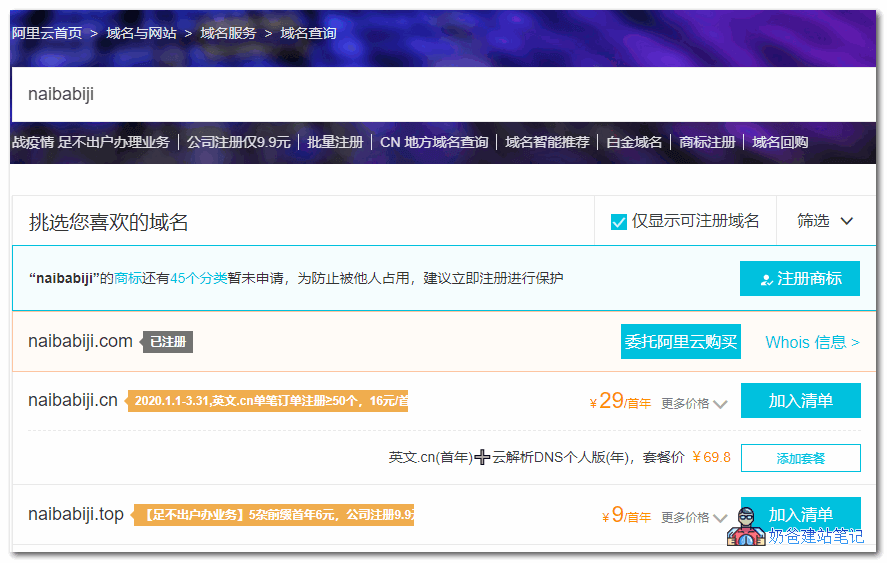
2. Enter the domain name you want to register in the search box.
3. Select a registrable domain name to register, and then check out.
Domain DNS Resolution Tutorial
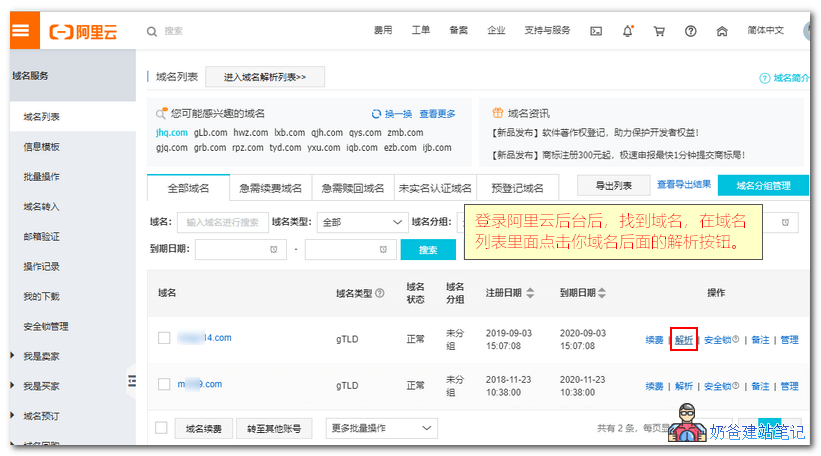
1. Log in to the Alibaba Cloud backend, find the domain name, and enter the domain name list.
Click the resolution button behind your domain name.
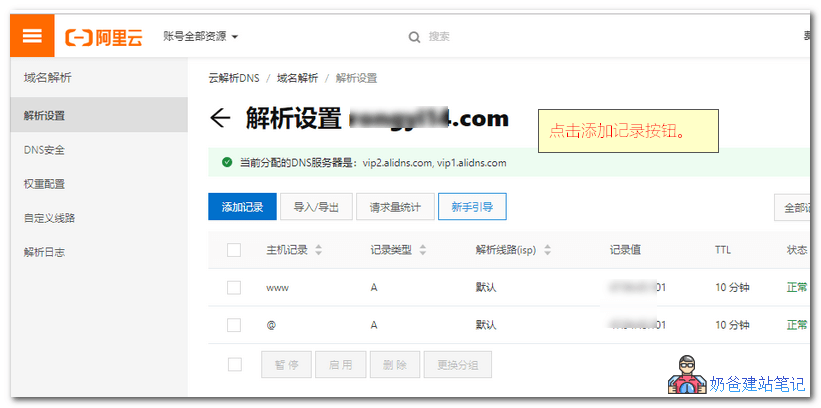
II. Click the 'Add Record' button.
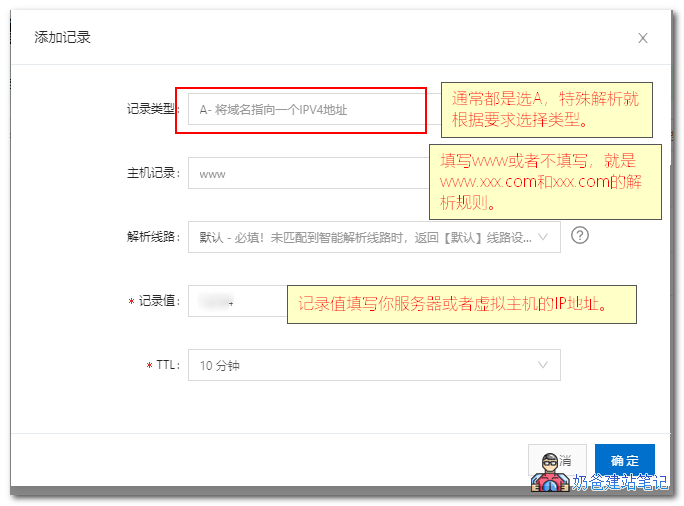
3. Fill in the corresponding information in the pop-up interface and click OK to add.
The record type is usually A record. In some special cases, CNAME or other types are used. Choose the type according to your needs.
The host record is the URL you want to resolve for your domain name. For example:
- If you want to use the address www.naibabiji.com to open the website, then add 'www' to the record.
- For naibabiji.com, leave it blank or fill in '@'.
- For blog.naibabiji.com, fill in 'blog'.
Fill in the record value with the IP address of your server or virtual host.
Keep TTL as default.
Modify Alibaba Cloud DNS Servers
For domain names registered with Alibaba Cloud, the DNS is generally set to Alibaba Cloud's DNS server addresses by default. If you have your own DNS server and need to modify the domain's DNS to your own, or to another service provider's DNS, you can refer to this article for the operation.
Prerequisites
The domain name is registered with Alibaba Cloud or has been transferred to Alibaba Cloud. If the domain name has been transferred out of Alibaba Cloud, you need to modify the DNS at the domain name registrar.
You already have your own DNS server or DNS from another provider.
Operation Steps
- Log in to the Alibaba Cloud Domain Console.
- Locate the target domain in the domain list, click 'Manage' under the Operations column to enter the Basic Information page.
- In the left navigation bar, click 'DNS Modification'.
- On the DNS Modification page, click 'Modify DNS Server' in the upper right corner.
- Follow the on-screen prompts to modify the DNS server addresses, then click 'Confirm' when finished.
Domain Resolution Related Issues
1. After adding the resolution, the time for the resolution to take effect varies depending on the update speed of DNS servers in different regions. It can be as fast as a few minutes, or as slow as a few hours or even one or two days.
2. If the resolution does not take effect, you can try clearing the DNS cache by going to „Start - Run - cmd“ and then entering „ipconfig /flushdns“.
3. The same record can only resolve to one value. For example, you cannot add two www records pointing to different IP addresses.
Alibaba Cloud Related Articles
- Alibaba Cloud Virtual Host WordPress Website Setup Tutorial with Screenshots
- How to Make Money with a Website? Five Ways for Personal Websites to Earn Money
- VPS Offer: Alibaba Cloud Group Buy Flash Sale 199 RMB/Year, Single Purchase 248 RMB/Year