
Frequent changes to a website's theme templatewebsite SEOhave a certain impact. What can be done toreduce the impact of changing theme templates on SEO? Naiba shares some of his experience. As for whether the experience is correct, you can verify it with Naiba.
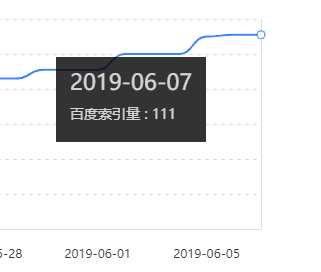
The impact of changing website theme templates on SEO
If you only change the website theme template without modifying the website program, domain name, and permalinks (pseudo-static format), the impact on website SEO is generally not significant.
However, if you don't pay attention to details, it may still cause search engine penalties. For example, reduced indexing, decreased crawl frequency, and ranking drops for articles that previously ranked well.
Precautions when changing website theme templates
When changing a website theme, the main thing is to pay attention to adjustments in details. These details do not refer to appearance and style. Search engines crawl CSS files, but they will not penalize you for changes in CSS styles. They will only check if your CSS and JS files contain content that deceives search engines and penalize you for that. So, if it's a legitimate theme template, don't worry about changes in CSS files.
What you need to worry about when changing theme templates are changes in the theme template's title, description, and similar content.
Due to differences in habits and skill levels among website theme template authors, the code of the new template you switch to will certainly differ from the previous one.
Pay attention to changes in Title and Description
If you use an SEO plugin and your new theme also has SEO options, you might disable the previously used SEO plugin. In this case, you need to check whether the display effect on the webpage is the same.
For example:NaibabijiThe website title with the previous theme was
奶爸建站笔记 | 记录WordPress建网站教程跟WordPress主题插件推荐
After switching to the new theme template, the title might change to something like the following
奶爸建站笔记 | 又一个WordPress站点
The new theme might directly use your subtitle as the webpage title content. In this case, search engines will put your new homepage under observation. When you discover this issue and revert it, search engines will be confused: why did it change again? So the observation period will be extended.
Another aspect is the description, usually the site description. For example, Naiba's notes currently have the description:
奶爸建站笔记记录的内容有:Wordpress教程、VPS教程、宝塔面板教程、零基础搭建网站教程、奇技赢巧、软件分享、带娃经验、奶爸日记等内容。
If you only pay attention to the frontend changes of the new theme template but do not check the Description changes from the source code, it will also affect your website.
Now Baidu's behavior is unpredictable, so we can only try to minimize changes to our website.
Pay attention to changes in keywords
Regarding keywords, it is generally advised not to set them on the website homepage nowadays, and article pages are rarely set with them either. There have been online reports suggesting that Baidu no longer references keywords. Moreover, based on Naiba's years of experience in website development, it seems unnecessary to write keywords unless your website's positioning is extremely clear. For personal blogs, it's completely unnecessary; it's better to let Google decide (I haven't fully figured out Baidu yet, so I still avoid writing them).
Pay attention to changes in H1 H2 H3 H4 H5 H6 tags
Naiba believes that changes in H tags likely have the greatest impact on SEO when switching website theme templates. For example,
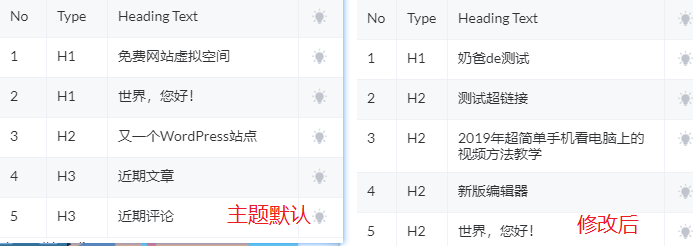
The left side of the image shows the default H tags after installing the theme. You can see there are two H1s. The right side shows the normal display effect after Naiba modified the theme.
From H1 to H6 tags, the weight decreases as the number increases. The common view in the SEO community is that a page should only have one H1 tag, but this theme results in two H1 tags on a page.
Although you may see some SEO experts' sites also have two H1 tags, your new site cannot compare to their established sites, especially since they are SEO experts.
Moreover, all the theme templates Naiba has used before have only one H1 per page. If the new theme template suddenly has two H1 tags, wouldn't that cause more trouble for search engines?
Changes in other theme details
For instance, some features added by your previous theme, especially those integrated into articles, should remain consistent with the previous theme template for both search engines and users. Maintaining the same functionality is also excellent for user experience, which is a crucial aspect of website SEO.
What to do if the new theme template involves URL changes
In website building, the most taboo thing is URL changes. Naiba really wanted to modify the site's permalink structure, but considering Baidu's uncontrollable factors, I gave up. (If Google were normally accessible in China, Naiba would have definitely changed it. Google responds quickly to WordPress permalink changes, basically harmless.)
By default, if you are usingWordPress to build a website, then after modifying the permalink, the previous articles will automatically 301 redirect to the new URL, and Google will quickly adapt.
For Baidu, there is a site modification feature in the Webmaster Tools. You can submit it, but Baidu will ignore you (I say this, but you still have to submit, because Baidu is the boss.)
Then, any places on the site such as articles, widgets, menus, etc., that use the old URL links must be updated to the new ones.
Of course, the best approach is to modify the theme template to keep the URLs consistent with the previous ones.
The above are Naiba's views on the impact of changing the site theme template on SEO. Let's check back in a week to see if the indexing of Naibabiji has changed and whether this theme change has affected Baidu.