
Baota Panel allows for intuitive installation of various PHP extensions. Previous tutorials required SSH operations, but the new version of Baota Panel can install them directly from the backend. However, it's not installed from the App Store. The correct method to install extensions in Baota Panel is:
Baota Panel: Methods for Installing Extensions like Memcached and ionCube
In the Baota Panel backend, click the settings button for the PHP you have installed and running, then select Install Extension.
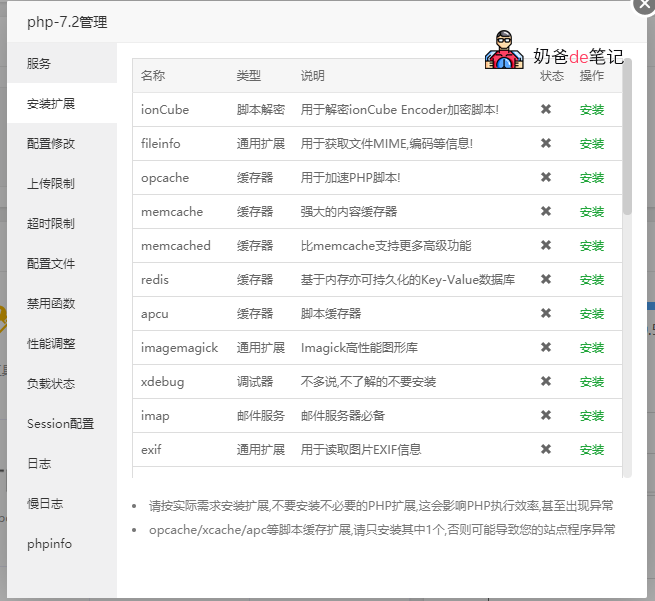
As of May 19, the Baota Panel backend can directly install the following extensions.
| Name | Type | Description |
|---|---|---|
| ionCube | Script Decryption | Used to decrypt scripts encrypted by ionCube Encoder! |
| fileinfo | General Extension | Used to obtain file information such as MIME type and encoding! |
| opcache | Cache | Used to accelerate PHP scripts! |
| memcache | Cache | Powerful content cache |
| memcached | Cache | Supports more advanced features than memcache |
| redis | Cache | In-memory, optionally persistent Key-Value database |
| apcu | Cache | Script cache |
| imagemagick | General Extension | Imagick high-performance graphics library |
| xdebug | Debugger | No further explanation, do not install if unfamiliar |
| imap | Mail service | Essential for mail servers |
| exif | General Extension | Used to read image EXIF information |
| intl | General Extension | Provides internationalization support |
| xsl | General Extension | XSL parsing extension |
| Swoole | General Extension | Asynchronous, parallel, high-performance network communication engine |
| Swoole4 | General Extension | swoole4.x version |
| yaf | Framework | Yaf is a PHP framework written in C |
| phalcon | Framework | Phalcon is a PHP framework written in C |
| yac | Cache | High-performance lock-free shared memory Cache |
| sg11 | Script encryption | PHP code obfuscation and encryption |
| pgsql | General Extension | PHP official extension (requires pre-installation of postgresql) |
| pdo_pgsql | General Extension | PHP official extension (requires pre-installation of postgresql) |
| readline | General Extension | PHP official extension |
| snmp | General Extension | PHP official extension |
| recode | General Extension | PHP official extension |
| enchant | General Extension | PHP official extension |
| pspell | General Extension | PHP official extension |
| bz2 | General Extension | PHP official extension |
| sysvshm | General Extension | PHP official extension |
| calendar | General Extension | PHP official extension |
| gmp | General Extension | PHP official extension |
| wddx | General Extension | PHP official extension |
| sysvmsg | General Extension | PHP official extension |