
How to batch replace images for already published articles? We can useEnable Media Replacethis plugin, which can replace images already uploaded to the media library and automatically update the image links and pixel sizes in published articles to those of the new images.
Tutorial on Replacing Article Images
Building a WebsiteAfter completion, as time goes by and articles grow, you may inevitably encounter situations where certain images need to be updated. Usually, we can overwrite the old images by uploading files via FTP to achieve image replacement.
However, if the replacement image size differs from the old one, directly replacing it may cause the image to stretch or appear unclear. Therefore, we can use the following method to safely replace images in published articles.
1. InstallEnable Media Replacethis plugin. The installation address is as follows:
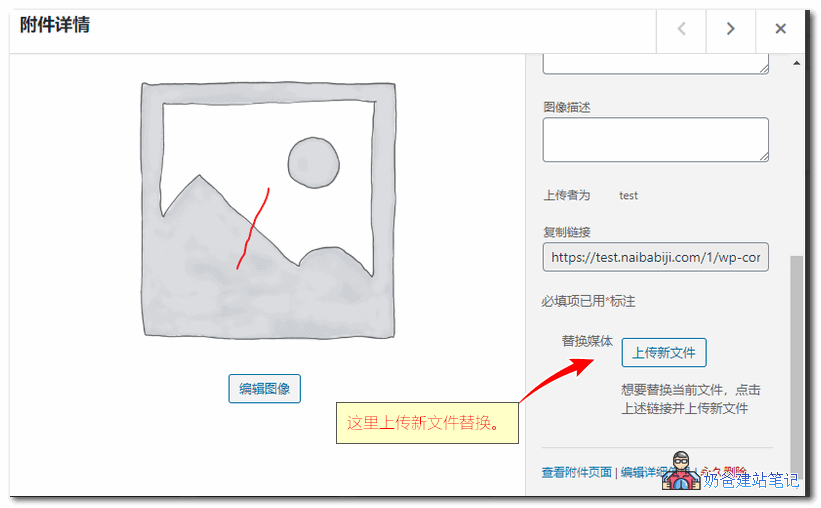
2. In the media library, click on the image file you want to replace and upload a new one.
3. After selecting the image, the new image's dimension information will automatically appear, along with options to update the new image's filename and link, as shown in the figure below:
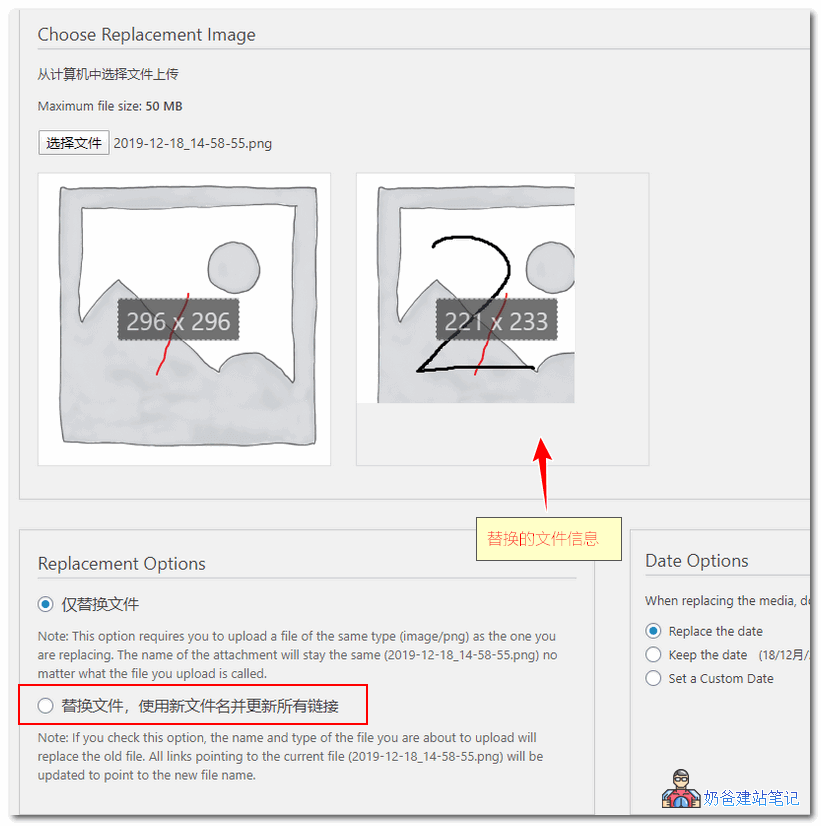
4. After uploading, all images in articles that used the old image will be replaced with the new one.
Note that this image replacement method does not apply to external images; it only supports replacing images uploaded through the media library.