
WordPress記事の固定表示は、記事を投稿する際に「ブログで固定表示()のオプションにチェックを入れるだけです。
しかし、カテゴリページでのみ固定記事を表示し、トップページには表示しないようにするにはどうすればよいでしょうか?本記事では2つのWordPressカテゴリーページ記事固定的プラグインとコード実装方法を紹介します。
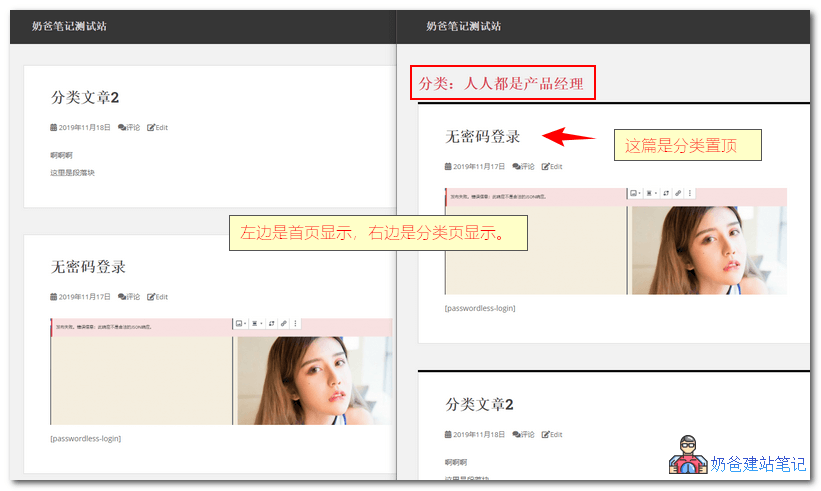
カテゴリー記事固定プラグイン
ここで紹介する、カテゴリーページで記事を固定表示できるプラグインは2つあります。Naiba サイト構築ノートWordPress 5.3バージョンでテスト済み、正常に動作します。
Category Sticky Post
Category Sticky Postの使用をお勧めしますWordPressプラグインを紹介します。これにより、カテゴリページで記事を固定表示する効果を簡単に実現できます。
Category Sticky Posを使用すると、各カテゴリページで指定した記事を先頭に固定表示できます。
- 固定表示する記事のカテゴリーを選択可能
- 組み込みの固定機能と同様に、カテゴリーページで記事を固定表示
- 特定のカテゴリーで異なる固定記事を表示可能
- WordPress 5.3をサポート
 プラグインをインストールした後、記事を投稿する際に右サイドバーに「Category Sticky」のオプションが表示されます。固定したいカテゴリーを選択してください。
Sticky Posts – Switch
Sticky Posts – Switchプラグインは比較的新しく、カテゴリページでの固定表示に加え、タグページやカスタム投稿タイプでも固定表示をサポートしています。
また、このプラグインで固定表示された記事は、管理画面の記事一覧で星アイコンが表示されるため、固定記事の管理が容易です。
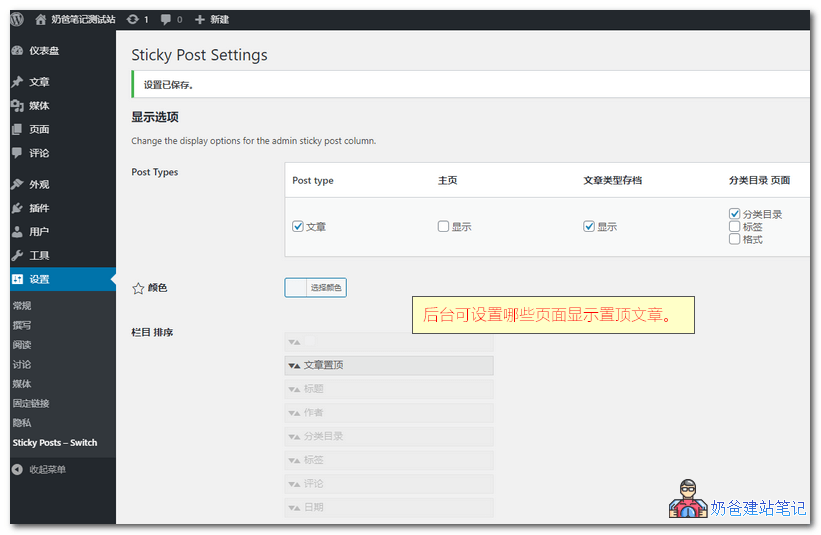
同時に、設定でホームページにスティッキー投稿を表示するかどうかを選択できます。
コードでカテゴリー別に固定記事を表示
コード版はNaibaがテストしていません。プラグインを使いたくない方は、コードでの実装方法を自分で研究してください。
テーマの関数ファイルfunctions.phpに以下のコードを挿入します。挿入方法がわからない場合は、プラグインを利用してください。参考:functions.phpファイルにコードを安全に追加する方法:Code Snippets
add_filter('the_posts',  'putStickyOnTop' );
function putStickyOnTop( $posts ) {
  if(is_home() || !is_main_query() || !is_archive())
    return $posts;

  global $wp_query;

  // 获取所有置顶文章
  $sticky_posts = get_option('sticky_posts');

  if ( $wp_query->query_vars['paged'] <= 1 && !empty($sticky_posts) && is_array($sticky_posts) && !get_query_var('ignore_sticky_posts') ) {
    $stickies1 = get_posts( array( 'post__in' => $sticky_posts ) );
    foreach ( $stickies1 as $sticky_post1 ) {
      // 判断当前是否分类页
      if($wp_query->is_category == 1 && !has_category($wp_query->query_vars['cat'], $sticky_post1->ID)) {
        // 去除不属于本分类的置顶文章
        $offset1 = array_search($sticky_post1->ID, $sticky_posts);
        unset( $sticky_posts[$offset1] );
      }
      if($wp_query->is_tag == 1 && !has_tag($wp_query->query_vars['tag'], $sticky_post1->ID)) {
        // 去除不属于本标签的文章
        $offset1 = array_search($sticky_post1->ID, $sticky_posts);
        unset( $sticky_posts[$offset1] );
      }
      if($wp_query->is_year == 1 && date_i18n('Y', strtotime($sticky_post1->post_date))!=$wp_query->query['m']) {
        // 去除不属于本年份的文章
        $offset1 = array_search($sticky_post1->ID, $sticky_posts);
        unset( $sticky_posts[$offset1] );
      }
      if($wp_query->is_month == 1 && date_i18n('Ym', strtotime($sticky_post1->post_date))!=$wp_query->query['m']) {
        // 去除不属于本月份的文章
        $offset1 = array_search($sticky_post1->ID, $sticky_posts);
        unset( $sticky_posts[$offset1] );
      }
      if($wp_query->is_day == 1 && date_i18n('Ymd', strtotime($sticky_post1->post_date))!=$wp_query->query['m']) {
        // 去除不属于本日期的文章
        $offset1 = array_search($sticky_post1->ID, $sticky_posts);
        unset( $sticky_posts[$offset1] );
      }
      if($wp_query->is_author == 1 && $sticky_post1->post_author != $wp_query->query_vars['author']) {
        // 去除不属于本作者的文章
        $offset1 = array_search($sticky_post1->ID, $sticky_posts);
        unset( $sticky_posts[$offset1] );
      }
    }

    $num_posts = count($posts);
    $sticky_offset = 0;
    // Loop over posts and relocate stickies to the front.
    for ( $i = 0; $i < $num_posts; $i++ ) {
      if ( in_array($posts[$i]->ID, $sticky_posts) ) {
        $sticky_post = $posts[$i];
        // Remove sticky from current position
        array_splice($posts, $i, 1);
        // Move to front, after other stickies
        array_splice($posts, $sticky_offset, 0, array($sticky_post));
        // Increment the sticky offset. The next sticky will be placed at this offset.
        $sticky_offset++;
        // Remove post from sticky posts array
        $offset = array_search($sticky_post->ID, $sticky_posts);
        unset( $sticky_posts[$offset] );
      }
    }

    // If any posts have been excluded specifically, Ignore those that are sticky.
    if ( !empty($sticky_posts) && !empty($wp_query->query_vars['post__not_in'] ) )
      $sticky_posts = array_diff($sticky_posts, $wp_query->query_vars['post__not_in']);

    // Fetch sticky posts that weren't in the query results
    if ( !empty($sticky_posts) ) {
      $stickies = get_posts( array(
        'post__in' => $sticky_posts,
        'post_type' => $wp_query->query_vars['post_type'],
        'post_status' => 'publish',
        'nopaging' => true
      ) );

      foreach ( $stickies as $sticky_post ) {
        array_splice( $posts, $sticky_offset, 0, array( $sticky_post ) );
        $sticky_offset++;
      }
    }
  }

  return $posts;
}
コード説明
①、アーカイブページでもすべての固定記事を表示したい場合は、12~45行目のコードを削除してください。
②、特定のカテゴリページで固定記事を表示したくない場合は、3行目のif(を
// abc是分类名称
if ( is_category( 'abc' ) ||
③、特定のタグページでスティッキー投稿を表示したくない場合は、3行目のif(以下のように変更します:
// abc是标签名称
if ( is_tag( 'abc' ) ||
④、特定の著者ページでスティッキー投稿を表示したくない場合は、3行目のif(以下のように変更します:
// abc是作者昵称
if ( is_author( 'abc' ) ||
⑤、上記のコードはメインループにのみ有効です。アーカイブページで WP_Query や query_posts を使用して投稿リストを取得し、そのリストの先頭にスティッキー投稿を表示したい場合は、3行目のコードから以下のコードを削除してください(注意:設定した投稿数と表示数が異なる場合があります):
|| !is_main_query()
コードは露兜博客