
WordPressのコメントメール通知は、Naiba(奶爸)にとって非常に便利な機能であり、読者とのインタラクションを増やすことができます。
想像してみてください。もしこの記事で„あなたのチュートリアルに従って操作したのに、なぜコメントにメール通知が来ないのですか?“と質問した場合、あなたは毎日何度も記事をリロードして私の返信を確認したいですか?それとも、私があなたのコメントに返信したときにメールで„こんにちは、あなたのコメントに返信がありましたよ“と通知される方が良いですか?
コード実装方法
WordPressブログでコメント後にコメント投稿者にメールを送信する機能を実現するには、2つの方法があります。1つはコードを追加する方法、もう1つはプラグインを使用する方法です。
コード機能を使用する場合、基本的には以下のコードまたは少し修正したバージョンが使われます。
/* comment_mail_notify v1.0 by willin kan. (すべての返信にメール送信) */
ブログの管理画面にログインし、„外観“タブの„編集“オプションをクリックしてテーマ編集画面に移動し、functions.phpファイル内の適切な場所に以下の関数を追加します。
1、全員にメールを送信
/* comment_mail_notify v1.0 by willin kan. (所有回复都发邮件) */
function comment_mail_notify($comment_id) {
  $comment = get_comment($comment_id);
  $parent_id = $comment->comment_parent ? $comment->comment_parent : '';
  $spam_confirmed = $comment->comment_approved;
  if (($parent_id != '') && ($spam_confirmed != 'spam')) {
    $wp_email = 'no-reply@' . preg_replace('#^www\.#', '', strtolower($_SERVER['SERVER_NAME'])); //e-mail 发出点, no-reply 可改为可用的 e-mail.
    $to = trim(get_comment($parent_id)->comment_author_email);
    $subject = '您在 [' . get_option("blogname") . '] 的留言有了回复';
    $message = '
    <div style=" border:1px solid #d8e3e8; color:#111; padding:0 15px; -moz-border-radius:5px; -webkit-border-radius:5px; -khtml-border-radius:5px;">
      <p>' . trim(get_comment($parent_id)->comment_author) . ', 您好!</p>
      <p>您曾在《' . get_the_title($comment->comment_post_ID) . '》的留言:<br />'
       . trim(get_comment($parent_id)->comment_content) . '</p>
      <p>' . trim($comment->comment_author) . ' 给您的回复:<br />'
       . trim($comment->comment_content) . '<br /></p>
      <p>您可以点击 查看回复完整內容</p>
      <p>欢迎再度光临 ' . get_option('blogname') . '</p>
      <p>(此邮件由系统自动发送,请勿回复.)</p>
    </div>';
    $from = "From: \"" . get_option('blogname') . "\" <$wp_email>";
    $headers = "$from\nContent-Type: text/html; charset=" . get_option('blog_charset') . "\n";
    wp_mail( $to, $subject, $message, $headers );
    //echo 'mail to ', $to, '<br/> ' , $subject, $message; // for testing
  }
}
add_action('comment_post', 'comment_mail_notify');
// -- END ----------------------------------------
2、訪問者自身にメール通知の可否を選択させる
functions.phpファイルの間に以下の関数を追加します。この関数はコメントボックスの下部に返信通知を受け取るかどうかのオプションを生成します。
/* 开始*/
function comment_mail_notify($comment_id) {
  $admin_notify = '1'; // admin 要不要收回复通知 ( '1'=要 ; '0'=不要 )
  $admin_email = get_bloginfo ('admin_email'); // $admin_email 可改为你指定的 e-mail.
  $comment = get_comment($comment_id);
  $comment_author_email = trim($comment->comment_author_email);
  $parent_id = $comment->comment_parent ? $comment->comment_parent : '';
  global $wpdb;
  if ($wpdb->query("Describe {$wpdb->comments} comment_mail_notify") == '')
    $wpdb->query("ALTER TABLE {$wpdb->comments} ADD COLUMN comment_mail_notify TINYINT NOT NULL DEFAULT 0;");
  if (($comment_author_email != $admin_email && isset($_POST['comment_mail_notify'])) || ($comment_author_email == $admin_email && $admin_notify == '1'))
    $wpdb->query("UPDATE {$wpdb->comments} SET comment_mail_notify='1' WHERE comment_ID='$comment_id'");
  $notify = $parent_id ? get_comment($parent_id)->comment_mail_notify : '0';
  $spam_confirmed = $comment->comment_approved;
  if ($parent_id != '' && $spam_confirmed != 'spam' && $notify == '1') {
    $wp_email = 'no-reply@' . preg_replace('#^www\.#', '', strtolower($_SERVER['SERVER_NAME'])); // e-mail 发出点, no-reply 可改为可用的 e-mail.
    $to = trim(get_comment($parent_id)->comment_author_email);
    $subject = '您在 [' . get_option("blogname") . '] 的留言有了回复';
    $message = '
    <div style=" border:1px solid #d8e3e8; color:#111; padding:0 15px; -moz-border-radius:5px; -webkit-border-radius:5px; -khtml-border-radius:5px;">
      <p>' . trim(get_comment($parent_id)->comment_author) . ', 您好!</p>
      <p>您曾在《' . get_the_title($comment->comment_post_ID) . '》的留言:<br />'
       . trim(get_comment($parent_id)->comment_content) . '</p>
      <p>' . trim($comment->comment_author) . ' 给您的回复:<br />'
       . trim($comment->comment_content) . '<br /></p>
      <p>您可以点击查看回复的完整內容</p>
      <p>还要再度光临 ' . get_option('blogname') . '</p>
      <p>(此邮件由系统自动发送,请勿回复.)</p>
    </div>';
    $from = "From: \"" . get_option('blogname') . "\" <$wp_email>";
    $headers = "$from\nContent-Type: text/html; charset=" . get_option('blog_charset') . "\n";
    wp_mail( $to, $subject, $message, $headers );
    //echo 'mail to ', $to, '<br/> ' , $subject, $message; // for testing
  }
}
add_action('comment_post', 'comment_mail_notify');

/* 自动加勾选栏 */
function add_checkbox() {
  echo '<input type="checkbox" name="comment_mail_notify" id="comment_mail_notify" value="comment_mail_notify" checked="checked" style="margin-left:20px;" /><span for="comment_mail_notify">有人回复时邮件通知我</span>';
}
add_action('comment_form', 'add_checkbox');
3、ブログ管理者がどのような場合にメールを送信するかを決定させる
functions.phpファイルの間に以下の関数を追加します。
/* comment_mail_notify v1.0 by willin kan. (无勾选栏) */
function comment_mail_notify($comment_id) {
  $admin_email = get_bloginfo ('admin_email'); // $admin_email 可改为你指定的 e-mail.
  $comment = get_comment($comment_id);
  $comment_author_email = trim($comment->comment_author_email);
  $parent_id = $comment->comment_parent ? $comment->comment_parent : '';
  $to = $parent_id ? trim(get_comment($parent_id)->comment_author_email) : '';
  $spam_confirmed = $comment->comment_approved;
  if (($parent_id != '') && ($spam_confirmed != 'spam') && ($to != $admin_email) && ($comment_author_email == $admin_email)) {
    /* 上面的判断式,决定发出邮件的必要条件:
    ($parent_id != '') && ($spam_confirmed != 'spam'): 回复的, 而且不是 spam 才可发, 必需!!
    ($to != $admin_email) : 不发给 admin.
    ($comment_author_email == $admin_email) : 只有 admin 的回复才可发.
    可视个人需修改上面的条件.
    */
    $wp_email = 'no-reply@' . preg_replace('#^www\.#', '', strtolower($_SERVER['SERVER_NAME'])); // e-mail 发出点, no-reply 可改为可用的 e-mail.
    $subject = '您在 [' . get_option("blogname") . '] 的留言有了回复';
    $message = '
    <div style=" border:1px solid #d8e3e8; color:#111; padding:0 15px; -moz-border-radius:5px; -webkit-border-radius:5px; -khtml-border-radius:5px;">
      <p>' . trim(get_comment($parent_id)->comment_author) . ', 您好!</p>
      <p>您曾在《' . get_the_title($comment->comment_post_ID) . '》的留言:<br />'
       . trim(get_comment($parent_id)->comment_content) . '</p>
      <p>' . trim($comment->comment_author) . ' 给您的回复:<br />'
       . trim($comment->comment_content) . '<br /></p>
      <p>您可以点击 查看回复的完整內容</p>
      <p>还要再度光临 ' . get_option('blogname') . '</p>
      <p>(此邮件由系统自动发送,请勿回复.)</p>
    </div>';
    $from = "From: \"" . get_option('blogname') . "\" <$wp_email>";
    $headers = "$from\nContent-Type: text/html; charset=" . get_option('blog_charset') . "\n";
    wp_mail( $to, $subject, $message, $headers );
    //echo 'mail to ', $to, '<br/> ' , $subject, $message; // for testing
  }
}
add_action('comment_post', 'comment_mail_notify');
// -- END ----------------------------------------コードに興味がある方は、こちらをクリックして申杰のブログをご覧ください、結構詳しく書かれています。
ただし、このコードは一部のテーマでは機能しないため、NaibaはWenprise Better EmailsというWordPressコメントメール通知プラグインを使用することをお勧めします。
プラグイン版の方法(推奨)
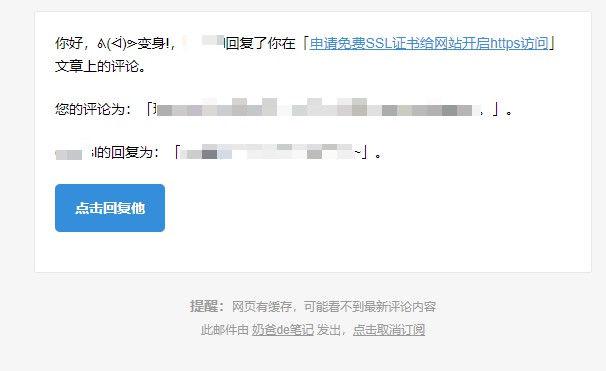
Wenprise Better Emailsは、WordPressのコメント承認通知メールや、記事作成者へのコメント通知メールを美化し、返信コメント時にコメント作成者にメール通知を送信する機能を追加します。
NaibaがこのWenprise Better Emailsプラグインをお勧めする理由は以下の通りです。
- コメント時のメール返信通知を実現でき、インストールしてすぐに使用可能で、初心者に適している。
- 中国人製のプラグインで、使用習慣に合い、インターフェースも美しい。
- 購読解除機能を備えており、メールがスパムと判定される確率を減らすことができる。
プラグインのインストール先:https://wordpress.org/plugins/wenprise-better-emails/
コードもプラグインも使えない?
コメントメール通知を使用するには、サーバーがメールを送信できることが前提条件です。
実際にはほとんどのホストが直接メールを送信できないため、サードパーティのプラグインを使用してホストからのメール送信を実現する必要があります。つまり、SMTP方式でメールを送信します。以下の記事を参考にしてください。
また、Comment ApprovedこのプラグインはNaibaも使用したことがあります。コメントが承認された後、相手に承認されたことを知らせるメールを送信します。