
给WordPress関連記事コードを追加することは、サイトのユーザー体験とSEOの両方にメリットがあります。本記事では、WordPressで関連記事を実装するコード方法を共有します。初心者の方は、テーマの標準機能やプラグインを使用することをお勧めします。
コード版 方法一
テーマファイルを修正する前に、必ずバックアップを取ってください。問題が発生した場合は元に戻してください。
1. テーマの関数ファイル functions.php に以下の内容を追加します。
/**
 * Related posts
 *
 * @global object $post
 * @param array $args
 * @return
 */
function wcr_related_posts($args = array()) {
    global $post;

    // default args
    $args = wp_parse_args($args, array(
        'post_id' => !empty($post) ? $post->ID : '',
        'taxonomy' => 'category',
        'limit' => 3,
        'post_type' => !empty($post) ? $post->post_type : 'post',
        'orderby' => 'date',
        'order' => 'DESC'
    ));

    // check taxonomy
    if (!taxonomy_exists($args['taxonomy'])) {
        return;
    }

    // post taxonomies
    $taxonomies = wp_get_post_terms($args['post_id'], $args['taxonomy'], array('fields' => 'ids'));

    if (empty($taxonomies)) {
        return;
    }

    // query
    $related_posts = get_posts(array(
        'post__not_in' => (array) $args['post_id'],
        'post_type' => $args['post_type'],
        'tax_query' => array(
            array(
                'taxonomy' => $args['taxonomy'],
                'field' => 'term_id',
                'terms' => $taxonomies
            ),
        ),
        'posts_per_page' => $args['limit'],
        'orderby' => $args['orderby'],
        'order' => $args['order']
    ));

    include( locate_template('related-posts-template.php', false, false) );

    wp_reset_postdata();
}
2. 新しい related-posts-template.php ファイルを作成し、以下の内容を追加します:
<?php if (!empty($related_posts)) { ?>
    <div class="related-posts">
        <h3 class="widget-title"><?php _e('相关文章', ''); ?></h3>

        <ul class="related-posts-list">
            <?php
            foreach ($related_posts as $post) {
                setup_postdata($post);
            ?>
            <li>
                <a class="title" href="<?php the_permalink(); ?>" title="<?php the_title_attribute(); ?>">
                    <?php if (has_post_thumbnail()) { ?>
                    <div class="thumb">
                        <?php echo get_the_post_thumbnail(null, 'medium', array('alt' => the_title_attribute(array('echo' => false)))); ?>
                    </div>
                    <?php } ?>
                    <h4><?php the_title(); ?></h4>
                </a>
            </li>
            <?php } ?>
        </ul>
        <div class="clearfix"></div>
    </div>
<?php
}
方法一 高度な呼び出し方法
関連記事コードを呼び出すには、テーマの適切な位置(通常は single.php ファイル内)に追加します。
1. 3件の関連記事を表示するコード
<?php wcr_related_posts(); ?>この関連記事はカテゴリーに基づいて表示されます。
2. 記事のTAGに基づいて関連記事を表示
<?php
wcr_related_posts(array(
   'taxonomy' => 'post_tag',
   'limit' => 6
));
?>
数字の6は表示する記事数です。必要に応じて変更してください。
3. カテゴリーの人気コメント記事に基づいて表示
<?php
wcr_related_posts(array(
   'limit' => 6,
   'orderby' => 'comment_count',
   'order' => 'ASC'
));
?>
4. 特定の記事のTAGに基づいて関連記事を表示
<?php
wcr_related_posts(array(
   'limit' => 6,
   'taxonomy' => 'post_tag',
   'post_id' => 145
));
?>
最後に、関連記事をより見栄え良くするために、CSSスタイルを自分で調整する必要があるかもしれません。
コード版 方法二
この方法は比較的簡単です。アイキャッチ画像付きの関連記事を呼び出します。すべての記事にアイキャッチ画像がない場合は、自分で追加するか、またはWordPressランダムアイキャッチ画像プラグイン:Random Post Thumbnails
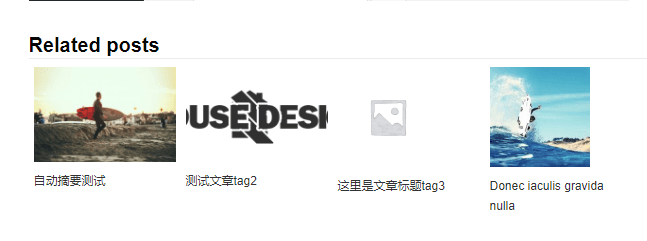
テーマの記事ページの適切な位置に、以下のコードを追加します。
<div class="relatedposts">
<h3>相关文章</h3>
<?php
  $orig_post = $post;
  global $post;
  $tags = wp_get_post_tags($post->ID);

  if ($tags) {
  $tag_ids = array();
  foreach($tags as $individual_tag) $tag_ids[] = $individual_tag->term_id;
  $args=array(
  'tag__in' => $tag_ids,
  'post__not_in' => array($post->ID),
  'posts_per_page'=>4, // 相关文章显示数量.
  'caller_get_posts'=>1
  );

  $my_query = new wp_query( $args );

  while( $my_query->have_posts() ) {
  $my_query->the_post();
  ?>

  <div class="relatedthumb">
    <a rel="external" href="<? the_permalink()?>"><?php the_post_thumbnail(array(150,100)); ?><br />
    <?php the_title(); ?>
    </a>
  </div>

  <? }
  }
  $post = $orig_post;
  wp_reset_query();
  ?>
</div>
上記のコード the_post_thumbnail(array(150,100)) の 150, 100 は、サムネイル画像のサイズを制御します。
.relatedposts {width: 640px; margin: 0 0 20px 0; float: left; font-size: 12px;}
.relatedposts h3 {font-size: 20px; margin: 0 0 5px 0; }
.relatedthumb {margin: 0 1px 0 1px; float: left; }
.relatedthumb img {margin: 0 0 3px 0; padding: 0;}
.relatedthumb a {color :#333; text-decoration: none; display:block; padding: 4px; width: 150px;}
.relatedthumb a:hover {background-color: #ddd; color: #000;}
CSSファイルでは、width: 640px が幅です。
このコードを使用する場合は、WP管理画面の設定 > メディアで、サムネイルサイズを同じ値に設定することをお勧めします。
コード版 方法三
このコードは、同じカテゴリーの他の記事を表示します。
<?php
		// 默认参数
		$args = array(
			'posts_per_page' => 4, // 要显示的项目数
			'post__not_in'   => array( get_the_ID() ), // 排除当前帖子
			'no_found_rows'  => true,
		);

		// 检查当前的帖子类别,并将tax_query添加到查询参数中
		$cats = wp_get_post_terms( get_the_ID(), 'category' );
		$cats_ids = array();
		foreach( $cats as $wpex_related_cat ) {
			$cats_ids[] = $wpex_related_cat->term_id;
		}
		if ( ! empty( $cats_ids ) ) {
			$args['category__in'] = $cats_ids;
		}

		// 查询文章
		$wpex_query = new wp_query( $args );

		// 输出文章
		foreach( $wpex_query->posts as $post ) : setup_postdata( $post ); ?>
		<div id="related_posts">
			<ul class="live">
				<li><a href="<?php the_permalink(); ?>" title="<?php echo esc_attr( the_title_attribute( 'echo=0' ) ); ?>"><?php the_title(); ?></a></li>
			</ul>
		</div>
		<?php
		// 结束循环
		endforeach;
		wp_reset_postdata(); ?>
このコードを使用するには、.live のスタイルをカスタマイズする必要があります。以下は、Naiba サイト構築ノートで現在使用しているスタイルです。
.live {
overflow: hidden;
margin: 0!important;
}
.live a{
text-decoration: none;
color: #32373c;
}
.live a:hover {
color: #009cee;
}
.live > li {
list-style: none;
position: relative;
padding: 0 0 0 2em;
margin: 0 0 .5em 10px;
-webkit-transition: .12s;
transition: .12s;
}
.live > li::before {
position: absolute;
content: '\2022';
font-family: Arial;
color: #111;
top: 0;
left: 0;
text-align: center;
font-size: 2em;
opacity: .5;
line-height: .75;
-webkit-transition: .5s;
transition: .5s;
}
.live > li:hover {
color: #333;
}
.live > li:hover::before {
-webkit-transform: scale(2);
-ms-transform: scale(2);
transform: scale(2);
opacity: 1;
text-shadow: 0 0 4px;
-webkit-transition: .1s;
transition: .1s;
}
プラグイン版 方法
プラグイン版の方法は、初心者により適しています。人気のあるWordPress関連記事プラグインは以下の通りです。
YARPP – Yet Another Related Posts Plugin
WPJAM-Basic(中国語プラグイン、機能豊富)