
默认情况下,WooCommerce安装完毕购物车按钮的文字是“加入购物车”或者“ADD TO CART”,有些外贸网站会为了追求个性化,想要修改这个添加到购物车按钮的文字内容,方法非常简单,只需要添加一段代码到主题函数文件就可以解决了,效果如下图:
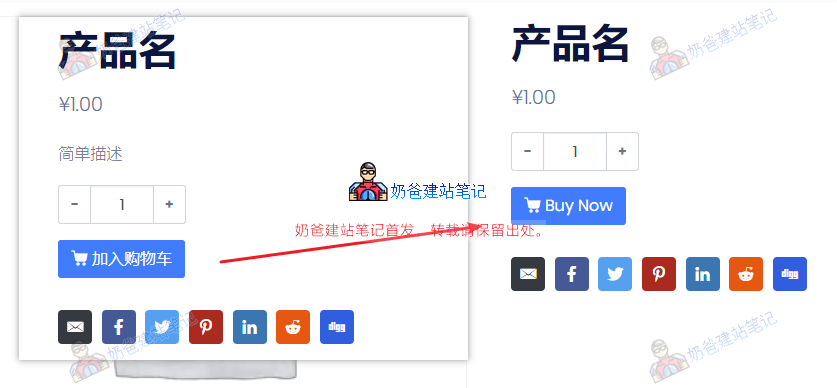
实现方法:复制下面内容添加到主题函数文件里面。
// 修改单个产品页面的购物车按钮文字
// https://blog.naibabiji.com/woocommerce/change-add-to-cart-button-text.html
add_filter( 'woocommerce_product_single_add_to_cart_text', 'woocommerce_custom_single_add_to_cart_text' );
function woocommerce_custom_single_add_to_cart_text() {
    return __( 'Buy Now', 'woocommerce' );
}

// 修改产品归档页购物车按钮文字
add_filter( 'woocommerce_product_add_to_cart_text', 'woocommerce_custom_product_add_to_cart_text' );
function woocommerce_custom_product_add_to_cart_text() {
    return __( 'Buy Now', 'woocommerce' );
}
自己修改上面代码里面的Buy Now为你想要修改的内容就可以了。
如果你想给WooCommerce添加询盘按钮的话,参见下面两篇文章: