
在使用外贸托管主机SiteGround的时候,默认是会自动升级WordPress版本,可能有些时候可能老版本你修改了一些内容,自动更新后就没有了,那么怎么恢复之前的版本数据呢?
方法如下:
SiteGround的管理界面是实用的cPanel面板,首先,登陆cPanel面板,找到下图中的图标按钮点击。
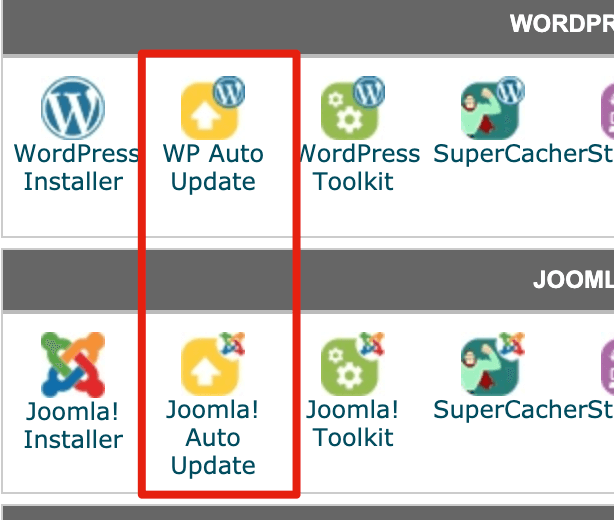 如果你是WordPress,就点击WP AUTO UPDATE
如果你是Joomla ,就点击Joomla Auto Update
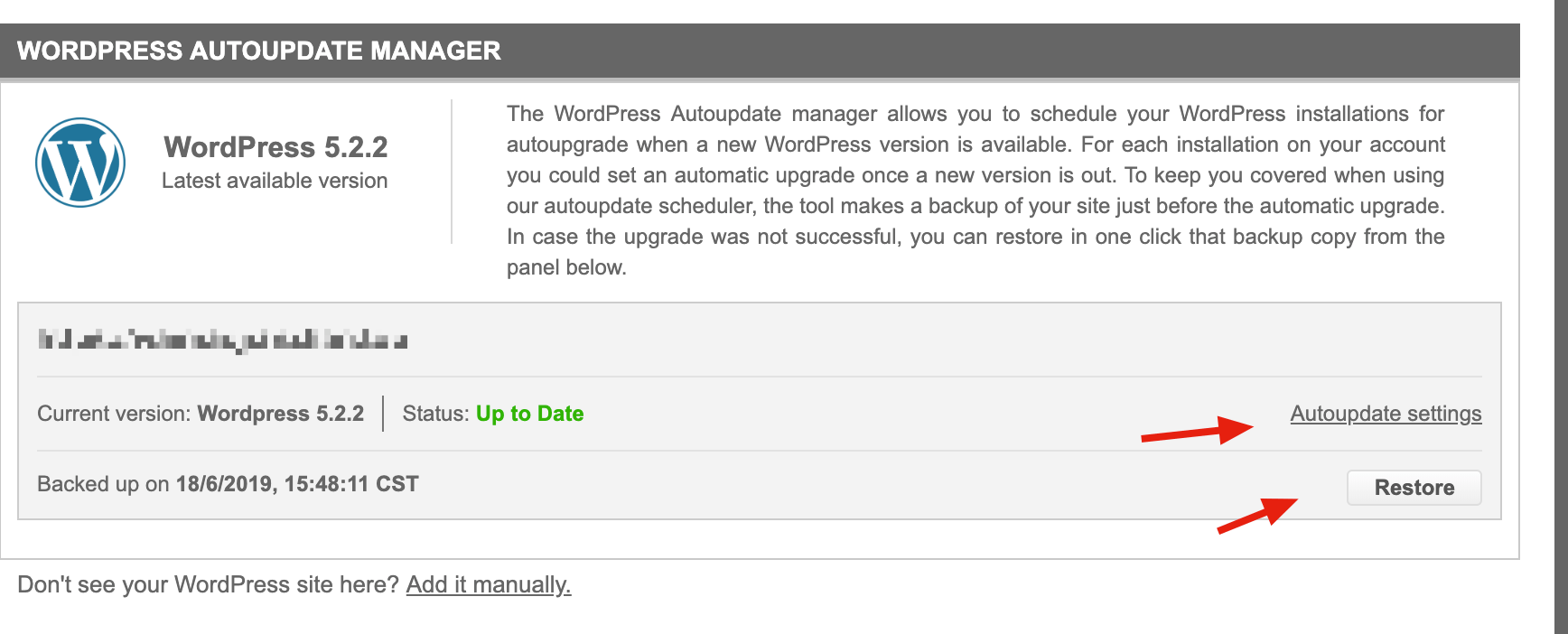 如果想要还原,就点击Restore,恢复到上一次备份。
如果不想自动更新,就点击Autoupdate settings进入设置。
更多SiteGround的文章请点击:SiteGround文章分类
你可能也感兴趣
外贸WordPress网站托管主机SiteGround注册教程
本文是全系列中第1 / 21篇:SiteGround教程
- SiteGround主机WordPress网站自动升级了怎么恢复
- SiteGround申请独立ip图文教程
- SiteGround的CPU Time Usage是什么意思?为什么有感叹号
- SiteGround客服入口,如何联系他们获取帮助
- SiteGround上用Avada搭建的主题图片不显示问题排查
- 怎么把域名转移到SiteGround(域名Transfer教程)
- SiteGround增加新域名安装第二个网站教程
- SiteGround设置免费SSL证书教程(新面板适用)
- SiteGround对比Bluehost,我为什么推荐SG的服务器
- SiteGround更换机房教程_SiteGround哪个机房好
- SiteGround域名转移到其他注册商教程(以Namesilo为例)
- 怎么使用SG Optimizer优化SiteGround上面的网站速度
- SiteGround不满意可以退款及退款政策
- 怎么查看SiteGround服务器IP和DNS并且解析域名
- SiteGround虚拟主机用cPanel手动备份网站和数据库教程
- 怎么把SiteGround注册的域名转移到其他服务商(域名转出)
- SiteGround安装的WordPress不能安装插件和主题是什么原因?
- Bluehost搬家到SiteGround的方法,All-In-One WP Migration使用教程
- SiteGround免费域名企业邮箱使用教程
- SiteGround开启Memcached加速的方法跟步骤
- SiteGround添加FTP帐号_使用教程_连接失败原因