
For the vast majority of websites built with
WordPress installation, the homepage displays all recently updated posts. However, for various reasons, you might not want posts from all categories to appear. You can achieve this by using the following two methods to
exclude specific categories from the homepage。
Plugin for Excluding Specific Categories from the Homepage
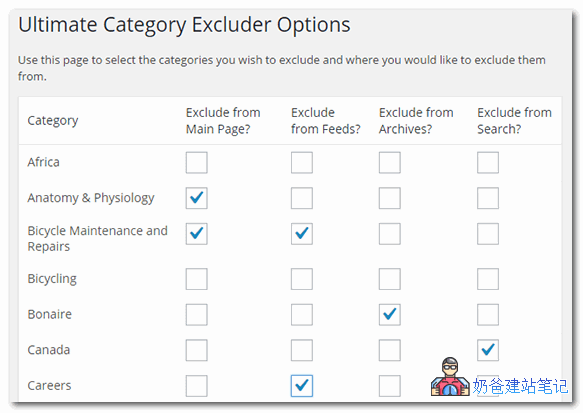
Ultimate Category Excluder is a
WordPress Pluginthat excludes post categories based on settings. It not only supports excluding posts from specific categories on the homepage but can also be configured to exclude them from tags, search results, archive pages, and RSS feeds. It's a very practical plugin, suitable for novice users.

Ultimate Category Excluder is a free WP plugin. You can download and install it from the link below, or search for it directly in the WordPress admin dashboard to install.
Download LinkExcluding Categories Using Code
If you don't want to install a separate plugin just to exclude category posts, you can also achieve this using code. The specific method is to copy the following code snippet into your
theme's functions.php fileand that's it.
function exclude_category_home( $query ) {
if ( $query->is_home ) {
$query->set( 'cat', '-5' );
}
return $query;
}
add_filter( 'pre_get_posts', 'exclude_category_home' );In the code above, the second line determines the page: `is_home` is for the homepage, `is_search` is for search result pages. If you want to target other pages, you can modify the code accordingly. The `-5` in the third line represents excluding all posts from the category with ID 5. You can find the category ID by hovering your mouse over the category link in the admin area and extracting it from the URL. To exclude multiple categories, separate the IDs with commas, e.g., `'-5, -1'`.
If the homepage is a static page, how to exclude category posts from the blog archive page?Naibabiji currently uses a static page as the homepage, with blog posts displayed on another page. In this case, using the code above would cause the excluded category content to be hidden on both the homepage and the blog page. If you want to exclude categories only from the homepage and not from the blog archive page, you need to edit your theme file (mine is index.php) and insert the following code.
<?php if ( have_posts() ) : query_posts($query_string .'&cat=-1'); while ( have_posts() ) : the_post(); ?>

The above code may need to be modified by yourself; the query part is
query_posts($query_string .'&cat=-1');

Comments are closed
The comment function for this article is closed. If you have any questions, please feel free to contact us through other channels.