
How to sort published articles in WordPress? By default, WP uses the article publication time for sorting. If we want to change the order of articles, besides modifying code, we can directly use WP plugins. This article shares
two useful WP custom post order plugins。
Intuitive Custom Post Order
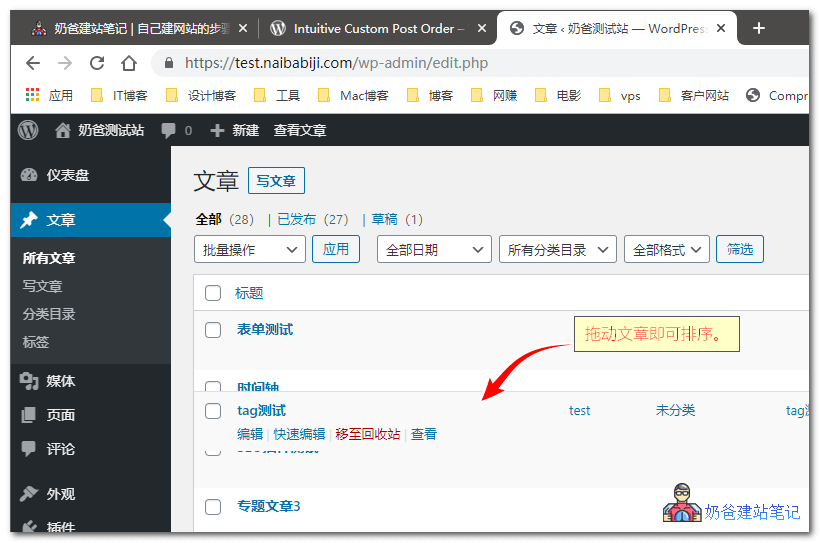
Intuitive Custom Post Order is a very intuitive plugin that uses drag-and-drop to sort WordPress posts. After installation and activation, go to settings, select the post types to support sorting, such as posts and pages, then go to the post list and simply drag to arrange the order.

The Intuitive Custom Post Order plugin is an open-source plugin, so you can use it with confidence.
Download LinkPost Types Order
Post Types Order has the same functionality as the plugin above, both for sorting WordPress posts. However, this plugin appears to be a bit more complex and offers more features, such as setting which user groups can use the sorting function.
Download LinkAbove are two very convenient plugins for sorting WordPress posts. If you don't want to use a plugin, you can also use code, but it's more complex, and the functionality is the same as the plugin. Alternatively, you can manually sort by modifying the article publication time, but it's more labor-intensive and not as convenient as using a plugin.
What are the benefits of custom post sorting?We
building your own websiteAfterwards, typically for series articles, you can let others see the first article first, followed by the subsequent articles in order, which provides a better user experience than viewing in reverse order.
Comments are closed
The comment function for this article is closed. If you have any questions, please feel free to contact us through other channels.